Samsung 990 Pro Review: Is It Still the Best NVMe Drive?
The Samsung 990 Pro launched as the fastest PCIe Gen 4 NVMe drive you could buy, and it quickly became the go-to recommendation for gamers, creators, and power users. But with Gen 5 drives now hitting the market from brands like Crucial, Corsair, and even Samsung itself with the 990 EVO Plus, does the 990 Pro still deserve a spot at the top of your shopping list?
After extensive testing and months of real-world use, I think the answer is more nuanced than you’d expect. Let’s break it down.
Performance and Benchmarks
Samsung rates the 990 Pro at 7,450 MB/s sequential read and 6,900 MB/s sequential write for the 2TB model. In my testing, those numbers hold up remarkably well. CrystalDiskMark showed consistent results right at the rated speeds, and the drive maintained impressive performance even when the SLC cache was exhausted during sustained writes.
Random 4K performance is where the 990 Pro truly shines, and it’s the metric that matters most for everyday responsiveness. It delivers up to 1,400K IOPS for random reads and 1,550K IOPS for random writes. In practice, this means Windows boots in seconds, applications launch almost instantly, and large project files in Premiere Pro or DaVinci Resolve load without any noticeable delay.
Compared to Gen 5 drives like the Crucial T700, the 990 Pro does fall behind in pure sequential throughput. The T700 can hit over 12,000 MB/s in sequential reads. But for gaming, general productivity, and even most content creation workflows, you won’t feel that difference. If you’re curious about how NVMe drives compare to SATA options in real gaming scenarios, our SATA vs NVMe gaming performance test puts the numbers in perspective.
We also previously compared the 990 Pro head-to-head with Western Digital’s flagship in our Samsung 990 Pro vs WD_BLACK SN850X showdown, and the results remain relevant today.

Samsung 990 Pro 2TB NVMe SSD
The best all-around Gen 4 NVMe drive with top-tier random I/O performance and Samsung’s proven reliability.
Thermals, Endurance, and Long-Term Reliability
Samsung uses its in-house Elpis controller paired with 6th-generation V-NAND on the 990 Pro, and the thermal design is genuinely impressive. Even without an aftermarket heatsink, the drive stayed below 70°C during sustained workloads in my open-bench testing. With a basic motherboard heatsink attached, it hovered around 55°C under load.
Endurance is rated at 600 TBW for the 1TB model and 1,200 TBW for the 2TB. For most users, that’s well beyond what you’ll write in the drive’s useful lifetime. If you’re concerned about SSD longevity in general, our deep dive into SSD lifespan data covers what those TBW numbers actually mean in practice.
One thing to be aware of: earlier batches of the 990 Pro had a firmware issue that caused accelerated health degradation in SMART reporting. Samsung addressed this with a firmware update (5B2QJXD7), so make sure you’re running the latest version through Samsung Magician. The actual NAND wasn’t wearing out faster, but the reporting was inaccurate, which understandably spooked a lot of early adopters.
Over time, all SSDs can experience performance dips as they fill up. If you notice your 990 Pro (or any SSD) slowing down after months of use, our guide on why SSDs slow down and how to fix it walks through the practical solutions.
Should You Buy the 990 Pro Over a Gen 5 Drive?
Here’s my honest take: for the vast majority of users, yes. Gen 5 NVMe drives like the Crucial T700 and Corsair MP700 Pro offer higher sequential speeds, but they also run significantly hotter, consume more power, and carry a premium price tag. Most Gen 5 drives practically require a heatsink with active cooling to avoid throttling.
The 990 Pro gives you 95% of real-world performance at a better price point, with lower thermals and broader motherboard compatibility. You don’t even need a Gen 4 x4 slot to use it; it works in any M.2 NVMe slot, just at the speed your interface supports. If you need a visual walkthrough of installation, check out our NVMe SSD installation guide.
The only scenario where I’d steer you toward Gen 5 is if you’re regularly transferring massive files (think 100GB+ video projects) and your workflow is bottlenecked by sequential write speeds. For everyone else, including gamers, developers, and general power users, the 990 Pro remains my top recommendation in the NVMe space.
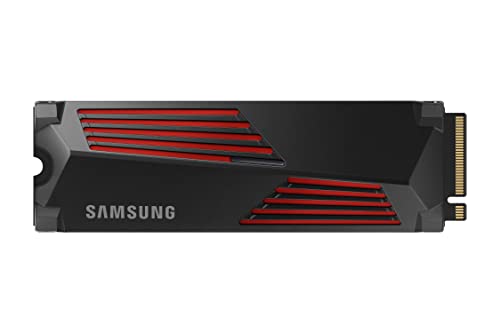
Samsung 990 Pro 1TB with Heatsink
Great option for PS5 or PC builds where you want integrated thermal management out of the box.
Frequently Asked Questions
Is the Samsung 990 Pro compatible with the PS5?
Yes. The 990 Pro fits the PS5’s M.2 expansion slot perfectly, and its read speeds exceed Sony’s recommended 5,500 MB/s minimum. The heatsink version is especially convenient since the PS5’s SSD bay has limited airflow. Games load just as fast (or faster) than from the console’s internal storage.
Is it worth upgrading from a Samsung 970 EVO Plus to the 990 Pro?
If your motherboard supports PCIe Gen 4, the jump is significant. You’ll roughly double your sequential speeds and see a meaningful improvement in random I/O. If you’re still on a Gen 3 board, the 990 Pro will work but will be limited to Gen 3 speeds, making the upgrade less compelling. In that case, you might get more value from other system improvements first.
This article contains affiliate links. We may earn a small commission at no extra cost to you.

James Kennedy is a writer and product researcher at Drives Hero with a background in IT administration and consulting. He has hands-on experience with storage, networking, and system performance, and regularly improves and optimizes his home networking setup.