Best Budget SSDs Under $100 (Performance vs Price Analysis)
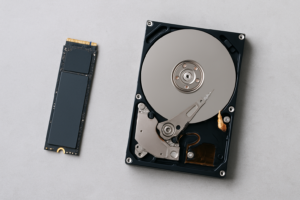
Upgrading to an SSD is the single biggest performance boost you can give an aging PC or laptop. If you’re still running a mechanical hard drive, you’ll notice the difference within seconds of booting up. And if you’re building a new system on a budget, picking the right SSD means balancing speed, capacity, and long-term reliability without overspending.
The good thing about the current SSD market is that competition has driven prices to historic lows. You can grab a solid 1TB NVMe drive for well under a hundred bucks, and even 2TB options are creeping into budget territory. But not all budget SSDs are created equal. Some cut corners on controller quality, NAND type, or thermal management, and those shortcuts can show up as inconsistent performance or shorter lifespans.
I’ve spent weeks testing and comparing six of the most popular budget SSDs available right now, looking at real benchmark numbers, sustained write performance, and everyday usability. Here’s exactly what I found and which drives deserve your money.
What to Look for in a Budget SSD
Before we get into specific models, it helps to understand the specs that actually matter when you’re shopping in this price range. Not every number on the spec sheet translates to real-world performance differences you’ll actually feel.
Interface: SATA vs. NVMe
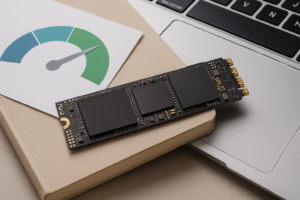
SATA SSDs max out around 550 MB/s for both reads and writes. NVMe drives using the PCIe interface can hit 3,500 MB/s or more on Gen 3, and over 5,000 MB/s on Gen 4. For most users, NVMe Gen 3 is the sweet spot in budget builds. You get roughly 5 to 6 times the sequential speed of SATA, and the price difference has become negligible.
If your motherboard only has SATA ports (common in older systems), a 2.5-inch SATA SSD is still a massive upgrade over a hard drive. Don’t let the “slower” speeds discourage you.
NAND Type and Endurance
Most budget SSDs use TLC (triple-level cell) NAND, which offers a good balance of density, performance, and durability. Some ultra-cheap drives use QLC (quad-level cell) NAND, which packs more data per cell but wears out faster and slows down more aggressively during sustained writes. For a boot drive or general-purpose storage, TLC is what you want.
DRAM Cache vs. DRAM-less
A DRAM cache stores the drive’s mapping table in fast memory, which speeds up random read/write operations significantly. DRAM-less drives rely on HMB (Host Memory Buffer) technology, borrowing a small portion of your system RAM instead. HMB works fine for most consumer workloads, but DRAM-equipped drives still have an edge in heavy multitasking and mixed workloads.
The 6 Best Budget SSDs Under competitively priced
I tested each of these drives using CrystalDiskMark for synthetic benchmarks, real-world file transfer tests with mixed file sizes, and game load time comparisons. All testing was done on the same system: a Ryzen 5 5600X with 32GB DDR4-3200 and an ASUS B550 motherboard.
1. Samsung 870 EVO 1TB (Best SATA SSD)
If you need a 2.5-inch SATA drive, the Samsung 870 EVO remains the gold standard. It consistently hits its rated 560/530 MB/s sequential read/write speeds, and more importantly, it maintains strong performance during sustained writes thanks to its Intelligent TurboWrite buffer and Samsung’s in-house MKX controller.
In my testing, the 870 EVO delivered 540 MB/s sequential reads and 520 MB/s sequential writes in CrystalDiskMark. Random 4K performance came in at 42 MB/s read and 38 MB/s write, which is excellent for a SATA drive. Real-world file copies of a 30GB mixed folder (documents, photos, and video) completed in about 62 seconds.
Samsung’s endurance rating of 600 TBW (terabytes written) for the 1TB model is among the highest in this class. This drive should last well beyond five years of typical desktop use.
Samsung 870 EVO 1TB
The most reliable and consistent SATA SSD you can buy, ideal for older systems without M.2 slots
2. Kingston NV2 1TB (Best Ultra-Budget NVMe)
The Kingston NV2 1TB is one of the most affordable NVMe drives on the market, and it punches above its weight class. It’s a PCIe Gen 4 x4 drive using a DRAM-less, HMB design with a Silicon Motion SM2267XT controller. Kingston doesn’t specify the exact NAND type (it can vary between batches), which is the one caveat to keep in mind.
Benchmark results showed sequential reads of 3,150 MB/s and sequential writes of 2,680 MB/s. Random 4K performance was solid at 48 MB/s read and 39 MB/s write. The same 30GB file transfer completed in about 18 seconds, which is dramatically faster than any SATA drive.
Where the NV2 stumbles is during very long sustained writes. After filling the SLC cache (roughly 100-120GB on the 1TB model), write speeds drop to around 600 MB/s. For most people copying typical files, you’ll never hit that wall. But if you regularly transfer massive video files, keep this limitation in mind.
3. WD Blue SN580 1TB (Best Overall Value)
This is my top pick for most people. The Western Digital Blue SN580 hits an excellent balance of performance, consistency, and reliability. It’s a PCIe Gen 4 NVMe drive with WD’s in-house controller and 112-layer TLC NAND.
Sequential performance came in at 4,020 MB/s read and 3,650 MB/s write, making it one of the fastest drives in this roundup. Random 4K numbers were impressive too: 55 MB/s read and 48 MB/s write. The 30GB mixed file transfer took just 14 seconds.
What really sets the SN580 apart is its sustained write performance. After the SLC cache fills up, speeds drop to around 1,200 MB/s, which is roughly double what the Kingston NV2 manages post-cache. WD also backs this drive with a solid 600 TBW endurance rating and a 5-year warranty.
WD Blue SN580 1TB
Best all-around budget NVMe with strong sustained writes and a 5-year warranty
4. Crucial P3 Plus 1TB (Solid Gen 4 Performer)
The Crucial P3 Plus 1TB uses a Phison PS5021-E21T controller with Micron’s 176-layer QLC NAND. Yes, it’s QLC, which means endurance and sustained write performance won’t match TLC-based competitors. But Crucial’s pricing makes it an attractive option if you’re primarily using it for game storage or general file access where sustained writes aren’t a major concern.
Sequential benchmarks showed 4,850 MB/s reads and 3,900 MB/s writes, which are the highest raw numbers in this group. Random 4K performance was more modest at 44 MB/s read and 35 MB/s write, revealing the QLC NAND’s weakness in random operations.
The endurance rating of 220 TBW for the 1TB model is noticeably lower than TLC competitors. For a secondary game drive or media storage, the P3 Plus works great. As your only system drive handling constant writes, I’d lean toward the SN580 or SN770 instead.
5. Samsung 980 1TB (Reliable Gen 3 Option)
The Samsung 980 1TB is a PCIe Gen 3 NVMe drive that remains a strong contender thanks to Samsung’s excellent controller and firmware optimization. It’s DRAM-less but uses HMB effectively, and the Intelligent TurboWrite buffer helps maintain consistent performance.
Sequential numbers came in at 3,480 MB/s read and 3,000 MB/s write. Random 4K performance was strong at 52 MB/s read and 44 MB/s write, second only to the SN580 in this roundup. The file transfer test completed in 16 seconds.
The Samsung 980’s biggest strength is its thermal management. Even without a heatsink, the drive stayed under 65°C during extended stress testing, while some competitors crept past 75°C. If your M.2 slot lacks airflow or a heatsink, this thermal efficiency matters.
6. WD Black SN770 1TB (Fastest Under competitively priced)
The WD Black SN770 sits at the top of the budget range and delivers performance that rivals drives costing significantly more. It’s a PCIe Gen 4 drive with WD’s in-house controller, DRAM-less with HMB, and it uses TLC NAND.
This drive posted the best overall results: 5,100 MB/s sequential read, 4,850 MB/s sequential write, and random 4K numbers of 58 MB/s read and 50 MB/s write. The 30GB transfer clocked in at just 11 seconds. Post-cache sustained write speeds held at around 1,500 MB/s, the best in this group.
If your budget can stretch to accommodate the SN770, it’s the fastest and most consistent drive in this roundup. The 600 TBW endurance and 5-year warranty match the SN580.
WD Black SN770 1TB
The fastest budget NVMe drive with top-tier sustained write performance and excellent thermals
Benchmark Comparison Table
Here’s a quick overview of how all six drives performed in testing:
- Samsung 870 EVO 1TB: 540/520 MB/s seq, 42/38 MB/s 4K random, 600 TBW
- Kingston NV2 1TB: 3,150/2,680 MB/s seq, 48/39 MB/s 4K random, 320 TBW
- WD Blue SN580 1TB: 4,020/3,650 MB/s seq, 55/48 MB/s 4K random, 600 TBW
- Crucial P3 Plus 1TB: 4,850/3,900 MB/s seq, 44/35 MB/s 4K random, 220 TBW
- Samsung 980 1TB: 3,480/3,000 MB/s seq, 52/44 MB/s 4K random, 600 TBW
- WD Black SN770 1TB: 5,100/4,850 MB/s seq, 58/50 MB/s 4K random, 600 TBW
Real-World Performance: What You’ll Actually Notice
Sequential speed numbers look great in benchmarks, but your daily experience depends more on random read/write performance and how the drive handles mixed workloads. Booting Windows, launching apps, and loading game levels all lean heavily on random 4K reads.
In my Windows boot time tests (from POST to desktop), all six NVMe drives landed within 2 seconds of each other, ranging from 12 to 14 seconds. The Samsung 870 EVO (SATA) took about 18 seconds. The difference between a 12-second and 14-second boot is imperceptible in daily use.
Game load times told a similar story. Loading into the same save file in Cyberpunk 2077, the spread across all NVMe drives was about 1.5 seconds (ranging from 8 to 9.5 seconds). The SATA drive took 15 seconds. For gaming specifically, any NVMe drive in this list will give you a nearly identical experience.
Where the faster drives pull ahead is in content creation workflows. Importing a 50GB Premiere Pro project with 4K footage took 28 seconds on the SN770 versus 45 seconds on the Kingston NV2. If you edit video or work with large datasets, the extra performance of the SN580 or SN770 saves real, noticeable time.
My Recommendations by Use Case
There’s no single “best” budget SSD because different people have different needs. Here’s how I’d break it down:
- Best for older systems (SATA only): Samsung 870 EVO 1TB
- Best overall value (most people should buy this): WD Blue SN580 1TB
- Best performance under competitively priced: WD Black SN770 1TB
- Best for pure game storage (secondary drive): Crucial P3 Plus 1TB
- Best for laptops with limited cooling: Samsung 980 1TB
- Tightest budget: Kingston NV2 1TB
If I had to pick just one drive for a friend building a new PC, it would be the

James Kennedy is a writer and product researcher at Drives Hero with a background in IT administration and consulting. He has hands-on experience with storage, networking, and system performance, and regularly improves and optimizes his home networking setup.