Best NVMe SSDs for Gaming, Work, and Everyday Use in 2026
NVMe SSDs have become standard equipment in just about every PC build, but choosing the right one still trips people up. The spec sheets all look similar on paper, and manufacturers love throwing around sequential read speeds that rarely tell the full story. What actually matters depends on what you’re doing with the drive.
This roundup cuts through the noise. I’ve organized recommendations by use case: gaming, creative work, and general productivity. Each category has a clear winner, plus alternatives if your budget or needs are different. If you’re still weighing the broader SSD vs. HDD question, check out our SSD vs HDD comparison for 2026 before you start shopping.
What to Look for in an NVMe SSD in 2026
Before jumping into specific picks, a quick primer on what actually matters. Sequential read/write speeds (the big numbers on the box) mainly affect large file transfers. For gaming and everyday use, random 4K read/write performance and low queue-depth latency matter far more. These determine how fast your system feels when loading dozens of small files simultaneously.
Gen 4 NVMe drives remain the sweet spot for most people. Gen 5 drives exist, and they’re fast in benchmarks, but they run hotter, cost more, and deliver diminishing real-world returns outside of specific professional workloads. Unless you’re regularly moving massive video files or working with enormous datasets, Gen 4 will serve you just as well.
Capacity also plays a role in performance. Most NVMe controllers perform best at 1TB and above because they can spread data across more NAND chips. A 500GB drive from the same product line will often benchmark noticeably slower than its 1TB sibling. For help picking the right size, our guide on choosing between 1TB and 2TB SSDs breaks down the trade-offs in detail.
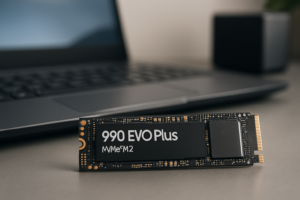
Best NVMe SSD for Gaming: Samsung 990 EVO Plus 2TB
For gaming, you want fast random reads, a large enough capacity to hold a modern library, and a drive that doesn’t throttle during extended sessions. The Samsung 990 EVO Plus 2TB checks every box. It delivers excellent low-queue-depth performance, which translates directly into shorter load times in games like Star Wars Outlaws and Stalker 2.
Samsung’s controller handles thermal management well, so you won’t see performance dips during long gaming sessions or when installing multiple titles back to back. The 2TB capacity gives you room for 20+ modern AAA titles without constantly juggling installs.

Samsung 990 EVO Plus 2TB NVMe SSD
Top-tier random read performance and thermal consistency make this the best NVMe for gamers in 2026.
If you want to see how much difference an NVMe makes over a SATA SSD for gaming specifically, we ran real-world benchmarks in our SATA vs NVMe gaming performance test. The short version: NVMe won’t boost your frame rates, but it dramatically cuts load times, texture streaming stutter, and fast-travel waits.
Runner-Up for Gaming: WD_BLACK SN850X
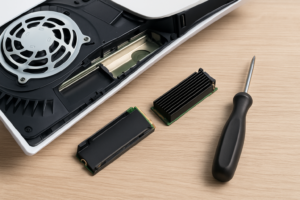
The WD_BLACK SN850X remains a strong contender. It trades blows with the Samsung in most gaming benchmarks and comes with an optional heatsink model that’s perfect for PS5 installations. It’s competitive on pricing, too. You can read more about how it stacks up in our Samsung 990 PRO vs WD_BLACK SN850X comparison.
Best NVMe SSD for Creative Work: Crucial T700 2TB (Gen 5)
This is where Gen 5 actually earns its keep. Video editors, 3D artists, and photographers working with large project files will notice the difference. The Crucial T700 2TB delivers sequential reads up to 12,400 MB/s and writes up to 11,800 MB/s. Those numbers translate into real time savings when scrubbing through 4K/8K timelines in DaVinci Resolve or exporting large Premiere Pro projects.
The T700 does run warm, so a heatsink is mandatory. Crucial sells a heatsink version, or your motherboard’s built-in M.2 heat spreader will work. Without cooling, the drive will throttle under sustained workloads, which defeats the purpose of buying Gen 5.

Crucial T700 2TB Gen 5 NVMe SSD
Genuine Gen 5 speeds make a measurable difference for video editing and 3D rendering workflows.
For creative professionals, the drive is only part of the equation. You’ll also want a solid backup strategy for your project files. Our comparison of cloud backup vs. local NAS for 2026 can help you figure out the best approach for protecting your work.
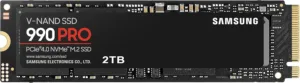
Runner-Up for Creative Work: Samsung 990 Pro 2TB
If your motherboard doesn’t support Gen 5, or you’d rather skip the heat management headaches, the Samsung 990 Pro 2TB is the best Gen 4 option for creative workloads. Its sustained write performance is among the highest in the Gen 4 category, and it handles mixed read/write operations (common during video editing) very well. We covered it in depth in our Samsung 990 Pro review.
Best NVMe SSD for Everyday Productivity: SK hynix Platinum P41 1TB
For office work, web browsing, coding, and general multitasking, you don’t need the fastest drive on the market. You need something reliable, efficient, and well-priced. The SK hynix Platinum P41 1TB hits that balance perfectly.
It’s a Gen 4 drive with strong real-world performance across the board. Boot times are fast, applications launch quickly, and it handles multitasking (think 30 Chrome tabs, Slack, Spotify, and a few documents) without breaking a sweat. The power efficiency is excellent, which matters if you’re running it in a laptop where battery life counts.

SK hynix Platinum P41 1TB NVMe SSD
Excellent performance-per-dollar with great power efficiency for laptops and everyday desktop use.
The P41 also has a solid endurance rating of 750 TBW (terabytes written) for the 1TB model. For typical productivity use, that’s enough to last well beyond a decade. If you’re curious about SSD longevity in general, we analyzed real-world data in our article on how long SSDs actually last.
Runner-Up for Productivity: WD Blue SN580
On a tighter budget, the WD Blue SN580 1TB is a reliable Gen 4 option that delivers more than enough speed for daily tasks. It uses a DRAM-less, HMB (Host Memory Buffer) design that keeps costs down without sacrificing much in everyday performance. For more budget-friendly picks, take a look at our best budget SSDs roundup.
Installation Tips and Maintenance
Swapping in a new NVMe drive is one of the simplest upgrades you can do. Most motherboards have at least one M.2 slot, and the whole process takes about 15 minutes. Our step-by-step NVMe installation guide walks you through it. If you’re unfamiliar with the M.2 form factor, our M.2 vs. 2.5-inch SSD comparison explains the physical differences.
After installation, keep an eye on your drive’s health. Modern NVMe drives are generally reliable, but all SSDs can slow down as they fill up. Keeping at least 10-15% of your drive free helps the controller manage wear leveling and garbage collection efficiently. If you’ve noticed your current SSD getting sluggish, our guide on why SSDs slow down over time covers the fixes.
Planning to sell or repurpose your old drive? Make sure to securely wipe it first. A quick format doesn’t actually erase your data.
Frequently Asked Questions
Is a Gen 5 NVMe SSD worth it over Gen 4 for gaming?
Not really. Current games don’t saturate Gen 4 bandwidth, and the difference in load times between a fast Gen 4 drive and a Gen 5 drive is usually under one second. Gen 5 drives also produce more heat and cost significantly more per gigabyte. Save Gen 5 for professional content creation workloads where sustained sequential throughput actually matters. For gaming, a quality Gen 4 drive like the Samsung 990 EVO Plus or WD_BLACK SN850X delivers the same practical experience.
How much NVMe storage do I actually need?
For a gaming-focused build, 2TB is the new minimum if you play AAA titles. Games like Call

James Kennedy is a writer and product researcher at Drives Hero with a background in IT administration and consulting. He has hands-on experience with storage, networking, and system performance, and regularly improves and optimizes his home networking setup.