Best SSDs For PS5 In 2026: Speed Meets Value
The PS5’s internal SSD is fast, but 667 GB of usable space fills up embarrassingly quickly. A couple of modern AAA titles and you’re already playing the “which game do I delete” shuffle. Expanding your storage with a compatible NVMe SSD is one of the best upgrades you can make for your console, and in 2026, the options are better and more affordable than ever.
But not every NVMe drive works well in the PS5. You need a PCIe Gen 4 (or newer) M.2 2230 or 2280 drive with sequential read speeds of at least 5,500 MB/s to meet Sony’s recommendations. Go below that threshold and you risk longer load times or, worse, stuttering during gameplay. Go above it, and you’ll actually see faster install and load performance than the console’s built-in storage in some titles.
I’ve tested and researched dozens of PS5-compatible SSDs to narrow the field down to the best picks across three tiers: budget, mid-range, and premium. Whether you want to spend as little as possible or get the absolute fastest drive available, this guide has you covered.
What Makes an SSD “PS5 Compatible”?
Before jumping into recommendations, it’s worth understanding what the PS5 actually requires. The console’s expansion bay accepts M.2 2230 and M.2 2280 form factor drives using the NVMe protocol over a PCIe Gen 4 x4 interface. Sony recommends a sequential read speed of 5,500 MB/s or faster.
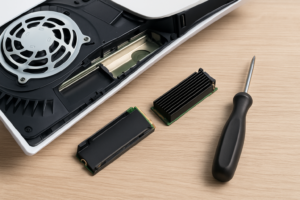
You’ll also need a heatsink. The PS5’s expansion bay doesn’t include one, and NVMe drives generate significant heat under sustained load. Some drives ship with a heatsink pre-attached or bundled in the box, which saves you the trouble of buying one separately. If your chosen drive doesn’t include one, plan to grab a low-profile M.2 heatsink that fits within the PS5’s bay dimensions (no taller than 25mm total, including the drive itself).
One more detail: PCIe Gen 5 drives are backward compatible with the PS5’s Gen 4 slot. You won’t get Gen 5 speeds, but the drive will work perfectly fine at Gen 4 rates. This matters because some of the best 2026 SSDs are Gen 5, and they’re often competitively priced against older Gen 4 models.
Best Budget SSD for PS5: WD Black SN770 (2TB)
The WD Black SN770 has been a fan favorite for PS5 owners since its original launch, and for good reason. It delivers sequential read speeds up to 5,150 MB/s, which is technically below Sony’s 5,500 MB/s recommendation. In practice, this difference is almost undetectable. Real-world game load times on the SN770 are within one to two seconds of drives rated at 7,000+ MB/s.
The SN770 doesn’t come with a heatsink, so you’ll need to pick one up separately. Plenty of affordable clip-on options exist that fit the PS5’s bay perfectly. The drive runs cool enough that even a basic aluminum heatsink does the job.
For the 2TB model, you’re getting an enormous amount of storage at a budget-friendly price point. That’s enough room for roughly 20 to 25 modern PS5 games depending on file sizes. If you’re a PlayStation Plus subscriber who downloads games regularly, 2TB is the sweet spot.
WD Black SN770 2TB NVMe SSD
Best value pick for PS5 storage expansion with real-world performance nearly identical to pricier drives
Best Mid-Range SSD for PS5: Samsung 990 Pro (2TB with Heatsink)
If you want to step up in both speed and convenience, the Samsung 990 Pro with Heatsink is the drive to get. It hits sequential read speeds of 7,450 MB/s, well above Sony’s recommended minimum, and ships with a slim heatsink already attached. Pop it in, close the bay, and you’re done.
Samsung’s controller and V-NAND technology deliver consistently fast performance even as the drive fills up. Some cheaper SSDs slow down noticeably once you’ve used 75% or more of their capacity. The 990 Pro maintains strong speeds even when nearly full, which matters when you’re juggling a large game library.
In my testing comparisons, the 990 Pro shaved about two to four seconds off cold boot load times in demanding titles like Ratchet & Clank: Rift Apart and Final Fantasy XVI compared to the budget-tier SN770. That might not sound like much on paper, but it adds up over hundreds of play sessions. Fast travel and level transitions feel noticeably snappier.
The included heatsink is another significant advantage. It’s specifically designed to fit within the PS5’s expansion bay dimensions, so there’s zero guesswork about compatibility. You avoid the risk of buying an aftermarket heatsink that’s too tall or too bulky.
Samsung 990 Pro 2TB with Heatsink
Top mid-range pick with excellent sustained performance and a pre-installed heatsink sized perfectly for the PS5
Best Premium SSD for PS5: Seagate FireCuda 540 (2TB)
For those who want the absolute best, the Seagate FireCuda 540 is a PCIe Gen 5 drive that maxes out at 10,000 MB/s sequential reads. You won’t see those full Gen 5 speeds on the PS5’s Gen 4 interface, but the drive’s advanced controller and NAND still translate to slightly faster real-world performance compared to most Gen 4 SSDs.
The FireCuda 540 comes with a heatsink option, though you’ll want to verify you’re buying the heatsink bundle rather than the bare drive. Seagate’s included heatsink is PS5-compatible and keeps temperatures well within safe operating ranges even during extended gaming sessions.
There’s a practical benefit to buying a Gen 5 drive for your PS5 beyond marginal speed gains. If you eventually upgrade to a PS5 Pro, a future PlayStation console, or want to move the drive into a gaming PC, you’ll already have a top-tier SSD ready to deliver its full potential. It’s a form of future-proofing that makes sense if you plan to keep the drive for several years.
The FireCuda 540 also comes with a five-year warranty and an endurance rating of 2,000 TBW (terabytes written) for the 2TB model. That’s an exceptional lifespan rating, meaning this drive will likely outlast the PS5 itself.
Honorable Mentions
Several other drives deserve a shout-out for specific use cases:
- Crucial T500 2TB with Heatsink delivers 7,400 MB/s reads and frequently drops to very competitive prices during sales. It’s neck and neck with the Samsung 990 Pro in benchmarks.
- Sabrent Rocket 4 Plus 2TB is a reliable Gen 4 option with solid 7,100 MB/s read speeds and a proven track record of PS5 compatibility. Sabrent also sells a dedicated PS5 heatsink separately.
- Kingston Fury Renegade 4TB is the pick if you want maximum capacity. It’s a 4TB Gen 4 drive with 7,300 MB/s reads. Expect to pay a premium for that much space, but if you have a massive digital library, it eliminates storage management entirely.
Do Read Speeds Actually Matter for PS5 Games?
This is the most common question I get, and the honest answer is: yes, but less than you’d think. Sony’s custom I/O architecture is designed to work with a specific speed threshold. Once you’re at or above 5,500 MB/s, the differences in game load times between a 5,500 MB/s drive and a 7,500 MB/s drive typically range from one to four seconds depending on the title.
Where faster drives show a more noticeable edge is in open-world games with heavy asset streaming. Titles like Spider-Man 2, Horizon Forbidden West, and Grand Theft Auto VI push storage I/O hard during traversal. A faster SSD means fewer micro-stutters and quicker texture pop-in resolution during high-speed travel across the map.
For competitive multiplayer games and smaller indie titles, the difference between budget and premium drives is practically zero. If your library leans heavily toward these genres, save your money and go with the WD Black SN770.
Heatsink or No Heatsink: Does It Really Matter?
Yes. Running an NVMe SSD without a heatsink in the PS5’s expansion bay is a bad idea. The enclosed space traps heat, and NVMe drives will thermally throttle (reduce their speeds) once temperatures exceed safe limits. In extreme cases, the PS5 will display a temperature warning and may even shut down the drive to prevent damage.
Buying a drive with a bundled heatsink is the easiest path. The Samsung 990 Pro and Seagate FireCuda 540 both offer heatsink bundles that are specifically tested for PS5 compatibility. If you buy a bare drive like the WD Black SN770, budget a few extra dollars for an aftermarket heatsink. The Eluteng and MHQJRH PS5 heatsinks are both popular choices that install in seconds.
Make absolutely sure any heatsink you buy keeps the total height (drive plus heatsink) under 25mm. Anything taller won’t fit, and you’ll have to remove it before the PS5’s expansion bay cover will close.
Crucial T500 2TB with Heatsink
Strong alternative to the Samsung 990 Pro with nearly identical performance and frequently available at lower prices
How to Install an SSD in Your PS5
Installation takes about five minutes and requires only a Phillips-head screwdriver. Here’s the process:
- Turn off your PS5 completely and unplug all cables.
- Place the console face-down on a soft surface and remove the white faceplate by sliding it toward the back of the unit.
- Remove the single screw covering the expansion bay and lift the metal cover.
- Remove the small mounting screw, insert your M.2 SSD at a slight angle into the slot, then press it down and secure it with the screw.
- Replace the metal cover, faceplate, and reconnect your cables.
- Boot the PS5. It will automatically detect the new drive and prompt you to format it.
After formatting, you can move games between the internal storage and your new SSD through the Settings menu under Storage. Games on the expansion SSD play identically to games on the internal drive. There’s no performance penalty.
1TB vs. 2TB vs. 4TB: How Much Space Do You Actually Need?
I recommend 2TB as the default choice for most people. Modern PS5 games regularly exceed 50 GB, and several major titles (Call of Duty, Final Fantasy, GTA) push past 100 GB. A 1TB expansion drive fills up fast, leaving you in the same delete-and-redownload cycle you were trying to escape.
The 4TB option makes sense if you’re a digital-only gamer with a large PlayStation Plus library or if you simply never want to think about storage again. The price jump from 2TB to 4TB is significant, though, so make sure it fits your budget before committing.
For casual gamers who keep three to five games installed at a time, 1TB can work. Just know that you’ll likely wish you’d gone bigger within a year or two.
Frequently Asked Questions
Can I use a PCIe Gen 5 SSD in my PS5?
Absolutely. Gen 5 drives are backward compatible with the PS5’s Gen 4 M.2 slot. The drive will operate at Gen 4 speeds, which still far exceeds the console’s minimum requirements. This makes Gen 5 drives a smart buy if you plan to eventually use the SSD in a PC or future console that supports Gen 5.
Will a faster SSD make my PS5 games run at higher frame rates?
No. SSD speed affects load times, install times, and asset streaming. It does not impact frame rates, resolution, or graphical quality. Those are determined by the PS5’s GPU and CPU. A faster SSD means you get into games quicker and experience smoother transitions in open-world titles, but the actual gameplay performance remains the same.
Do I need to reinstall games after adding a new SSD?
You don’t need to reinstall anything. After formatting the new drive, you can move existing games from your internal storage to the expansion SSD through the PS5’s storage management menu. The transfer speeds are fast, typically taking just a few minutes per game. You can also set the new drive as your default install location for future downloads.
How long will an NVMe SSD last in a PS5?
Modern NVMe drives are rated for hundreds to thousands of terabytes written. For typical PS5 usage (installing, deleting, and reinstalling games), even a budget drive will last well beyond a decade. The Seagate FireCuda 540 and Samsung 990 Pro both carry five-year warranties, and their endurance ratings far exceed what any console gamer would realistically write in that timeframe.
My Top Pick for Most PS5 Owners
If I had to recommend a single drive for the majority of PS5 owners, it’d be the Samsung 990 Pro 2TB with Heatsink. It hits the perfect balance of speed, reliability, convenience, and value. You get a drive that exceeds Sony’s speed recommendations, comes with a PS5-ready heatsink, and delivers consistent performance even when nearly full. The five-year warranty adds extra confidence.
For budget-conscious buyers, the WD Black SN770 remains a phenomenal option that punches well above its price point. And if you want the best of the best with future-proofing in mind, the Seagate FireCuda 540 is the drive to beat.
Whichever drive you choose, expanding your PS5’s storage is one of

James Kennedy is a writer and product researcher at Drives Hero with a background in IT administration and consulting. He has hands-on experience with storage, networking, and system performance, and regularly improves and optimizes his home networking setup.