Black Friday SSD Deals: What to Buy (and Skip) in 2026
Black Friday is the one time of year when SSD prices actually drop low enough to make upgrading feel like a smart decision rather than an impulse buy. But here’s what most deal roundups won’t tell you: not every “deal” is actually a deal. Some of those flashy discounts are inflated from artificially raised pre-sale prices, and a few popular models are genuinely worse values during Black Friday than they were three months earlier.
I’ve been tracking SSD prices throughout 2024, and this guide is built on that data. I’ll walk you through which drives are genuinely worth grabbing, which ones to skip entirely, and how to make sure you’re not falling for fake markdowns. Whether you’re building a new PC, upgrading your laptop, or just need more fast storage for your PS5, there’s a right way and a wrong way to shop for SSDs on Black Friday.
Before we get into specific picks, this video gives a solid primer on what to look for in an SSD and how different specs actually affect real-world performance:
How to Spot a Real SSD Deal (and Avoid Fake Ones)
The single most important thing you can do before Black Friday is understand price history. A drive listed at “50% off” means nothing if the seller bumped the list price two weeks before the sale. This happens constantly, especially with lesser-known brands on Amazon.
Use a free browser extension like CamelCamelCamel or Keepa to check any SSD’s price over the last 3 to 6 months. If the “original price” shown on the listing is higher than anything the drive has actually sold for, that discount is manufactured. Walk away.
Here are a few quick rules I follow every Black Friday:
- Check the 90-day price trend. If the current “deal” price is the same as or higher than the average price over the last three months, it’s not a deal.
- Compare per-gigabyte cost. Divide the price by the capacity in GB. For NVMe drives in 2024, anything well below the per-GB average for that tier is a genuine bargain.
- Beware of off-brand 2TB drives. High-capacity drives from unknown brands often use QLC NAND with small SLC caches, leading to brutal write speed drops after the cache fills up.
- Set price alerts early. Tools like Keepa let you set a target price and get an email the moment a drive drops to that level. This removes the pressure of constantly refreshing deal pages.
Best NVMe SSDs to Buy on Black Friday 2024
These are the drives I’d personally recommend based on performance, reliability, and historically strong Black Friday discounts. Each one has a proven track record, and all of them tend to see legitimate price cuts during the holiday sales window.
Best Overall: Samsung 990 Pro (1TB / 2TB)
The Samsung 990 Pro remains one of the fastest consumer PCIe Gen 4 drives you can buy. Sequential reads hit 7,450 MB/s, and its random read/write performance is among the best in its class. Samsung’s V-NAND and in-house controller give this drive excellent endurance ratings, too.
For most people building or upgrading a gaming PC, the 2TB model is the sweet spot. It consistently sees meaningful discounts during Black Friday, and price tracking data from previous years shows it tends to hit its lowest annual price during this window. Check current pricing on Amazon to see where it stands.

Samsung 990 Pro 2TB NVMe SSD
Top-tier Gen 4 speed with excellent endurance, consistently discounted during Black Friday
Best Value Gen 4: WD Black SN770 (1TB / 2TB)
If the 990 Pro is more than you need to spend, the WD Black SN770 is where I’d point you instead. It doesn’t quite match Samsung’s peak sequential speeds, but in real-world gaming and general desktop use, the difference is barely noticeable. You’re looking at 5,150 MB/s reads and 4,900 MB/s writes, which is more than enough for any current game or application.
The SN770 is a DRAM-less design that uses Host Memory Buffer (HMB) technology, which keeps costs down without the performance penalty you’d see in cheaper DRAM-less drives. It’s a genuinely excellent drive that regularly appears in Black Friday sales at very competitive pricing.
Best for PS5: Samsung 990 EVO Plus (2TB)
The 990 EVO Plus is a newer addition to Samsung’s lineup, and it’s designed to sit between the standard 990 EVO and the 990 Pro. It supports both PCIe Gen 4 x4 and Gen 5 x2, which makes it versatile across different platforms. For PS5 owners, the 2TB version with a heatsink is the move.
Just make sure you’re buying the version with a heatsink included, or budget for a third-party one. The PS5’s M.2 slot requires a heatsink, and the console’s compact design means thermals matter more than in a desktop case.
Best Budget Pick: Kingston NV2 (1TB / 2TB)
For a pure budget play, the Kingston NV2 1TB is hard to beat. It’s a no-frills PCIe Gen 4 drive with decent sequential speeds around 3,500 MB/s reads. It won’t win any benchmarking contests, but for a secondary storage drive or a budget laptop upgrade, it does the job well.
One caveat: Kingston uses different NAND and controller combinations across production batches of the NV2, so performance can vary slightly. For a boot drive on a performance-focused build, I’d spend a bit more on the SN770. For bulk game storage or a general-use laptop, the NV2 is perfectly fine.
Best SATA SSDs to Buy on Black Friday 2024
SATA drives aren’t dead. If you’re upgrading an older laptop or desktop that doesn’t have an M.2 slot, a 2.5-inch SATA SSD is still the single biggest upgrade you can make. The speed difference between a mechanical hard drive and even a basic SATA SSD is massive.
Top SATA Pick: Samsung 870 EVO (1TB / 2TB)
The Samsung 870 EVO is the gold standard for SATA SSDs. It maxes out the SATA III interface at around 560 MB/s reads and 530 MB/s writes, and Samsung’s reliability here is well-documented. The 1TB and 2TB models both tend to see solid Black Friday discounts.

Samsung 870 EVO 1TB SATA SSD
The most reliable SATA SSD on the market, perfect for older laptop and desktop upgrades
For budget SATA options, the Crucial BX500 is worth a look, though I’d steer toward the 870 EVO if the price gap is small during Black Friday. The BX500 lacks DRAM cache, which can affect sustained write performance and longevity under heavy workloads.
SSDs to Skip on Black Friday 2024
Not every popular drive deserves your money, especially during a sale event when the hype machine is running at full speed. Here are a few I’d avoid.
Skip: PCIe Gen 5 Drives (For Most People)
Gen 5 SSDs like the Crucial T700 and Samsung 990 EVO Plus (in Gen 5 mode) offer incredible sequential speeds on paper. But for gaming, general productivity, and even most content creation workflows, you won’t notice the difference over a good Gen 4 drive. Gen 5 drives also run hotter and cost significantly more per gigabyte.
Unless you’re doing sustained large file transfers daily (think video editing with 8K RAW footage), Gen 5 is a premium you’re paying for bragging rights, not practical performance. Save that money and buy a larger Gen 4 drive instead.
Skip: Unknown Brand “Too Good to Be True” Deals
Every Black Friday, brands you’ve never heard of pop up with 2TB NVMe drives at suspiciously low prices. Many of these use low-quality QLC NAND, underspec’d controllers, and have SLC caches so small that write speeds tank to hard drive levels after transferring more than 20 or 30 GB at once. Some have been documented with deceptive capacity reporting.
Stick with established brands: Samsung, Western Digital, Crucial/Micron, Kingston, SK hynix, and Sabrent. A deal on a drive that fails in six months isn’t a deal at all.
Skip: 256GB and 512GB Capacities
The per-gigabyte pricing on smaller capacity SSDs is almost always worse than 1TB models, and with modern games regularly exceeding 100GB, a 512GB drive fills up fast. Black Friday is the time to go bigger. The jump from 512GB to 1TB is usually a much better value, and the jump to 2TB is often the sweet spot for price per gigabyte.
Price Tracking Strategy: Set Up Before Black Friday
Don’t wait until Black Friday morning to start shopping. The best deals often go live days or even weeks before the actual date, and popular models sell out quickly. Here’s a quick action plan:
- Install Keepa or CamelCamelCamel as a browser extension right now. Both integrate directly with Amazon product pages and show you full price history graphs.
- Create a wishlist of 3 to 5 SSDs you’d be happy with. Don’t fixate on a single model. Flexibility lets you grab whichever one gets the best discount.
- Set price drop alerts for each drive on your wishlist. Pick a target price based on the lowest price you see in the 2024 price history. If it hits that number, buy it.
- Check early and check often. Amazon’s Black Friday deals roll out in waves starting in early November. Some of the best SSD deals in 2023 appeared during early access events, not on Black Friday itself.
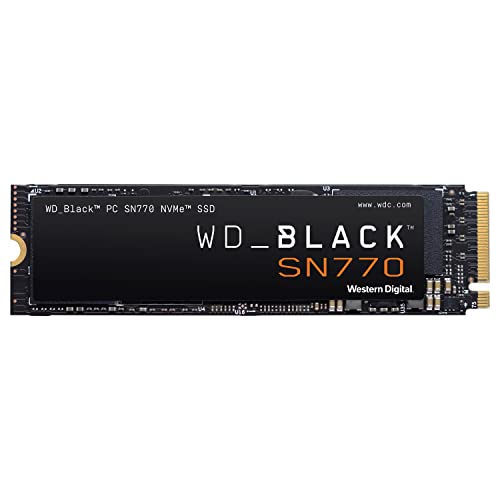
WD Black SN770 2TB NVMe SSD
Best bang for your buck Gen 4 NVMe drive, ideal for gaming and everyday use
Quick Buyer’s Guide: Which SSD Is Right for You?
Here’s a cheat sheet based on common use cases:
- Gaming PC boot drive: Samsung 990 Pro 2TB or WD Black SN770 2TB
- PS5 storage expansion: Samsung 990 EVO Plus 2TB with heatsink
- Laptop upgrade (M.2 slot): WD Black SN770 1TB
- Laptop upgrade (SATA only): Samsung 870 EVO 1TB
- Budget secondary storage: Kingston NV2 2TB
- NAS or creative workstation: Samsung 990 Pro 2TB or Crucial T500 2TB
Frequently Asked Questions
When do Black Friday SSD deals actually start?
Most major retailers, Amazon included, start rolling out early Black Friday deals in the first or second week of November. Some of the best SSD prices in recent years appeared during these early access windows rather than on Black Friday itself. I’d recommend having your price alerts set up by early November so you don’t miss anything.
Is it worth upgrading from a SATA SSD to an NVMe SSD?
It depends on what you’re doing. If you’re gaming or doing general productivity work, you probably won’t notice much difference in day-to-day use. Boot times and app launches might improve by a second or two. But if you regularly transfer large files, work with video editing software, or your motherboard supports NVMe and you’re already opening up the system, it’s a worthwhile upgrade. The biggest leap in perceived speed comes from upgrading a mechanical hard drive to any SSD, whether SATA or NVMe.
How do I know if my computer supports NVMe SSDs?
Check your motherboard’s specifications for an M.2 slot that supports NVMe (PCIe). Most motherboards from 2018 onward have at least one M.2 NVMe slot. If you’re on a laptop, look up your exact model number and check the storage specifications. You can also use free software like CrystalDiskInfo or HWiNFO to see what kind of storage interface your system currently uses. If your system only has a 2.5-inch drive bay and no M.2 slot, you’ll need a SATA SSD.
Should I buy a 1TB or 2TB SSD on Black Friday?
Go for 2TB if your budget allows it. Modern games, operating system updates, and application sizes have grown considerably, and 1TB fills up faster than you’d expect. The per-gigabyte cost of 2TB drives is usually very close to 1TB models, and during Black Friday the gap often narrows even further. If you can only afford 1TB right now, that’s still a solid amount of storage for most people. Just plan to add a second drive down the road.
Final Thoughts
Black Friday is genuinely one of the best times to buy an SSD, but only if you do a little homework first. Track prices before the sales start, stick with reputable brands, and don’t get lured in by huge percentage-off claims without verifying the price history. The drives I’ve recommended here all have strong track records for both performance and Black Friday discounting.
Focus on 1TB and 2TB Gen 4 NVMe drives for the best combination of speed and value. Skip Gen 5 unless you have a specific professional need for it. And always, always check the price history before you click “Add to Cart.”
This article contains affiliate links. We may earn a small commission at no extra cost to you.

James Kennedy is a writer and product researcher at Drives Hero with a background in IT administration and consulting. He has hands-on experience with storage, networking, and system performance, and regularly improves and optimizes his home networking setup.