What Is DirectStorage and How Does It Change Game Load Times?
If you’ve ever stared at a loading screen for what felt like an eternity, even with an NVMe SSD installed, you’re not imagining things. Traditional game loading pipelines were designed around slow hard drives and haven’t evolved much since. DirectStorage is Microsoft’s answer to this bottleneck, and it’s finally starting to show up in real games with real results.
The core idea is simple: let your SSD talk almost directly to your GPU, skipping the slow, multi-step process that Windows has used for decades. But does it actually deliver on the promise? Let’s look at the data.
How DirectStorage Actually Works
In the traditional Windows storage stack, game assets travel a winding road. Data moves from the SSD through the CPU, gets decompressed by the CPU, and then finally lands in GPU memory. Every step involves the CPU acting as a middleman, creating thousands of tiny I/O requests that queue up and slow everything down.
DirectStorage changes this in two major ways. First, it batches those thousands of small I/O requests into much larger, more efficient queues that the NVMe SSD can process in parallel. Second, with GPU decompression enabled, the compressed game data goes from the SSD to the GPU, where the GPU itself handles decompression. Your CPU barely has to lift a finger.
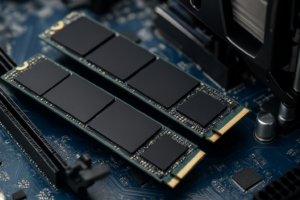
This matters because modern game textures and assets are enormous. A single level in a modern open-world game might need several gigabytes of data loaded on the fly. If you’re still relying on the old storage pipeline, even a fast NVMe drive can’t reach its full potential. If you’re curious about how different SSD types compare for gaming workloads, our real-world gaming test between SATA and NVMe SSDs breaks down the performance gap.
Which Games Support DirectStorage (and What the Benchmarks Show)
DirectStorage support is still growing, but several notable titles have shipped with it. Forspoken was the first PC game to implement it. Ratchet & Clank: Rift Apart, Final Fantasy XVI, and Star Wars Outlaws followed. Indiana Jones and the Great Circle is another recent addition.
Here’s where things get interesting. In benchmarks compiled by Digital Foundry and independent testers, Forspoken showed load time reductions of roughly 40% when DirectStorage with GPU decompression was enabled on a PCIe 4.0 NVMe drive compared to the standard Win32 API path. Ratchet & Clank saw load times drop from around 6 seconds to under 2 seconds on a fast Gen4 SSD. In Final Fantasy XVI, fast travel load screens that took 4 to 5 seconds dropped below 2 seconds with DirectStorage active.
The biggest gains appear in games with massive texture streaming demands. Open-world titles and games that frequently load large new areas benefit the most. Smaller, more linear games may not show as dramatic a difference.
PCIe 4.0 vs PCIe 5.0: Does Gen Matter?
PCIe 4.0 NVMe drives (topping out around 7,000 MB/s sequential read) already deliver substantial DirectStorage benefits. Most current games with DirectStorage support were designed and tested around Gen4 hardware, so you’re not leaving much on the table.
PCIe 5.0 drives, like the Crucial T700 and Samsung 990 EVO Plus, push sequential reads past 12,000 MB/s. In current DirectStorage titles, they offer a modest improvement over Gen4, typically shaving off another half-second or so from load times. The real payoff for Gen5 will come as game engines start designing specifically around those higher bandwidths.
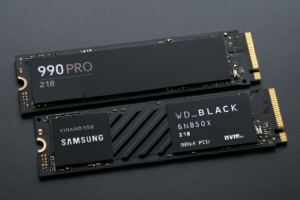
For most gamers building or upgrading a PC right now, a quality PCIe 4.0 drive is the sweet spot. The Samsung 990 Pro and WD_BLACK SN850X are both excellent choices. If you want a deeper look at how these two stack up, check out our Samsung 990 PRO vs WD_BLACK SN850X comparison.

Samsung 990 Pro 2TB NVMe SSD
Top-tier PCIe 4.0 gaming SSD with consistent performance in DirectStorage-enabled titles.
Keep in mind that SSD performance can degrade over time if you don’t maintain your drive properly. Our guide on why your SSD slows down and how to fix it covers the maintenance steps you should know about. Also, if you’re choosing between drive sizes for a gaming build, our 1TB vs 2TB SSD capacity guide can help you decide.

WD_BLACK SN850X 2TB NVMe SSD
Consistently fast Gen4 NVMe with a heatsink option, ideal for gaming PCs that support DirectStorage.
Frequently Asked Questions
Do I need Windows 11 for DirectStorage?
DirectStorage 1.0 technically works on Windows 10, but GPU decompression (the feature that provides the biggest speed gains) requires Windows 11. If you want the full benefit, you’ll need Windows 11 and an NVMe SSD. SATA drives are not supported by DirectStorage.
Will DirectStorage make my old SATA SSD faster?
No. DirectStorage requires an NVMe drive connected via the M.2 slot or a PCIe adapter. SATA SSDs, including M.2 SATA models, don’t support the NVMe protocol that DirectStorage relies on. If you’re unsure about the difference, our M.2 vs 2.5-inch SSD form factor guide explains the distinctions clearly.
This article contains affiliate links. We may earn a small commission at no extra cost to you.

James Kennedy is a writer and product researcher at Drives Hero with a background in IT administration and consulting. He has hands-on experience with storage, networking, and system performance, and regularly improves and optimizes his home networking setup.