PCIe Gen 5 vs Gen 4 NVMe SSDs: Real-World Speed Differences
PCIe Gen 5 NVMe SSDs are here, and the spec sheet numbers are genuinely wild. Sequential reads topping 12,000 MB/s. Sequential writes pushing past 11,000 MB/s. On paper, these drives obliterate their Gen 4 predecessors. But here’s what the marketing materials won’t tell you: most people will never feel the difference. I’ve spent weeks running benchmarks, transferring massive files, loading games, and booting operating systems on both Gen 5 and Gen 4 drives. The results might change how you spend your money.
In this comparison, I’m pitting the Crucial T700 (one of the fastest Gen 5 drives available) against the Samsung 990 Pro (still one of the best Gen 4 drives on the market). I’ll show you exactly where Gen 5 pulls ahead, where it doesn’t matter at all, and who should actually consider upgrading.
Understanding the Generational Leap: Gen 4 to Gen 5
Before we get into benchmarks, it helps to understand what’s actually different between these two generations. PCIe Gen 5 doubles the theoretical bandwidth per lane compared to Gen 4. A Gen 4 x4 NVMe drive maxes out around 8 GB/s of theoretical bandwidth, while Gen 5 x4 pushes that to roughly 16 GB/s. In practice, after overhead and encoding, Gen 4 drives top out around 7,000 MB/s sequential read, and Gen 5 drives can hit about 12,400 MB/s.
That’s a massive improvement on paper. Nearly double the speed sounds transformative. But storage performance is far more nuanced than a single sequential read number. Random I/O performance, queue depth behavior, sustained write speeds, and thermal throttling all play critical roles in how a drive actually feels during daily use. If you’re still running an older SATA SSD and wondering whether NVMe is worth the jump, that’s a separate (and more clear-cut) conversation.
Synthetic Benchmarks: Where Gen 5 Dominates
In CrystalDiskMark, the Crucial T700 puts up staggering numbers. Sequential reads clock in around 12,300 MB/s, and sequential writes hit approximately 11,600 MB/s on the 2TB model. The Samsung 990 Pro, by comparison, delivers about 7,450 MB/s reads and 6,900 MB/s writes. In pure sequential throughput, the T700 is roughly 65% faster on reads and 68% faster on writes.
Random 4K read and write performance tells a less dramatic story. The T700 manages around 1,500K IOPS on random reads, while the 990 Pro delivers approximately 1,400K IOPS. That’s only about a 7% difference, and it’s the metric that matters most for everyday computing tasks like booting your OS, launching apps, and general multitasking.
In ATTO Disk Benchmark, Gen 5 shows its advantage primarily on larger block sizes (256KB and above). At smaller block sizes typical of everyday workloads, the two drives are surprisingly close. This pattern repeats across multiple synthetic tests and explains why the “feel” gap between generations is much smaller than the numbers suggest.

Crucial T700 2TB PCIe Gen 5 NVMe SSD
The fastest consumer NVMe drive available, ideal for professional workloads involving massive sequential file transfers.
Real-World File Transfers: The Actual Gap
Synthetic benchmarks are useful for comparing drives under controlled conditions, but they don’t reflect how you’ll actually use your storage. I ran several real-world transfer tests to see how these drives perform during typical heavy workloads.
Large Single File Transfer (50GB Video File)
Copying a single 50GB video file from one location to another on the same drive, the Crucial T700 completed the task in about 8.5 seconds, while the Samsung 990 Pro took roughly 14 seconds. That’s a meaningful difference if you’re regularly moving massive files. Video editors working with 8K RAW footage or data scientists shuffling large datasets will notice this every single day.
Mixed File Transfer (30GB of Small to Medium Files)
Transferring a 30GB folder containing thousands of files ranging from tiny text documents to medium-sized images paints a different picture. The T700 finished in about 45 seconds, and the 990 Pro completed the same task in approximately 52 seconds. A 7-second difference on a 30GB mixed workload is barely perceptible. This type of transfer relies heavily on random I/O and small-block performance, where Gen 5’s bandwidth advantage can’t fully express itself.
Game Installation from Compressed Archives
Installing a large game (Baldur’s Gate 3, roughly 120GB installed) from a compressed archive showed virtually identical completion times. Both drives finished within 2 seconds of each other. The bottleneck here shifts to CPU decompression speed, not storage throughput. Your drive is waiting on your processor, not the other way around.
Gaming and Boot Times: Prepare to Be Underwhelmed
This is where the marketing hype collides hardest with everyday experience. I tested game load times across several demanding titles, Windows boot times, and application launch speeds. The results were consistent and, frankly, a bit anticlimactic for Gen 5 enthusiasts.
Windows 11 boot time: The T700 booted in 11.2 seconds. The 990 Pro booted in 11.8 seconds. Half a second. You will never, ever notice this.
Cyberpunk 2077 load time (fast travel): T700 completed in 2.1 seconds. The 990 Pro took 2.3 seconds. Again, functionally identical.
Starfield initial load: T700 at 6.8 seconds versus the 990 Pro at 7.4 seconds. Slightly faster, but not enough to justify a generational upgrade.
DirectStorage and GPU decompression are supposed to be the technologies that finally make ultra-fast SSDs matter for gaming. While games like Ratchet & Clank: Rift Apart and Forspoken support DirectStorage on PC, the real-world load time improvements between Gen 4 and Gen 5 remain minimal. The technology is still maturing, and game engines haven’t been optimized to fully exploit Gen 5 bandwidth yet. If you’re building a gaming PC and want the best M.2 form factor SSD, a good Gen 4 drive will serve you just as well for gaming in 2026.
Where Gen 5 Actually Matters
After all that testing, you might think Gen 5 is pointless. It’s not. There are specific workflows where the extra bandwidth translates to real productivity gains.
Professional Video Editing
If you’re editing 8K ProRes or RED RAW footage, you’re working with files that easily exceed the sustained throughput capabilities of Gen 4 drives. Scrubbing through a multi-cam 8K timeline with the T700 is noticeably smoother than on the 990 Pro. The difference between a 7 GB/s and 12 GB/s sustained read can mean the difference between dropped frames and smooth playback on a demanding timeline.
Large-Scale Data Processing
Data scientists, machine learning engineers, and anyone working with datasets exceeding 100GB will see tangible benefits. Loading massive datasets into memory, shuffling training data, and checkpointing large models all benefit from the increased sequential bandwidth. These workflows are throughput-bound in ways that everyday computing simply isn’t.
Sustained Write Workloads
The T700’s 2TB model maintains impressively high write speeds even after its SLC cache is exhausted. If you’re running a local database, building large software projects, or doing anything that involves sustained sequential writes over extended periods, Gen 5 provides a genuine advantage. Note that over time, any SSD’s performance can degrade if you don’t maintain it properly. Our guide on why SSDs slow down over time covers how to keep your drive performing at its best.

Samsung 990 Pro 2TB NVMe SSD
The best Gen 4 NVMe drive for most users, offering excellent performance without the thermal challenges of Gen 5.
The Heat Problem Nobody Talks About Enough
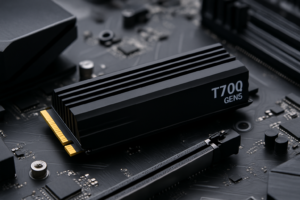
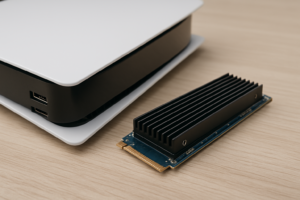
Gen 5 drives run hot. Really hot. The Crucial T700 ships with a heatsink for good reason. During sustained workloads, the controller can push past 80°C without adequate cooling. Some motherboard heatsinks aren’t sufficient, especially in compact builds where airflow is limited.
The Samsung 990 Pro, meanwhile, rarely exceeds 65°C under similar conditions with a basic motherboard heatsink. It’s more power-efficient, generates less heat, and doesn’t require you to worry about thermal throttling during extended file transfers.
If you’re building in a small form factor case or your motherboard’s M.2 heatsink is modest, a Gen 5 drive can actually perform worse than a Gen 4 drive due to thermal throttling. This is a real concern, not a theoretical one. During my sustained write tests in a compact ITX build without supplemental airflow, the T700 throttled down to Gen 4 speeds within about 90 seconds of continuous heavy writing.
Platform Requirements and Compatibility
Running a Gen 5 NVMe SSD requires a compatible platform. On Intel, you’ll need a 13th Gen (Raptor Lake) or newer CPU with a Z790 or newer chipset. On AMD, you’ll need a Ryzen 7000 series or newer with an X670E or B650E motherboard that offers a Gen 5 M.2 slot.
Most Gen 5 drives are backward compatible with Gen 4 slots, but they’ll run at Gen 4 speeds. So if you’re planning an upgrade path, buying a Gen 5 drive for a Gen 4 system “for the future” can make some sense, but you won’t see any speed benefit until you upgrade your platform too. If you need help with the installation process, our step-by-step guide to installing an NVMe SSD walks you through it.
Also keep in mind that running a Gen 5 SSD in certain M.2 slots on some motherboards can reduce your GPU slot to x8 PCIe lanes instead of x16. Check your motherboard manual before installing. This PCIe lane sharing rarely impacts gaming performance, but it’s worth knowing about.
My Recommendation: Who Should Buy What
I’ll be direct with my picks.
For most people, the Samsung 990 Pro remains the smarter buy. It’s fast enough for gaming, general productivity, content creation with 4K footage, and software development. It runs cooler, uses less power, and the real-world performance difference from Gen 5 is imperceptible in everyday tasks. If you want to compare it against other top Gen 4 options, our Samsung 990 Pro vs WD_BLACK SN850X comparison breaks down the finer details.
Other excellent Gen 4 alternatives include the WD_BLACK SN850X and the SK Hynix Platinum P41, both of which trade blows with the 990 Pro depending on the workload.
For professional content creators and data professionals, the Crucial T700 earns its premium. If you’re regularly working with files over 50GB, editing 8K footage, or running workloads that saturate Gen 4 bandwidth, the investment makes sense. The Corsair MP700 Pro is another strong Gen 5 contender worth considering.
For budget-conscious builders, you can get incredible performance from mid-range Gen 4 drives. Check out our roundup of the best budget SSDs for options that punch well above their weight class.

WD_BLACK SN850X 2TB NVMe SSD
A top-tier Gen 4 drive with outstanding gaming performance and excellent sustained write speeds.
Frequently Asked Questions
Will a Gen 5 SSD make my games load faster than Gen 4?
In almost all current games, no. The difference is typically less than half a second. Game engines and DirectStorage technology haven’t matured enough to fully leverage Gen 5 bandwidth yet. A quality Gen 4 NVMe drive delivers virtually identical gaming performance. This may change as more games adopt advanced asset streaming techniques, but for 2026, Gen 4 is more than sufficient for gaming.
Can I use a PCIe Gen 5 SSD in a Gen 4 M.2 slot?
Yes, Gen 5 drives are backward compatible with Gen 4 (and even Gen 3) M.2 slots. The drive will simply operate at the maximum speed supported by your slot. You won’t damage anything, but you also won’t get Gen 5 speeds. This can be a reasonable strategy if you plan to upgrade your motherboard and CPU later and want a drive that will grow with your system.
Do Gen 5 SSDs run hotter than Gen 4 drives?
Significantly, yes. Gen 5 controllers consume more power and generate considerably more heat. Most Gen 5 drives require a dedicated heatsink, and some will thermal throttle with inadequate cooling. If your case has poor airflow around

James Kennedy is a writer and product researcher at Drives Hero with a background in IT administration and consulting. He has hands-on experience with storage, networking, and system performance, and regularly improves and optimizes his home networking setup.