Sabrent Rocket 4 Plus SSD Review And Guide
Sabrent has built a reputation for delivering fast, reliable storage at competitive prices, and the Rocket 4 Plus is the drive that really put them on the map for enthusiasts. Whether you’re building a high-end gaming PC, upgrading your PS5’s internal storage, or just want an NVMe SSD that can keep up with heavy workloads, this drive deserves a close look.
The Rocket 4 Plus launched as one of the first consumer SSDs to hit PCIe Gen 4 speeds near the theoretical maximum, and it’s continued to hold its ground even as newer drives have entered the market. It’s built on Phison’s E18 controller paired with 176-layer TLC NAND, a combination that delivers impressive sequential and random performance without breaking the bank.
I’ve been using Sabrent drives in multiple builds over the past couple of years, and the Rocket 4 Plus remains one of my top recommendations for anyone who wants Gen 4 performance without paying a premium for a brand name. Let me walk you through everything you need to know before buying one.
Sabrent Rocket 4 Plus: What You Get
The Rocket 4 Plus comes in four capacity options: 500GB, 1TB, 2TB, and 4TB. All models use the standard M.2 2280 form factor, so they’ll fit in virtually any modern motherboard or laptop with an M.2 slot. Sabrent also sells versions bundled with their own heatsink, which we’ll cover in detail later.
Inside, you’re looking at the Phison PS5018-E18 controller, which was the flagship Gen 4 controller when this drive launched. It’s paired with Micron’s 176-layer TLC NAND flash and a DRAM cache (DDR4) that scales with capacity. The 1TB model gets 1GB of DRAM, the 2TB gets 2GB, and so on. That DRAM cache is a big deal for sustained workloads and random I/O performance.
Sabrent rates the drive at up to 7,100 MB/s sequential read and 6,600 MB/s sequential write on the 1TB and larger models. The 500GB version is slightly slower on writes, which is typical for lower-capacity NVMe drives due to fewer NAND chips working in parallel.
Sabrent Rocket 4 Plus 1TB NVMe SSD
The sweet spot capacity for most users, delivering full Gen 4 speeds with DRAM cache and excellent endurance ratings
Performance: Real-World Numbers
Synthetic benchmarks tell part of the story, and the Rocket 4 Plus delivers strong results there. In CrystalDiskMark, the 1TB model consistently hits around 7,000 MB/s sequential read and 6,500 MB/s sequential write, which is right in line with Sabrent’s rated specs. Random 4K performance at QD1 (the metric that matters most for everyday responsiveness) lands around 80-90 MB/s read and 250-300 MB/s write.
But synthetic benchmarks don’t always reflect what you’ll actually experience. In real-world file transfers, like copying a 50GB game installation folder, the Rocket 4 Plus sustains impressive speeds well above 3,000 MB/s for the bulk of the transfer before the SLC cache fills up. Once that cache is exhausted on the 1TB model, write speeds drop to around 1,500-2,000 MB/s, which is still very fast by any reasonable standard.
Gaming Performance
For game loading times, you’ll see meaningful improvements over SATA SSDs and noticeable gains over slower NVMe drives. Games like Cyberpunk 2077, Starfield, and Baldur’s Gate 3 load noticeably faster compared to a budget Gen 3 NVMe drive. The difference between this and other top-tier Gen 4 drives (like the Samsung 980 Pro or WD Black SN850X) is minimal in gaming, usually within a second or two at most.
If DirectStorage becomes more widely adopted in PC games, having a fast Gen 4 drive like the Rocket 4 Plus will matter even more, since the technology is designed to stream assets directly from the SSD to the GPU.
Content Creation and Productivity
Video editors and photographers will appreciate the Rocket 4 Plus’s sustained performance. Scrubbing through 4K and 8K timelines in Premiere Pro or DaVinci Resolve feels smooth, and exporting large projects benefits from the high sequential write speeds. The DRAM cache helps maintain consistent performance during extended write operations, which is where cheaper, DRAM-less drives tend to stumble.
For database work, virtual machines, and software compilation, the strong random I/O performance makes a real difference. This drive handles mixed read/write workloads better than most of its competitors at similar price points.
PS5 Compatibility and Installation
One of the biggest reasons people buy the Rocket 4 Plus is for PS5 storage expansion, and Sabrent clearly knows this. The drive meets all of Sony’s requirements for the PS5’s internal M.2 expansion slot: it’s PCIe Gen 4, uses the 2280 form factor, and easily exceeds the recommended 5,500 MB/s sequential read speed.
Installation in the PS5 is simple. You remove the console’s side panel, unscrew the M.2 slot cover, insert the drive at an angle, secure it with the provided screw and standoff, and replace everything. The whole process takes about five minutes. After powering on, the PS5 will prompt you to format the drive, and you’re ready to start moving games.
One important note: the PS5’s M.2 slot has limited airflow, so you’ll want a heatsink. The built-in heatsink on the PS5’s expansion slot cover (on newer PS5 models) can work, but a dedicated heatsink is a better solution. This is where Sabrent’s bundled heatsink options come in handy.
Heatsink Options: Which One Should You Pick?
Sabrent sells the Rocket 4 Plus in three configurations: the bare drive, a version with a thin aluminum heatsink, and a version with a larger heatsink designed specifically for the PS5. Choosing the right one depends on where you’re installing the drive.
For PC Builds
Most modern motherboards include their own M.2 heatsinks, so buying the bare drive is usually the best value. If your motherboard doesn’t have a built-in heatsink, Sabrent’s slim aluminum heatsink version works well and keeps the drive thin enough to fit under most GPU backplates without clearance issues.
For PS5
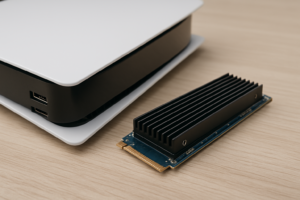
The Sabrent Rocket 4 Plus with PS5 heatsink is specifically designed to fit within the PS5’s M.2 bay dimensions. It keeps temperatures well-managed during extended gaming sessions. The heatsink adds some height, but it’s been measured to fit within the PS5’s clearance specifications, including the height limit of 25mm (including the heatsink).
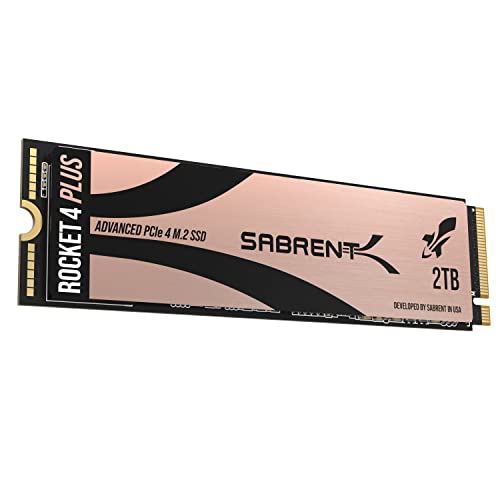
Sabrent Rocket 4 Plus 2TB with Heatsink for PS5
The ideal all-in-one PS5 storage upgrade with a purpose-built heatsink that fits perfectly in the console’s expansion bay
Thermal Performance
The Phison E18 controller runs warm under load. Without a heatsink, the Rocket 4 Plus can reach temperatures above 80°C during sustained writes, which is enough to trigger thermal throttling. With any decent heatsink, temperatures typically stay in the 55-65°C range, which is well within safe operating limits.
In a PS5 with Sabrent’s dedicated heatsink, I’ve seen temperatures settle around 55-60°C during long gaming sessions, even with demanding titles like Ratchet & Clank: Rift Apart that constantly stream data from the SSD. You won’t experience any throttling under normal use with a heatsink installed.
The takeaway here is simple: don’t run this drive without a heatsink if you’re doing anything beyond light workloads. The good news is that even a basic thermal pad and heatsink solution makes a huge difference.
Endurance and Reliability
Sabrent rates the Rocket 4 Plus endurance at 700 TBW (terabytes written) for the 1TB model and 1,400 TBW for the 2TB model. These are solid numbers that put it in line with Samsung’s 980 Pro and ahead of several competitors. For context, even if you write 100GB to the drive every single day, the 1TB model would last over 19 years before hitting its rated endurance limit.
Sabrent backs the Rocket 4 Plus with a 5-year limited warranty, which matches the industry standard for premium NVMe drives. They also offer free cloning software and a firmware update tool through their website, which is a nice touch that some competitors don’t provide.
In terms of real-world reliability, the Rocket 4 Plus has been on the market since 2021 and has accumulated a strong track record. User reviews consistently praise its longevity, and Sabrent’s customer support has a solid reputation for handling warranty claims without excessive red tape.
How It Compares to the Competition
The Rocket 4 Plus competes directly with some well-known drives, so let’s see how it stacks up.
Vs. Samsung 990 Pro
Samsung’s 990 Pro is technically faster in some benchmarks, particularly in random read performance. But the real-world difference in gaming and general use is negligible. Samsung’s drive has the advantage of slightly better power efficiency, which matters more in laptops. For desktop and PS5 use, the Rocket 4 Plus delivers comparable performance at a typically lower price. I’d pick the Sabrent here for value.
Vs. WD Black SN850X
The SN850X is another excellent Gen 4 drive with very similar specs. Performance is essentially a toss-up, with each drive winning different benchmarks by small margins. Both have DRAM caches and strong endurance ratings. Your choice between them often comes down to which one is on sale, and the Rocket 4 Plus tends to be priced aggressively.
Vs. Sabrent Rocket 4 Plus-G (Gen 4 Refresh)
Sabrent also offers the Rocket 4 Plus-G, which is a newer revision using updated NAND. Performance is nearly identical to the original Rocket 4 Plus, so don’t stress too much about which version you end up with. Both are excellent drives.
Who Should Buy the Sabrent Rocket 4 Plus?
This drive makes sense for a wide range of users:
- PS5 owners who need more internal storage and want a proven, compatible drive with an optional purpose-built heatsink.
- PC gamers who want fast load times and strong overall performance without overspending on a Samsung-branded drive.
- Content creators who work with large files and need sustained read/write performance backed by a DRAM cache.
- Anyone building a new PC with a Gen 4 (or Gen 5) motherboard who wants a reliable primary or secondary drive.
The 1TB model is the best all-around pick for most people. If you’re primarily using it for PS5 game storage or have a large Steam library, stepping up to the 2TB version is worthwhile since games keep getting bigger and you’ll appreciate the extra room.
Sabrent Rocket 4 Plus 4TB NVMe SSD
The best option for users who want massive Gen 4 storage without sacrificing speed, ideal for large game libraries or video editing
Tips for Getting the Most Out of Your Rocket 4 Plus
A few practical tips to keep in mind after you install your drive:
- Update the firmware. Download Sabrent’s Rocket Control Panel software from their website. Firmware updates can improve performance, fix bugs, and enhance compatibility.
- Use a heatsink. Even if your motherboard has one, make sure it’s actually making contact with the drive’s controller. A thermal pad that’s too thin or poorly aligned won’t do much.
- Enable the correct boot mode. Make sure your BIOS is set to use the M.2 slot in PCIe Gen 4 x4 mode. Some motherboards default to Gen 3 or share bandwidth with other slots.
- Don’t fill it completely. Keep at least 10-15% of the drive’s capacity free to maintain optimal performance and extend the life of the NAND cells.
- Check your motherboard manual. Some M.2 slots on older boards share lanes with SATA ports, which can disable certain drive bays when an NVMe drive is installed.
Frequently Asked Questions
Does the Sabrent Rocket 4 Plus work with the PS5?
Yes, it’s fully compatible with the PS5’s internal M.2 expansion slot. It exceeds Sony’s recommended 5,500 MB/s sequential read speed, and Sabrent even sells a version with a PS5-specific heatsink. After installation, the PS5 will format the drive automatically, and you can move games between the internal storage and the Rocket 4 Plus freely.
Do I need a heatsink for the Sabrent Rocket 4 Plus?
You should absolutely use one. The Phison E18 controller generates significant heat under sustained loads, and without a heatsink, the drive can thermally throttle and reduce performance. Most modern motherboards include M.2 heatsinks, and Sabrent sells bundled heatsink versions for both PC and PS5 use. Even a basic aftermarket heatsink with a thermal pad will do the job.
Is the Rocket 4 Plus still worth buying, or should I wait for Gen 5?
The Rocket 4 Plus is still an excellent buy. Gen 5 drives are available, but they’re significantly more expensive, run hotter, and the real-world performance gains in gaming and everyday use are minimal right now. Very few applications can actually take advantage of Gen 5 speeds today. For the vast majority of users, a Gen 4 drive like the Rocket 4 Plus offers the best balance of performance, thermals, and value.
How does the 500GB model compare to the 1TB and 2TB models?
The 500GB model is noticeably slower in sequential writes (rated at around 3,800 MB/s vs. 6,600 MB/s for the larger models) because it has fewer NAND chips working in parallel. It also has a smaller SLC cache and lower endurance at 350 TBW. If your budget allows, the 1TB model is a much better value and delivers the full performance the drive is capable of. The 500GB version works fine as a boot drive, but you’ll notice the difference during large file transfers.
Final Verdict
The Sabrent Rocket 4 Plus is one of the best Gen 4 NVMe SSDs you can buy. It delivers top-tier sequential speeds, strong random performance thanks to its DRAM cache, solid endurance ratings, and excellent compatibility across PCs and the PS5. The included he

James Kennedy is a writer and product researcher at Drives Hero with a background in IT administration and consulting. He has hands-on experience with storage, networking, and system performance, and regularly improves and optimizes his home networking setup.