PCIe Gen 3 Vs Gen 4 Vs Gen 5 SSD Compared
Shopping for an SSD in 2024 means confronting a question that didn’t exist a few years ago: which PCIe generation do you actually need? The spec sheets throw around impressive sequential read numbers like 7,000 MB/s and 14,000 MB/s, but translating those into real-world benefits for your specific use case is a different story entirely.
I’ve tested SSDs across all three generations, and I’ll be honest: the marketing hype doesn’t always match what you’ll experience day to day. Some workloads see massive improvements jumping from Gen 3 to Gen 5. Others barely notice the difference between Gen 3 and Gen 4. Your wallet definitely notices, though.
This comparison breaks down the actual bandwidth specs, real-world performance data, backward compatibility details, and most importantly, when spending more on a newer generation is justified versus when it’s just burning money for bragging rights.
PCIe Generations: The Bandwidth Specs
Each PCIe generation doubles the theoretical bandwidth of the one before it. For SSDs using four-lane (x4) connections, that shakes out like this:
- PCIe Gen 3 x4: ~3.94 GB/s theoretical max, with real-world sequential reads topping out around 3,500 MB/s
- PCIe Gen 4 x4: ~7.88 GB/s theoretical max, with real-world sequential reads reaching about 7,000-7,400 MB/s
- PCIe Gen 5 x4: ~15.75 GB/s theoretical max, with real-world sequential reads hitting 12,000-14,500 MB/s
Those numbers look dramatic on paper. A Gen 5 drive is roughly four times faster than a Gen 3 drive in sequential throughput. But sequential throughput is only part of the picture, and it’s not even the part that matters most for many users.
Gen 3 SSDs: Still Surprisingly Capable
Gen 3 NVMe drives like the Samsung 970 EVO Plus and WD Black SN750 were the gold standard not long ago. They max out around 3,500 MB/s for sequential reads and 3,300 MB/s for sequential writes. Random read/write performance, which actually determines how snappy your system feels, typically lands around 500,000-600,000 IOPS.
For everyday computing, Gen 3 drives still feel fast. Booting Windows, launching applications, copying files around your system. These tasks involve small, random I/O operations where Gen 3 drives perform within striking distance of their newer siblings.
The biggest advantage of Gen 3 today is value. Drives like the Samsung 970 EVO Plus 1TB and Crucial P3 are available at their lowest prices ever, making them excellent choices for secondary storage, NAS drives, or budget builds. They also run cooler and consume less power than Gen 4 and Gen 5 drives, which matters in laptops and small form factor builds.
Best Gen 3 SSDs Still Worth Buying
- Samsung 970 EVO Plus: Best overall Gen 3 drive with excellent endurance and consistent performance
- Crucial P3: Budget-friendly option that still delivers solid Gen 3 speeds
- WD Blue SN570: Great middle ground between price and performance
Gen 4 SSDs: The Sweet Spot in 2024
Gen 4 is where things get interesting, and it’s where I’d point most people right now. Flagship Gen 4 drives like the Samsung 990 Pro, WD Black SN850X, and Crucial T500 deliver sequential reads around 7,000-7,400 MB/s with random IOPS reaching 1,000,000 or higher.
The jump from Gen 3 to Gen 4 is most noticeable in sustained file transfers. Copying a 50GB folder of video files takes noticeably less time. Loading levels in modern games with DirectStorage support shows measurable improvement. Video editors working with high-bitrate 4K and 8K footage experience smoother timelines and faster renders.
Gen 4 drives also benefit from several years of controller maturation. The Phison E18, Samsung Elpis, and WD-designed controllers have been refined through multiple firmware revisions. Thermal management is better than early Gen 4 drives, and prices have dropped to the point where the gap between a good Gen 3 drive and a good Gen 4 drive is surprisingly small.
Best Gen 4 SSDs Right Now
- Samsung 990 Pro 2TB: My top pick overall. Excellent sustained write performance, great endurance ratings, and Samsung’s Magician software is genuinely useful. Check current pricing on Amazon.
- WD Black SN850X 1TB: Trades blows with the 990 Pro and sometimes wins in gaming workloads. Includes a heatsink option that fits most builds.
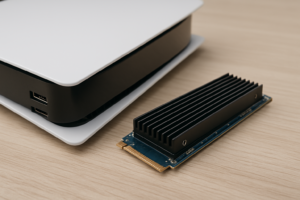
- Crucial T500: Slightly behind the top two in benchmarks but offers excellent value and comes with a heatsink version for PS5 users.
- SK Hynix Platinum P41: Underrated option with outstanding power efficiency, making it my favorite Gen 4 drive for laptops.
Gen 5 SSDs: Bleeding Edge Performance
Gen 5 drives are the new kids on the block, and they’re impressive on paper. The Crucial T700, Samsung 990 EVO Plus (the Gen 5 variant), Corsair MP700 Pro, and Gigabyte Aorus Gen5 12000 all deliver sequential reads between 12,000 and 14,500 MB/s. Those are numbers that would’ve sounded fictional three years ago.
But Gen 5 comes with real trade-offs that you need to understand before buying. These drives run hot. Seriously hot. The Crucial T700 without its included heatsink can thermal throttle within seconds under sustained load. Even with a heatsink, many Gen 5 drives operate at 70-80°C during heavy writes. You’ll almost certainly need good case airflow or the bundled heatsink, and the heatsink versions are physically large enough to cause clearance issues with some GPU backplates.
Power consumption is another concern. A Gen 5 drive under load can draw 10-12W, compared to 6-8W for Gen 4 and 3-5W for Gen 3. In a desktop, that’s negligible. In a laptop, it impacts battery life noticeably.
Best Gen 5 SSDs Available
- Crucial T700 2TB (with heatsink): Currently the most refined Gen 5 option. The included heatsink is mandatory for sustained workloads. Check current pricing on Amazon.
- Corsair MP700 Pro: Strong competitor with slightly better thermal management than some alternatives.
- Samsung 990 EVO Plus: Samsung’s more accessible Gen 5 entry, though it uses an x2 Gen 5 interface rather than x4, limiting it to around 7,250 MB/s. It’s more of a Gen 4.5 product in practice.
Real-World Performance: Where Generations Actually Differ
Here’s where the rubber meets the road. I’ll break this down by use case because the “best” generation depends entirely on what you’re doing.
Gaming
Most games show minimal difference between Gen 3 and Gen 5. Loading times in titles without DirectStorage support are nearly identical across all three generations because the bottleneck is the game engine’s decompression routines, not raw drive throughput. Games using DirectStorage, like Ratchet & Clank: Rift Apart and Forspoken, do show improvements from Gen 4 and above, but we’re talking 1-3 seconds off a 10-15 second load. Noticeable in benchmarks, barely perceptible in practice.
My recommendation for gaming: Gen 4. It covers DirectStorage titles and doesn’t cost significantly more than Gen 3.
Video Editing and Content Creation
This is where faster generations start to matter. Editing 4K ProRes 422 HQ footage in DaVinci Resolve or Premiere Pro benefits from Gen 4 speeds, especially when scrubbing through timelines or applying real-time effects. Multicam 8K RAW editing can genuinely benefit from Gen 5 bandwidth, though you’d also want to pair it with 64GB+ of RAM to avoid making the SSD the bottleneck anyway.
For content creators working with large files regularly, Gen 4 is the minimum I’d recommend. Gen 5 makes sense if you’re editing 8K RAW or working with massive datasets where sustained throughput directly impacts your productivity.
Software Development and Virtual Machines
Compiling large codebases and running multiple VMs simultaneously involves heavy random I/O, where Gen 4 drives hold a meaningful advantage over Gen 3. Gen 5 adds marginal improvement here because the random 4K performance between Gen 4 and Gen 5 drives is much closer than the sequential numbers suggest. A Samsung 990 Pro and a Crucial T700 deliver similar random 4K read speeds in the 80-100 MB/s range.
General Desktop Use
Browsing the web, using Office apps, managing email, streaming media. A Gen 3 drive handles all of this identically to a Gen 5 drive. You will not perceive any difference. Save your money here.
Backward Compatibility: What Works Where
PCIe is backward and forward compatible, which is one of the best things about the standard. You can plug a Gen 5 drive into a Gen 3 slot and it’ll work perfectly, just limited to Gen 3 speeds. Similarly, a Gen 3 drive in a Gen 5 slot will work fine at Gen 3 speeds.
A few things to keep in mind:
- Physical compatibility: All three generations use the standard M.2 2280 form factor (for consumer drives), so they physically fit the same slots.
- Motherboard support: You need a motherboard with a Gen 5 M.2 slot to get Gen 5 speeds. As of late 2024, Intel 13th/14th Gen (Z790) and AMD Ryzen 7000 (X670E, B650E) platforms support Gen 5 M.2.
- PS5 compatibility: Sony’s PS5 supports Gen 4 NVMe drives. Gen 5 drives work but run at Gen 4 speeds. Gen 3 drives are not supported (they’re too slow for the console’s architecture).
- CPU lane allocation: On some platforms, using a Gen 5 SSD might share bandwidth with your GPU or other devices. Check your motherboard manual for lane routing details.
One practical tip: if you’re building a new system with a Gen 5-capable motherboard, buy a Gen 4 drive now and upgrade to Gen 5 later when prices drop and the technology matures. You won’t sacrifice meaningful real-world performance in the interim.
Heat, Power, and Longevity Considerations
This is an underrated factor in the Gen 3 vs Gen 4 vs Gen 5 discussion. Higher bandwidth means higher power draw, which means more heat. And heat is the enemy of NAND flash longevity.
Gen 3 drives rarely need heatsinks. Gen 4 drives benefit from them during sustained writes but usually don’t thermal throttle in a case with decent airflow. Gen 5 drives essentially require heatsinks for any sustained workload. The Phison E26 controller used in most Gen 5 drives runs particularly hot, and passive cooling is borderline mandatory.
For laptops, I strongly recommend sticking with Gen 4 or even Gen 3. The power efficiency of drives like the SK Hynix Platinum P41 or Samsung 980 Pro means better battery life and less heat in a thermally constrained chassis. Putting a Gen 5 drive in a thin-and-light laptop is asking for thermal throttling.
My Recommendation: Which Generation Should You Buy?
I’ll keep this simple with clear recommendations:
- Budget builds, secondary drives, NAS storage: Gen 3. The Samsung 970 EVO Plus or WD Blue SN570 will serve you well.
- Most people, most of the time: Gen 4. Get the Samsung 990 Pro or WD Black SN850X. You’ll have excellent performance for every common workload, including gaming, content creation, and development. This is where the best balance of price, performance, heat, and power efficiency lives.
- Professional content creators working with massive files, or enthusiasts who want the absolute fastest storage available: Gen 5. The Crucial T700 with heatsink is the most mature option. Just make sure your case has room for the heatsink and your motherboard actually supports Gen 5 M.2.
For the vast majority of users, Gen 4 is the right call right now. Gen 5 drives will eventually come down in price and improve in thermal efficiency, but as of late 2024, you’re paying a significant premium for speed gains that few workloads can actually use.
Frequently Asked Questions
Will a Gen 5 SSD make my PC boot faster than a Gen 4 or Gen 3 drive?
No, not in any meaningful way. Windows boot times are limited by initialization processes, driver loading, and startup programs, not raw sequential throughput. A Gen 3 NVMe drive boots Windows in about 10-15 seconds, and a Gen 5 drive typically shaves off maybe 1-2 seconds. You’d never notice the difference without a stopwatch.
Can I use a Gen 5 SSD in a Gen 3 or Gen 4 M.2 slot?
Yes. PCIe is backward compatible, so a Gen 5 drive will work in a Gen 3 or Gen 4 slot. It’ll just run at the speed of the slower slot. This can actually be useful if you find a great deal on a Gen 5 drive and plan to upgrade your motherboard later. You won’t damage anything by running it in an older slot.
Is it worth upgrading from a Gen 3 SSD to Gen 4?
For most people, no, not as a standalone upgrade. If you’re already building a new system or upgrading your motherboard, absolutely go Gen 4 for your new boot drive. But pulling a perfectly good Gen 3 NVMe drive and replacing it with Gen 4 just for speed won’t transform your computing experience. The exception is if you regularly transfer very large files (50GB+) or work with high-resolution video editing, where the sustained throughput difference is genuinely useful.
Do Gen 5 SSDs require special cooling?
Effectively, yes. While they’ll technically function without a heatsink, most Gen 5 drives will thermal throttle under sustained load within 30-60 seconds without one. The Crucial T700, Corsair MP700 Pro, and most other Gen 5 drives either include a heatsink in the box or offer a heatsink SKU. Many motherboards also include built-in M.2 heatsinks that work well enough, but verify the thermal solution covers both sides of the drive for best results.

James Kennedy is a writer and product researcher at Drives Hero with a background in IT administration and consulting. He has hands-on experience with storage, networking, and system performance, and regularly improves and optimizes his home networking setup.