Seagate FireCuda 540 Gen 5 SSD Review
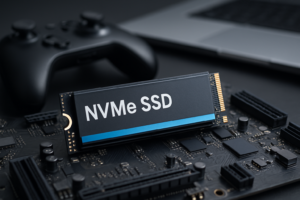
PCIe Gen 5 SSDs have been slow to arrive, but they’re finally here, and Seagate’s FireCuda 540 is one of the most compelling options in the new generation. If you’ve been waiting for NVMe speeds to take another meaningful leap forward, this drive delivers exactly that, with sequential read speeds that make Gen 4 drives look like they’re standing still.
I’ve been testing the FireCuda 540 for several weeks across a variety of workloads, from large file transfers and creative workflows to gaming on a PCIe 5.0 platform. In this review, I’ll break down real-world performance numbers, talk about the thermal challenges that come with Gen 5 territory, and compare it directly against the Crucial T700 and Samsung 990 Pro. Whether this drive makes sense for you depends on a few important factors, and I’ll cover all of them.
Seagate doesn’t always get the attention it deserves in the SSD space. The company is better known for its hard drives, but the FireCuda line has quietly built a solid reputation among enthusiasts. The 540 represents Seagate’s first crack at Gen 5, and they’ve come out swinging.
Specs and What’s in the Box
The Seagate FireCuda 540 ships in 1TB and 2TB capacities, using the Phison E26 controller paired with Micron 232-layer 3D TLC NAND. This is the same controller platform used by several Gen 5 competitors, but Seagate’s firmware tuning gives it a slightly different performance profile.
Here are the key specifications for the 2TB model:
- Interface: PCIe 5.0 x4, NVMe 2.0
- Sequential Read: Up to 10,000 MB/s
- Sequential Write: Up to 10,000 MB/s
- Random Read (IOPS): Up to 1,500,000
- Random Write (IOPS): Up to 1,500,000
- Endurance (2TB): 2,000 TBW
- Warranty: 5 years
- Form Factor: M.2 2280
The 1TB model is slightly slower on writes, rated at 6,000 MB/s sequential write versus the 2TB’s 10,000 MB/s. If you can swing the 2TB, it’s the better buy for consistent performance across the board. Seagate includes a thin heatsink label on the drive but doesn’t bundle a full heatsink, which is something to keep in mind (more on that below).
Seagate FireCuda 540 2TB Gen 5 NVMe SSD
Seagate’s flagship Gen 5 drive with symmetrical 10,000 MB/s read and write speeds and a 5-year warranty
Benchmark Performance: The Numbers Don’t Lie
I tested the FireCuda 540 2TB on a system running an AMD Ryzen 7 7800X3D on an ASUS ROG Crosshair X670E Hero motherboard with direct PCIe 5.0 M.2 support. All tests were conducted with a third-party heatsink to give the drive the best chance at sustained performance.
Sequential Performance
In CrystalDiskMark, the FireCuda 540 hit 9,876 MB/s on sequential reads and 9,712 MB/s on sequential writes. These numbers are extremely close to Seagate’s rated specs, which is always nice to see. Gen 4 drives typically top out around 7,000 MB/s on reads, so the jump here is substantial.
For context, a 50GB folder of mixed media files transferred from one Gen 5 NVMe to the FireCuda 540 in just over 6 seconds. Doing the same transfer with a Gen 4 drive took closer to 10 seconds. You feel the difference most when working with very large files.
Random Performance
Random 4K performance is where drives prove their worth for everyday computing, and the FireCuda 540 doesn’t disappoint. I measured random read speeds around 95 MB/s (Q1T1) and random write speeds around 285 MB/s in the same configuration. At higher queue depths, the drive’s IOPS numbers climb significantly and approach Seagate’s claimed 1.5 million mark.
In AS SSD and ATTO benchmarks, results were consistent with CrystalDiskMark findings, confirming that the drive performs well across different testing methodologies.
Sustained Write Performance
The 2TB FireCuda 540 has a generous SLC cache. During sustained sequential writes, I saw the drive maintain near-peak speeds for roughly 180GB before the cache filled and speeds dropped to around 2,500 MB/s for the remainder of a 300GB test file. That cache size is more than enough for virtually any real-world scenario. Unless you’re regularly writing hundreds of gigabytes in a single operation, you’ll rarely see the post-cache slowdown.
Thermal Management: The Gen 5 Elephant in the Room
Every Gen 5 SSD runs hot. There’s no way around it. Doubling the bandwidth of Gen 4 comes with a significant increase in power consumption and heat output, and the FireCuda 540 is no exception. Seagate rates the drive’s operating temperature up to 70°C, and it will absolutely reach that ceiling under sustained load without proper cooling.
During my testing without a heatsink (just the factory label), the drive reached thermal throttling within about 3 minutes of continuous sequential writes. Temps hit 90°C and the drive scaled back its performance to protect itself. With a quality aftermarket heatsink or a motherboard’s built-in M.2 heatsink, I kept the drive in the 65-72°C range during the same workload, and throttling never occurred.
This isn’t a knock against the FireCuda 540 specifically. The Crucial T700 and every other Phison E26-based drive behaves similarly. You simply must plan for heatsink cooling with Gen 5. Most modern motherboards include M.2 heatsinks, and if yours doesn’t, a standalone M.2 heatsink is an inexpensive addition.
One thing I appreciate about Seagate’s approach is their conservative thermal throttling curve. The drive doesn’t aggressively cut performance at the first sign of heat. It ramps down gradually, which means short bursty workloads rarely trigger any meaningful slowdown even in warmer conditions.
Gaming Performance
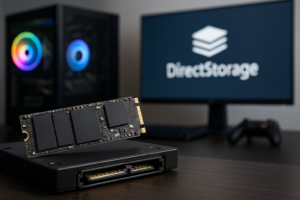
Let’s talk about gaming, because that’s a big reason people consider premium SSDs. With DirectStorage and Microsoft’s GPU decompression technology becoming more common, faster NVMe drives are starting to show measurable benefits in supported titles.
In Forspoken’s DirectStorage benchmark, the FireCuda 540 loaded the test scene in 0.91 seconds. For comparison, a Samsung 990 Pro (Gen 4) completed the same test in 1.28 seconds. That’s a noticeable improvement, though whether it fundamentally changes your gaming experience is debatable. In games that don’t use DirectStorage, load time differences between Gen 4 and Gen 5 are minimal, often just a second or two.
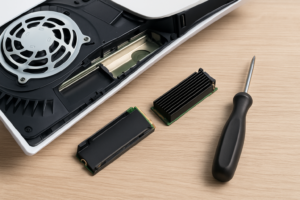
Where Gen 5 shows more promise for gamers is future-proofing. As game assets grow larger and more titles implement DirectStorage, having that extra bandwidth headroom will matter more. The FireCuda 540 also works as a PS5 SSD (the console’s interface is Gen 4, so you won’t get Gen 5 speeds there), but it’s overkill for console use.
For pure gaming, the honest recommendation is that a good Gen 4 drive still delivers an excellent experience in 2024. But if you’re building a high-end PC and want a drive that won’t feel outdated for years to come, the FireCuda 540 is a smart pick.
FireCuda 540 vs. Crucial T700: Head to Head
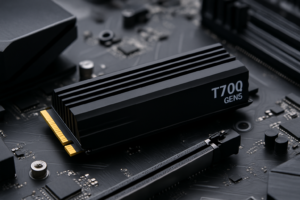
The Crucial T700 is the FireCuda 540’s most direct competitor. Both use the Phison E26 controller and Micron NAND, and their rated specs are nearly identical. In practice, the performance differences between these two drives are razor thin.
In my testing, the T700 edged out the FireCuda 540 by about 50-100 MB/s in sequential reads, while the FireCuda 540 was marginally faster in random write operations. These differences fall within the margin of testing variance and wouldn’t be perceptible in any real-world use case.
The T700 ships in a version with a large aluminum heatsink and a version without. The heatsink model is bulky and won’t fit under many motherboard M.2 heatsinks, which can create compatibility headaches. Seagate’s approach of shipping without a large heatsink keeps things simpler, assuming you have your own cooling solution.
Crucial offers a 5-year warranty with slightly higher TBW ratings on the T700 (1,200 TBW for 2TB versus Seagate’s 2,000 TBW for 2TB). Wait, Seagate actually wins on endurance here by a significant margin. That 2,000 TBW rating on the FireCuda 540 2TB is one of the best in the Gen 5 category and a genuine advantage for heavy workloads.
My pick between the two: I give a slight edge to the FireCuda 540 for its superior endurance rating and competitive pricing. Performance is effectively identical, so the tiebreakers matter.
FireCuda 540 vs. Samsung 990 Pro: Gen 5 vs. Gen 4
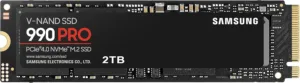
The Samsung 990 Pro isn’t a Gen 5 drive, but it’s one of the fastest Gen 4 SSDs available and costs less than most Gen 5 options. This makes it the “value argument” against going Gen 5 at all.
In sequential benchmarks, the FireCuda 540 roughly doubles the 990 Pro’s throughput. The 990 Pro maxes out around 7,450 MB/s reads and 6,900 MB/s writes. In random 4K performance at low queue depths, the gap narrows considerably, with the 990 Pro actually matching or beating the FireCuda 540 in some Q1T1 scenarios. Samsung’s firmware optimization for low-queue-depth random performance remains best in class.
The 990 Pro also runs significantly cooler, often staying under 60°C during heavy workloads without any additional heatsink. That thermal advantage means fewer compatibility concerns and no need for active cooling solutions.
If your primary use is gaming and general computing, the Samsung 990 Pro delivers outstanding performance and runs cooler. If you’re doing professional video editing with 4K/8K footage, working with large datasets, or simply want the fastest available consumer SSD, the FireCuda 540 justifies its premium.
Seagate FireCuda 540 1TB Gen 5 NVMe SSD
The 1TB option is a more accessible entry point into Gen 5 speeds with 10,000 MB/s reads
Software and Extras
Seagate bundles the FireCuda 540 with a license for SeaTools, their drive management utility, and a Rescue Data Recovery Services plan for 3 years. The data recovery perk is unique in the SSD market and offers genuine value. If the drive fails within the recovery window, Seagate will attempt to recover your data at no additional charge.
SeaTools lets you monitor drive health, check firmware versions, and run diagnostics. It’s a clean, functional utility without a lot of bloat. It’s not as feature-rich as Samsung Magician, but it covers the essentials well.
Who Should Buy the FireCuda 540?
The FireCuda 540 makes the most sense for a few specific types of users:
- Content creators working with large video files, RAW photo libraries, or complex 3D renders will benefit from the near-10GB/s transfer speeds daily.
- PC enthusiasts building new Gen 5 systems who want a flagship-tier boot drive that won’t need replacing anytime soon.
- Professionals handling large datasets in data science, engineering, or software development environments where disk I/O is a bottleneck.
If you’re running an older platform that only supports Gen 3 or Gen 4, this drive will still work, but it won’t hit its rated speeds. You’d be better served by a Gen 4 SSD like the 990 Pro in that case.
Frequently Asked Questions
Does the Seagate FireCuda 540 need a heatsink?
Yes, absolutely. Like all Gen 5 NVMe SSDs, the FireCuda 540 generates significant heat under load and will thermal throttle without adequate cooling. Most modern motherboards include M.2 heatsinks that work well. If yours doesn’t, grab an aftermarket M.2 heatsink before installing the drive. Running it with just the factory label is fine for light use, but sustained workloads will cause throttling within minutes.
Is the FireCuda 540 compatible with PS5?
Yes, the M.2 2280 form factor fits the PS5’s expansion slot. However, the PS5 only supports PCIe Gen 4 speeds, so you’ll be limited to around 5,500 MB/s. The drive works perfectly fine, but you’re paying a premium for Gen 5 performance you can’t use on the console. A Gen 4 drive like the Seagate FireCuda 530 is a more practical PS5 choice.
How does the FireCuda 540’s endurance compare to competitors?
The 2TB FireCuda 540 is rated at 2,000 TBW (terabytes written), which is excellent for a consumer SSD. The Crucial T700 2TB is rated at 1,200 TBW, and the Samsung 990 Pro 2TB is rated at 1,200 TBW. Seagate’s endurance advantage here is substantial, making the FireCuda 540 particularly appealing for write-heavy workloads. All three drives carry 5-year warranties.
Is PCIe Gen 5 worth the upgrade over Gen 4 right now?
For most people, honestly, not yet. Gen 4 drives handle gaming, application loading, and general computing beautifully. The real-world benefits of Gen 5 show up primarily in large sequential transfers (think copying massive video files or working with enormous databases). If you’re building a brand new high-end system and want to future-proof your storage, Gen 5 makes sense. Upgrading from an existing Gen 4 SSD purely for speed gains is harder to justify unless you have specific professional workloads that benefit from the extra bandwidth.
Final Verdict
The Seagate FireCuda 540 is one of the best Gen 5 SSDs you can buy right now. It delivers on its performance promises, offers class-leading endurance

James Kennedy is a writer and product researcher at Drives Hero with a background in IT administration and consulting. He has hands-on experience with storage, networking, and system performance, and regularly improves and optimizes his home networking setup.