PS5 Internal SSD vs External Drive: What Can Each One Do?
The PS5 ships with roughly 667 GB of usable internal storage, and modern games regularly eat 50 to 100 GB each. You’ll hit that ceiling fast. When you do, you’ve got two paths: install an NVMe SSD inside the console or plug in an external drive via USB. But these two options don’t work the same way, and Sony’s rules about what can run from where will trip you up if you’re not prepared.
This guide breaks down exactly what each storage type can and can’t do on PS5, so you can spend your money on the right drive the first time.
How the PS5 Handles Internal vs. External Storage
Sony built the PS5 around an ultra-fast custom SSD. The console’s architecture relies on that speed for features like near-instant fast travel, texture streaming, and the virtual absence of loading screens. Because of this, PS5-native games must be played from internal storage. There’s no workaround.
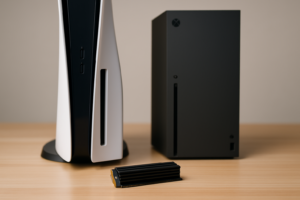
Your internal storage includes both the built-in 1TB drive (about 667 GB usable after the operating system) and any M.2 NVMe SSD you install in the expansion slot. The PS5 treats both as equivalent. Once you pop in a compatible internal SSD, PS5 games can be installed, stored, and played directly from it.
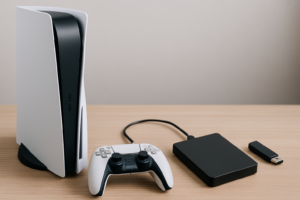
External USB drives, on the other hand, follow a different set of rules. You can play PS4 games directly from an external drive, and you can store PS5 games on one to free up internal space. But you cannot launch and play PS5 games from an external USB drive. If you want to play a stored PS5 game, you’ll need to transfer it back to internal storage first. The good part is that transferring is significantly faster than re-downloading, especially if your internet connection isn’t great.
Internal M.2 SSD: What You Need to Know
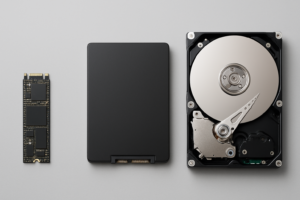
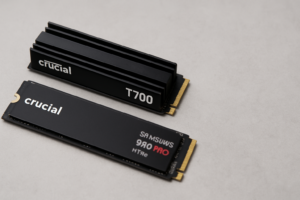
The PS5’s expansion slot accepts a Gen 4 NVMe M.2 SSD in the 2230 or 2280 form factor. Sony recommends drives with sequential read speeds of 5,500 MB/s or higher to match the built-in drive’s performance. Most quality Gen 4 NVMe drives meet or exceed this. If you’re not familiar with the physical differences between SSD types, our M.2 vs 2.5-inch SSD comparison guide covers the basics.
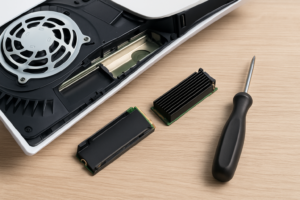
Installing one takes about 10 to 15 minutes. You’ll remove the side panel, unscrew a small cover, seat the drive, and screw it down. Sony walks you through it in the system settings, and the console will format the drive automatically once it’s inserted.
Best Internal SSD Picks for PS5
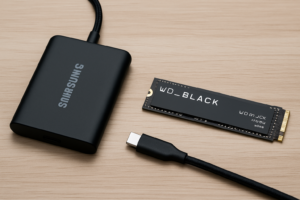
The Samsung 990 Pro with Heatsink is the top pick for most PS5 owners. It delivers sequential reads up to 7,450 MB/s, well above Sony’s recommendation, and the included heatsink means you don’t need to buy one separately. It’s available in 1TB, 2TB, and 4TB capacities. We covered this drive in depth in our Samsung 990 Pro review, and it remains one of the best NVMe drives you can buy.
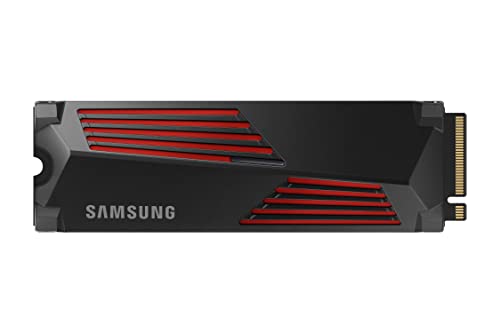
Samsung 990 Pro 2TB with Heatsink
Top-tier Gen 4 NVMe with built-in heatsink, perfect for PS5 expansion with read speeds up to 7,450 MB/s.
If you want to save a bit, the WD_BLACK SN850X with Heatsink is an excellent alternative. It matches the 990 Pro in real-world gaming performance and is often competitively priced. Both drives have earned strong reputations for reliability, and you can read a side-by-side breakdown in our Samsung 990 Pro vs WD_BLACK SN850X comparison.
For capacity, 2TB is the sweet spot for most gamers. It roughly triples your usable PS5 game storage. A 1TB drive works if you’re selective about what you keep installed, but 2TB gives you room to breathe.
External USB Drives: What They Can (and Can’t) Do
An external drive connected via USB serves two main purposes on PS5:
- Play PS4 games directly. PS4 titles run just fine from an external USB drive. You don’t need to transfer them to internal storage first.
- Store PS5 games for later. You can offload PS5 games you’re not currently playing to an external drive. When you want to play again, transfer them back to internal storage. This is much faster than re-downloading.
Sony requires the external drive to connect via USB 3.0 (SuperSpeed USB) or faster, and the drive must be between 250 GB and 8 TB in capacity. Both traditional hard drives (HDDs) and external SSDs work. The console will format the drive in its own file system, which means you won’t be able to use it with a PC simultaneously.
HDD vs. External SSD for PS5
For playing PS4 games from an external drive, an SSD will give you noticeably faster load times compared to a spinning hard drive. If you mostly use the external drive as cold storage for PS5 games you’re not currently playing, a cheaper HDD does the job fine since you’re just transferring files back and forth. The performance difference between SSDs and HDDs matters most when you’re actively loading game data.
Transfer speeds also differ. An external SSD connected via USB 3.2 can move a 50 GB game to internal storage in a few minutes. A mechanical HDD might take two to three times longer for the same file.
Best External Drive Picks for PS5
For an external SSD, the Samsung T7 Shield 2TB is a great all-rounder. It’s compact, durable, and fast enough for both PS4 game playback and quick PS5 game transfers. If you travel with your console or carry games between locations, you’ll appreciate its rugged build. Our list of the best portable SSDs for travel covers similar options if you want more choices.

Samsung T7 Shield 2TB
Rugged, fast portable SSD that works great for PS4 game playback and PS5 game storage.
For budget-friendly bulk storage, a Seagate Portable 4TB external hard drive gives you massive capacity for parking PS5 games and housing a large PS4 library. It won’t win speed contests, but it’s reliable and simple. Just plug it in via USB and you’re set.

Seagate Portable 4TB External Hard Drive
Affordable high-capacity HDD for storing PS5 games and playing PS4 titles directly.
Quick Reference: What Goes Where
| Task | Internal SSD | External USB Drive |
|---|---|---|
| Play PS5 games | ✅ Yes | ❌ No |
| Store PS5 games | ✅ Yes | ✅ Yes |
| Play PS4 games | ✅ Yes | ✅ Yes |
| Store PS4 games | ✅ Yes | ✅ Yes |
| Media apps and screenshots | ✅ Yes | ✅ Yes (media gallery export) |
The Smartest Storage Strategy for Most Gamers
The ideal setup combines both types of storage. Add a 2TB internal NVMe SSD to triple your playable PS5 game space. Then connect an affordable external HDD (2TB to 4TB) to park games you’re not actively playing and to hold your PS4 library.
This way, you keep your most-played PS5 titles on fast internal storage and use the external drive as a overflow shelf. When you’re ready to revisit an older game, a quick transfer brings it back without burning through your internet data cap.
One thing to keep in mind: SSDs, both internal and external, can slow down slightly as they fill up and age. If you notice performance dips over time, our guide on why SSDs slow down and how to fix it has practical solutions.
Frequently Asked Questions

James Kennedy is a writer and product researcher at Drives Hero with a background in IT administration and consulting. He has hands-on experience with storage, networking, and system performance, and regularly improves and optimizes his home networking setup.

James Kennedy is a writer and product researcher at Drives Hero with a background in IT administration and consulting. He has hands-on experience with storage, networking, and system performance, and regularly improves and optimizes his home networking setup.