M.2 SATA vs 2.5-Inch SATA SSD: What Is the Difference?
If you’ve been shopping for a solid-state drive, you’ve probably noticed that SATA SSDs come in two very different-looking packages. One is a flat, rectangular drive about the size of a credit card stack. The other is a tiny stick that looks like a piece of gum. They’re both SATA SSDs, they both use the same interface, and they perform at virtually identical speeds. So what’s actually different, and which one should you buy?
The confusion between M.2 SATA and 2.5-inch SATA SSDs is one of the most common mix-ups in PC building. Many people assume the M.2 form factor automatically means faster speeds, but that’s not the case when we’re talking about M.2 SATA specifically. This guide will walk you through the real differences, help you figure out what your motherboard supports, and point you toward the best options for your setup.
Understanding the Two Form Factors
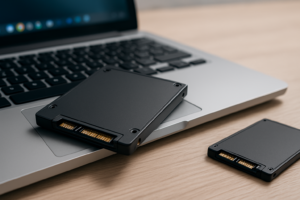
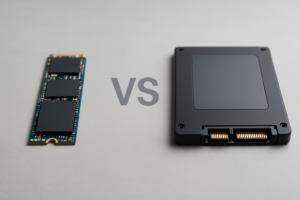
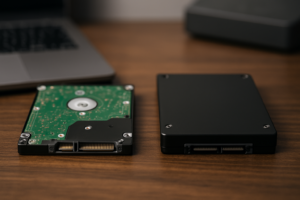
A 2.5-inch SATA SSD is the traditional form factor that replaced old laptop hard drives. It’s a small rectangular box, typically 7mm thick, that connects to your motherboard using a SATA data cable and draws power from a SATA power connector on your PSU. You’ll usually mount it in a drive bay or bracket somewhere inside your case.
An M.2 SATA SSD, on the other hand, is a small circuit board (usually 22mm wide and 80mm long, called “2280” size) that plugs directly into an M.2 slot on your motherboard. No cables needed. It sits flat against the board and is held down by a single screw. If you want a deeper dive into how these form factors compare physically, our M.2 vs 2.5-inch form factor comparison guide covers the dimensions and mounting differences in detail.
The critical thing to understand is that “M.2” describes only the physical connector and shape. It doesn’t tell you anything about speed. An M.2 slot can carry either a SATA signal or an NVMe signal, and those two are very different animals.
Speed: They’re the Same (And That’s Not a Bad Thing)
This is the most important takeaway from this entire article. An M.2 SATA SSD and a 2.5-inch SATA SSD deliver the same performance. Both are limited by the SATA III interface, which caps out at a theoretical 6 Gbps, translating to real-world sequential read and write speeds around 550 MB/s and 520 MB/s respectively.
You won’t see any benchmark difference between a Samsung 870 EVO (2.5-inch) and a WD Blue SA510 (M.2 SATA) when running the same workloads. Same interface, same controller limitations, same speed ceiling.
For context, SATA speeds are still excellent for everyday computing: booting your OS, loading applications, browsing, and even gaming. If you’re curious about how SATA stacks up against NVMe in actual game load times, our SATA vs NVMe real-world gaming test shows that the difference is often smaller than people expect.
M.2 SATA vs M.2 NVMe: Don’t Confuse Them
This is where most people trip up. When someone says “M.2 SSD,” they could mean two completely different things:
- M.2 SATA SSD: Uses the SATA protocol through the M.2 connector. Maxes out at ~550 MB/s. Uses a B+M key (two notches on the connector edge).
- M.2 NVMe SSD: Uses the PCIe/NVMe protocol through the M.2 connector. Gen 3 NVMe drives hit ~3,500 MB/s, and Gen 4 drives can reach ~7,000 MB/s. Uses an M key (one notch on the right side).
The physical appearance is nearly identical at a glance, but the notch pattern on the connector edge is different. An M.2 SATA drive typically has two notches (B+M key), while an M.2 NVMe drive usually has a single notch (M key). Always check the product listing carefully before buying, because plugging an M.2 SATA drive into an NVMe-only slot (or vice versa) simply won’t work in most cases.
How to Check Your Motherboard Compatibility
Before you buy any M.2 SSD, you need to confirm what your motherboard’s M.2 slot actually supports. Not all M.2 slots accept SATA drives, and getting this wrong means a drive that won’t be detected at all.
Step 1: Find Your Motherboard Model
On Windows, open the Command Prompt and type wmic baseboard get product,manufacturer. This will give you the exact manufacturer and model number. On a Mac, click the Apple menu and select “About This Mac” (though Mac users will rarely encounter M.2 SATA situations).
Step 2: Check the Motherboard Manual or Spec Sheet
Go to the manufacturer’s website and look up your board. In the specifications section, find the “Storage” or “M.2” section. You’ll see one of these descriptions for each M.2 slot:
- “Supports SATA and PCIe” or “SATA/NVMe”: This slot accepts both M.2 SATA and M.2 NVMe drives. You’re good either way.
- “Supports PCIe only” or “NVMe only”: This slot will NOT work with an M.2 SATA drive. You need an NVMe SSD for this slot.
- “Supports SATA only”: Rare, but it means only M.2 SATA drives will work.
Step 3: Watch for Shared Bandwidth Notes
Many motherboards share bandwidth between certain M.2 slots and SATA ports. For example, your manual might say “When M.2_1 is populated with a SATA SSD, SATA port 2 is disabled.” This means if you use an M.2 SATA drive, one of your 2.5-inch SATA ports stops working. This is important if you’re running multiple drives.
If your motherboard doesn’t have an M.2 slot at all (common on older systems), or only supports NVMe in its M.2 slots, the 2.5-inch form factor is your only SATA SSD option.
Advantages of Each Form Factor
Why Choose M.2 SATA
No cables. This is the biggest practical benefit. The M.2 drive plugs directly into the motherboard, eliminating both the data cable and the power cable. In small form factor builds or mini-ITX cases, this alone can be worth the choice.
Saves space. Without a drive bay, bracket, or cable routing to worry about, your build stays cleaner. If you’re building in a compact case where every millimeter counts, M.2 SATA is the smarter pick.
Cleaner aesthetics. Fewer cables means better airflow and a tidier look, especially in windowed cases.
Why Choose 2.5-Inch SATA
Universal compatibility. Every desktop motherboard made in the last 15+ years has SATA ports. Laptops with 2.5-inch bays can use these drives too. You don’t need to worry about M.2 slot types, key configurations, or bandwidth sharing.
More product options. The 2.5-inch SATA market is more mature and offers a wider range of capacity options and brands. Drives like the Crucial MX500 and Samsung 870 EVO are proven, reliable options with years of track record.

Samsung 870 EVO 1TB 2.5-Inch SATA SSD
One of the most reliable 2.5-inch SATA drives available, with consistently strong read/write performance and excellent endurance ratings.
Easy portability between systems. A 2.5-inch drive can be popped into a USB enclosure in seconds for use as an external drive, moved between desktops, or installed in older laptops. If you ever plan to wipe a drive before selling an old computer and repurpose the SSD elsewhere, the 2.5-inch form factor makes that process simple.
Easier to use as secondary storage. Most motherboards have 4 to 6 SATA ports, so you can add multiple 2.5-inch SSDs without running out of slots. M.2 slots are typically limited to one or two on consumer boards. If you’re using an SSD alongside an HDD, the 2.5-inch SATA form factor often makes the most sense for the SSD since it leaves M.2 slots free for a faster NVMe drive later.
Recommended M.2 SATA and 2.5-Inch SATA SSDs
Since performance is identical between the two form factors, your buying decision should come down to which form factor fits your system, along with the drive’s reliability, warranty, and endurance ratings.
Best M.2 SATA Picks
The WD Blue SA510 M.2 is a solid all-around choice that’s available in capacities up to 2TB. It offers dependable SATA speeds and a 5-year warranty. For a budget-friendly alternative, the Kingston A400 M.2 gets the job done for basic boot and application drives, though its endurance ratings are lower.

WD Blue SA510 1TB M.2 SATA SSD
A reliable M.2 SATA drive with a 5-year warranty and consistent performance for everyday use.
Best 2.5-Inch SATA Picks
The Samsung 870 EVO remains the gold standard for 2.5-inch SATA SSDs. Its combination of performance, endurance (up to 2,400 TBW for the 4TB model), and Samsung’s Magician software makes it hard to beat. The Crucial MX500 is a close runner-up and sometimes edges ahead on pricing.
For those shopping on a tighter budget, check out our best budget SSDs performance and price analysis for more options across both form factors.

Crucial MX500 1TB 2.5-Inch SATA SSD
Excellent value SATA SSD with hardware-based encryption, power-loss protection, and proven long-term reliability.
Which One Should You Actually Buy?
Here’s my straightforward recommendation based on the situation:
Buy an M.2 SATA SSD if your motherboard’s M.2 slot supports SATA, you don’t plan to use that slot for a faster NVMe drive in the future, and you want a cable-free installation. This is especially true for small form factor builds and compact laptops with M.2 slots but no 2.5-inch bays.
Buy a 2.5-inch SATA SSD if your motherboard doesn’t have an M.2 slot, your M.2 slots only support NVMe, you want to preserve your M.2 slot for an NVMe upgrade later, or you need multiple SATA drives in one system. The 2.5-inch form factor is also better if you might repurpose the drive into a USB enclosure as portable external storage down the road.
My overall pick for most people: Go with a 2.5-inch SATA SSD unless you have a specific reason to use M.2 SATA. Reserve your M.2 slot for an NVMe drive, which will give you a genuine speed upgrade. A 2.5-inch Samsung 870 EVO or Crucial MX500 as a secondary storage drive, paired with an NVMe boot drive, is one of the best configurations for a balanced PC build.
And regardless of which you choose, keep in mind that all SSDs can experience performance degradation over time, so periodic maintenance and firmware updates matter for both form factors.
Frequently Asked Questions
Is an M.2 SATA SSD faster than a 2.5-inch SATA SSD?
No. Both use the same SATA III interface and deliver the same maximum speeds of approximately 550 MB/s for sequential reads and 520 MB/s for sequential writes. The only difference is the physical form factor and how they connect to your motherboard. Don’t pay extra for an M.2 SATA drive expecting a speed boost over a 2.5-inch SATA model.
Can I plug an M.2 SATA SSD into any M.2 slot on my motherboard?
Not necessarily. Some M.2

James Kennedy is a writer and product researcher at Drives Hero with a background in IT administration and consulting. He has hands-on experience with storage, networking, and system performance, and regularly improves and optimizes his home networking setup.