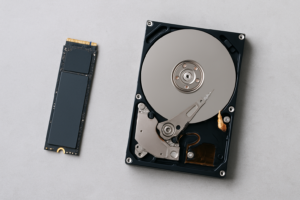
SSHD vs Pure SSD: Is a Hybrid Drive Still Worth It for Boot Drives?
If you’ve been shopping for a boot drive recently, you might have stumbled across SSHDs (Solid State Hybrid Drives) still sitting on store shelves and wondered whether they’re a clever bargain or a relic from a bygone era. Back in 2013 or so, hybrid drives seemed like a brilliant compromise: the massive storage of an HDD with a small flash cache that learned your most-used files and served them at near-SSD speeds. It sounded great on paper.
But we’re in 2026. Pure SSDs have gotten dramatically cheaper, NVMe drives are everywhere, and the storage market looks nothing like it did when Seagate’s FireCuda SSHD first made waves. The question is whether hybrid drives still deserve a spot in your PC, especially as your primary boot drive. I’ve dug into the benchmarks, the pricing trends, and the real-world experience to give you a clear, honest answer.
What Exactly Is an SSHD?
An SSHD, or Solid State Hybrid Drive, is essentially a traditional spinning hard drive with a small amount of NAND flash memory bolted on. Typically, you’d find 8GB of flash cache paired with a 1TB or 2TB spinning platter. The drive’s firmware monitors which files and data blocks you access most frequently, then copies those into the flash portion for faster retrieval.
Think of it like a librarian who notices you keep asking for the same five books. Instead of walking to the back of the warehouse every time, she keeps those five on her desk. The first time you request a file, you get full HDD speed. After a few boots or app launches, the cache “learns” and serves those files much faster.
The major players were Seagate with their FireCuda line and Toshiba with their MQ02ABD series. These drives used the standard 2.5-inch SATA form factor, which made them drop-in replacements for laptop and desktop HDDs. For a while, they represented the best of both worlds for budget-conscious buyers who couldn’t afford large SSDs. If you’re curious about how traditional drives stack up against solid-state options more broadly, our SSD vs HDD comparison for 2026 covers the fundamental differences in detail.
How SSHDs Perform as Boot Drives (Benchmarks)
Let’s talk numbers, because this is where the SSHD story gets complicated. SSHD performance is inconsistent by design. Your first cold boot with a fresh SSHD will be pure HDD speed, roughly 80-120 MB/s sequential read, with the random 4K read speeds that actually matter for booting sitting around 0.5-1.5 MB/s. That translates to boot times of 45-60 seconds for Windows 11.
After three to five boot cycles, the flash cache kicks in and you’ll see improvement. Cached boot times drop to roughly 25-35 seconds, which is noticeably better. But here’s the key detail: that 8GB cache fills up fast. If you install a new application, run a big Windows update, or change your workflow, the cache has to re-learn. You’ll get periodic slowdowns that feel random and frustrating.
Pure SSD Benchmark Comparison
Compare that to even a budget SATA SSD like the Kingston A400. You’re looking at 500 MB/s sequential reads, 4K random reads around 20-40 MB/s, and consistent boot times of 12-18 seconds. Every single time. No learning curve, no cache misses, no mystery slowdowns.
An NVMe drive like the WD Blue SN580 pushes those numbers even further, with sequential reads above 4,000 MB/s and boot times regularly under 12 seconds. The gap between an SSHD’s best-case scenario and a pure SSD’s worst-case scenario is still enormous.

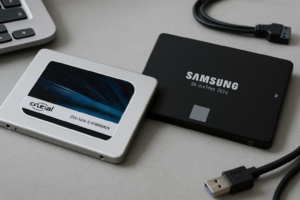
Samsung 870 EVO 500GB SATA SSD
Consistently reliable SATA SSD with excellent endurance ratings, ideal as a boot drive replacement for any SSHD
The Cache Problem: Why 8GB Isn’t Enough in 2026
When SSHDs debuted, Windows 7 had a relatively small boot footprint. The 8GB flash cache could comfortably hold the critical boot files, a few frequently launched applications, and some user data. It worked reasonably well for a predictable, routine workflow.
Windows 11 in 2026 is a different animal entirely. The OS footprint is larger, updates are more frequent and more substantial, and background processes are constantly shuffling data. Modern browsers alone can chew through gigabytes of cached data. An 8GB flash buffer simply can’t keep up with the demands of a modern operating system, and no manufacturer has released SSHDs with larger caches because the market moved on.
There’s also the issue of write amplification and wear on that tiny flash partition. With only 8GB of NAND handling constant cache updates, the flash cells endure significantly more write cycles per cell than they would on a proper SSD with wear leveling spread across hundreds of gigabytes. Over time, this can degrade the cache performance, making the drive behave more and more like a plain HDD. If you’ve noticed your SSD getting slower over time, some of the same principles apply, and our guide on why your SSD slows down and how to fix it explains the mechanics behind flash degradation.
Price Parity Has Killed the SSHD’s Value Proposition
The original appeal of SSHDs was economic. In 2014, a 500GB SSD might have been five or six times the price of a 1TB SSHD. The hybrid drive gave you a taste of SSD speed without the premium. It was a legitimate compromise for budget builds and laptop upgrades.
That math no longer works. Budget SATA SSDs like the Crucial BX500 480GB are available at remarkably affordable prices. Even 1TB SATA SSDs have become budget-friendly. Meanwhile, the remaining SSHD inventory tends to be old stock with no price advantage. You’re often paying a similar amount for dramatically inferior boot performance.
For anyone building a PC on a tight budget, you can grab a small SSD for your boot drive and pair it with a larger HDD for mass storage. This dual-drive approach gives you fast boots, fast application launches, and plenty of room for games, media, and documents. We’ve actually written a full guide on how to use an SSD and HDD together in one PC that walks through the setup process.

Crucial BX500 1TB SATA SSD
A budget-friendly 1TB SATA SSD that outperforms any SSHD as a boot drive while offering ample storage
Where SSHDs Might Still Make (Some) Sense
I want to be fair here. There are a few narrow scenarios where an SSHD isn’t a completely terrible choice, though even in these cases there are usually better options.
- Legacy laptops with a single 2.5-inch SATA bay and no M.2 slot. If you have an older laptop that physically cannot accept an M.2 drive and you need more than 500GB in a single drive, an SSHD gives you large capacity with some speed improvement. But a 1TB 2.5-inch SATA SSD is a better pick if you can find one within budget.
- Secondary storage for media or game libraries. If you’re using an SSHD as a secondary drive (not a boot drive) for a game library, the cache can speed up loading for your most-played titles. Still, a proper SSD will deliver more consistent results.
- DVR or surveillance systems. Some users repurpose SSHDs in always-on recording setups where the flash cache helps with frequent read-back of recent footage. This is a niche use, and purpose-built surveillance drives from WD or Seagate are generally better suited.
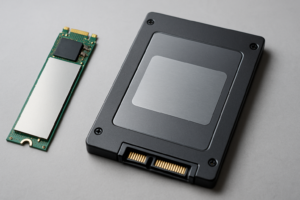
If you’re upgrading an older system and considering your storage options, you’ll also want to think about form factor. Our M.2 vs 2.5-inch SSD form factor guide can help you figure out what your system supports before you buy.
Reliability and Longevity Concerns
SSHDs carry the reliability risks of both technologies without the full benefits of either. The spinning platters are still vulnerable to shock, vibration, and mechanical wear. The small flash cache endures heavy write cycles. And because the drive’s firmware is managing a complex caching algorithm, there’s an additional layer of potential failure.
Seagate’s FireCuda SSHDs were rated for roughly 55TB of total writes, which sounds decent until you remember that much of that write endurance is consumed by the cache constantly shuffling data. A budget SATA SSD like the Samsung 870 EVO 500GB is rated for 300 TBW (terabytes written), providing far more usable endurance for the flash component. For a deeper look at how long solid-state drives actually last, check out our data analysis on SSD lifespan.
There’s also the mechanical component to worry about. Any drive with spinning platters can develop head crashes, motor failures, or the dreaded clicking sounds that signal impending failure. Pure SSDs eliminate all mechanical failure modes, which is especially valuable for laptops that get jostled around in bags and on desks.
Our Verdict: SSHDs Are Not Worth It for Boot Drives in 2026
I’ll be direct: do not buy an SSHD as a boot drive in 2026. The technology served its purpose during a transitional period when SSD prices were prohibitively high, but that era ended years ago. Every meaningful metric, including boot speed, application launch times, consistency, reliability, power consumption, and noise, favors a pure SSD.
If you’re building a new system, go with an NVMe SSD for your boot drive. The Samsung 990 EVO or the WD Blue SN580 are excellent choices. If your system only supports SATA, the Samsung 870 EVO remains one of the most reliable options available.

WD Blue SN580 1TB NVMe SSD
Fast Gen4 NVMe boot drive with excellent power efficiency, perfect for both desktops and laptops
If you’re upgrading an older laptop or desktop that currently has an HDD or SSHD, clone your existing drive to a new SSD and enjoy the transformation. Our guide on how to clone your hard drive without losing data makes the process painless. And if you’re planning to sell or recycle the old SSHD, make sure to securely wipe it first.
For budget builds where every dollar counts, pair a small 256GB or 500GB SSD as your boot drive with a larger HDD for bulk storage. This approach costs about the same as a single large SSHD while delivering vastly superior boot performance and the flexibility to upgrade each component independently.
Frequently Asked Questions
Can I use an SSHD and an SSD together in the same system?
Yes, technically you can install both in a desktop with multiple drive bays. You’d want the SSD as your boot drive and the SSHD as secondary storage. However, at that point, a standard HDD would serve as secondary storage just as well and usually for less money. The SSHD’s caching benefits are most noticeable on a boot drive, and you’d already have the SSD handling that role.
Will SSHD manufacturers release newer models with larger flash caches?
It’s extremely unlikely. Seagate discontinued the FireCuda SSHD line, and no major manufacturer has announced new hybrid drive products. The market has firmly moved toward pure SSDs for performance and traditional HDDs for bulk archival storage. Hybrid drives occupy a middle ground that no longer has meaningful demand.
Is an SSHD faster than a regular HDD?
Yes, once the cache has learned your usage patterns, an SSHD will outperform a traditional HDD for frequently accessed files. Boot times can improve by 30-50% compared to a standard 5400 RPM laptop drive. But this advantage only applies to cached data. Any file that isn’t in the flash cache will load at standard HDD speeds, and the cache is small enough that it fills up quickly.
How do I know if my laptop supports NVMe or only SATA?
Check your laptop’s specifications on the manufacturer’s website, or open it up and look for an M.2 slot on the motherboard. If you see a small rectangular slot with a screw mount (often labeled M.2 or SSD), your laptop likely supports either SATA M.2 or NVMe M.2 drives. Software tools like HWiNFO or CrystalDiskInfo can also identify your current drive interface. Our M.2 vs 2.5-inch SSD comparison guide covers the physical and interface differences you’ll need to understand before upgrading.
This article contains affiliate links. We may earn a small commission at no extra cost to you.

James Kennedy is a writer and product researcher at Drives Hero with a background in IT administration and consulting. He has hands-on experience with storage, networking, and system performance, and regularly improves and optimizes his home networking setup.