What Is Wear Leveling on an SSD?
Every time you save a file, install an app, or even just browse the web, your SSD is quietly writing data to its flash memory cells. Each of those cells can only be written and erased a limited number of times before it wears out. If your SSD kept hammering the same cells over and over, certain spots would die early while others barely got used.
That’s where wear leveling comes in. It’s a behind-the-scenes feature built into every modern SSD, and it’s one of the main reasons solid-state drives last as long as they do.
How Wear Leveling Works
Wear leveling is managed by your SSD’s controller, the small processor that sits between your operating system and the NAND flash memory chips. Its job is to distribute write operations as evenly as possible across all available memory cells, preventing any single group of cells from wearing out faster than the rest.
Think of it like rotating tires on your car. If you never rotated them, the front tires would wear down much faster than the rears. By swapping them periodically, all four tires last longer. Wear leveling does the same thing for your SSD’s memory cells.
There are two main types, and they work quite differently.
Dynamic Wear Leveling
Dynamic wear leveling only distributes writes among blocks that are already considered “free” or available for writing. When data needs to be written, the controller picks the free block with the lowest erase count rather than just grabbing the next available one.
This approach is simpler and less resource-intensive, but it has a limitation. Blocks that hold static data (files you wrote once and never touch again, like OS system files) just sit there permanently. They never get rotated into the pool. Over time, the “active” blocks absorb all the wear while the static blocks coast along untouched.
Static Wear Leveling
Static wear leveling is more aggressive. It moves even the data that isn’t being changed. If the controller notices that certain blocks holding cold, rarely-accessed data have very low erase counts compared to the rest of the drive, it will relocate that static data to a more worn block and free up the fresh block for new writes.
This means every single block on the drive gets used more or less equally over the SSD’s lifetime. Static wear leveling is more effective at extending drive longevity, and it’s the standard approach in modern consumer and enterprise SSDs. The tradeoff is slightly more background processing, but today’s controllers handle it with almost zero impact on performance.
Why You Don’t Need to Worry About It
If you’re a typical user, wear leveling is entirely invisible. You can’t configure it, you can’t turn it off, and honestly, you don’t need to. The SSD’s firmware handles everything automatically.
Modern TLC and QLC NAND drives are rated for hundreds of terabytes written (TBW) before cells start failing. A Samsung 870 EVO 1TB, for example, is rated for 600 TBW. For most people writing 20 to 40 GB per day, that’s decades of use. Wear leveling ensures you’ll actually reach those numbers instead of burning out a fraction of the cells prematurely.

Samsung 870 EVO 1TB SSD
A reliable, well-rated SATA SSD with a generous 600 TBW endurance rating for everyday use
There are a few things that can indirectly affect how efficiently wear leveling operates. Running your SSD near full capacity limits the controller’s flexibility, since it has fewer free blocks to work with. Keeping at least 10 to 20 percent of your drive free is a good habit. If you’ve noticed your SSD slowing down over time, a nearly full drive could be part of the problem.
Enabling TRIM (which is on by default in Windows 10/11 and macOS) also helps. TRIM tells the controller which blocks are no longer in use, giving it more room to optimize writes and leveling. If you ever plan to securely wipe your drive before selling it, keep in mind that wear leveling complicates simple overwrite methods, which is why a full secure erase command is the better approach for SSDs.
For write-intensive workloads like surveillance systems, databases, or constant video recording, you’ll want a high-endurance SSD specifically designed for heavy writes. Drives like the Samsung 870 EVO or enterprise-grade options use higher-quality NAND and more aggressive wear leveling algorithms to handle the extra load.

WD Red SA500 NAS SATA SSD 1TB
Built for always-on NAS environments with higher endurance ratings than standard consumer drives
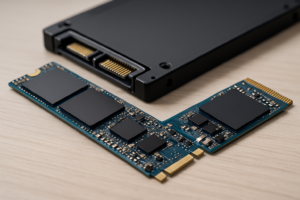
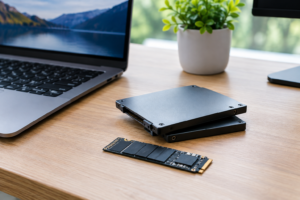
If you’re shopping for an SSD and want to understand how form factors compare between M.2 and 2.5-inch models, the good news is that wear leveling works identically across both. The form factor affects physical size and interface speed, not how the controller manages cell wear.
Frequently Asked Questions
Can I check how much wear my SSD has experienced?
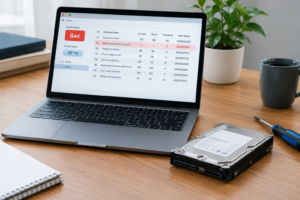
Yes. Most SSD manufacturers provide free monitoring tools, like Samsung Magician or Western Digital Dashboard. You can also use third-party utilities like CrystalDiskInfo, which reads the drive’s SMART data and shows you remaining life percentage, total bytes written, and overall health status. Checking once every few months is more than enough for typical users.
Does wear leveling affect SSD performance?
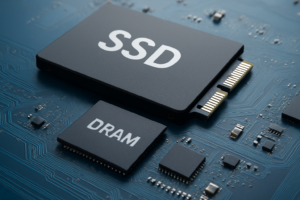
In daily use, you won’t notice any performance impact. The controller handles wear leveling alongside other background tasks like garbage collection and error correction. On very old or very full drives, these background operations can occasionally cause brief dips in write speed, but modern SSDs with DRAM caches or HMB (Host Memory Buffer) support manage this efficiently. If you’re comparing drive options, our SSD vs HDD comparison covers the broader performance differences you’ll actually feel in real-world use.
This article contains affiliate links. We may earn a small commission at no extra cost to you.

James Kennedy is a writer and product researcher at Drives Hero with a background in IT administration and consulting. He has hands-on experience with storage, networking, and system performance, and regularly improves and optimizes his home networking setup.