Sequential vs Random Read Speeds: What Actually Matters for Performance?
You just bought a shiny new SSD, and the box proudly advertises “7,000 MB/s sequential read speeds.” Impressive, right? Except that number has almost nothing to do with how fast your computer actually feels in daily use. It’s one of the most misleading specs in the storage industry, and manufacturers know exactly what they’re doing when they slap it on the front of the package.
Let’s talk about what actually determines your real-world drive performance, and why the number you should care about is buried deep in the spec sheet.
Sequential vs. Random: Two Very Different Tests
Sequential read/write speeds measure how fast a drive can read or write large, contiguous blocks of data. Think of it like reading a book cover to cover. You’re moving through data in order, one page after the next. This is what happens when you copy a single large video file or read a disk image.
Random read/write speeds (measured in IOPS, or Input/Output Operations Per Second) measure how quickly a drive can access tiny, scattered pieces of data across the entire drive. This is like being asked to find 10,000 random words scattered throughout a library. Your drive has to jump around constantly, finding small 4K blocks of data in unpredictable locations.
Here’s why this matters: your operating system, applications, browser, and background services are all doing random I/O almost all the time. When you boot Windows, it’s loading thousands of small files from different locations. When you open Chrome with 15 tabs, that’s random reads. When a game loads a new level, it’s pulling textures, scripts, and assets scattered across the drive.
Sequential speeds only dominate in a narrow set of tasks: copying large files, video editing with huge clips, or creating disk backups. For most people, this represents maybe 5% of their actual drive usage.
Why Marketing Focuses on Sequential Speeds
It’s simple. Sequential numbers are big and easy to compare. “7,000 MB/s” sounds a lot better than “1,200K random read IOPS,” even though that second number tells you far more about everyday responsiveness. A drive with 7,000 MB/s sequential read but mediocre random 4K performance will feel slower in daily use than a drive with 3,500 MB/s sequential but excellent random IOPS.
This is exactly why many users report that their NVMe SSD doesn’t feel dramatically faster than a SATA SSD for general tasks. The sequential gap between SATA (around 550 MB/s) and NVMe Gen4 (up to 7,000 MB/s) is enormous on paper. But the random 4K IOPS gap is much smaller, and random 4K is what your system uses most.
If you’ve noticed your SSD getting slower over time, degraded random write performance is often the culprit, not sequential throughput. A drive filling up or losing its SLC cache will tank random IOPS long before you notice any change in large file transfers.
What to Actually Look for When Buying an SSD
When you’re comparing drives, dig past the headline sequential speed and look for these specs:
- Random 4K Read IOPS (QD1): This is the single most important number for how snappy your system feels. QD1 (queue depth 1) reflects single-threaded access, which is what most desktop applications do. Look for drives hitting 15,000+ IOPS at QD1.
- Random 4K Write IOPS: Matters for OS responsiveness, app installs, and database workloads.
- SLC Cache behavior: Some drives have blazing specs that collapse once the cache fills. Check reviews that test sustained writes beyond the cache.
For most people building a general-purpose PC or upgrading a laptop, the Samsung 990 Pro remains one of the best options. It posts excellent random 4K numbers at low queue depths, which is where it counts for desktop use. The controller and firmware optimization Samsung puts into these drives consistently translates to a snappier experience.

Samsung 990 Pro 2TB NVMe SSD
Outstanding random 4K IOPS at low queue depths, making it one of the most responsive NVMe drives for everyday desktop and gaming use
If you’re on a tighter budget, the WD Black SN770 punches well above its price in random I/O tests. It’s a Gen4 drive that skips the DRAM cache to save cost but still delivers strong real-world responsiveness. For a deeper look at how it stacks up, check out our best budget SSDs performance analysis.

WD Black SN770 1TB NVMe SSD
Excellent random read performance for a budget-friendly Gen4 NVMe drive, great for system boot drives
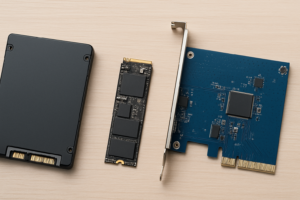
Choosing between form factors also plays a role. If you’re deciding between an M.2 NVMe and a 2.5-inch SATA SSD, remember that the NVMe advantage is most dramatic in sustained sequential workloads. For basic desktop use, a good SATA SSD with strong random IOPS can still feel surprisingly fast.
FAQ
Do sequential speeds matter at all?
Yes, but only for specific tasks. If you regularly transfer large files, work with raw video footage, or do disk-to-disk cloning, sequential speeds make a noticeable difference. For booting your OS, launching apps, gaming, and general multitasking, random 4K IOPS are far more relevant. Most users will never saturate even a SATA SSD’s sequential bandwidth in normal use.
How can I test my drive’s random 4K performance?
CrystalDiskMark is the most popular free tool for this on Windows. Run the benchmark and look at the “RND4K Q1T1” results for both read and write. This simulates real-world, single-threaded random access. On macOS, Blackmagic Disk Speed Test covers sequential speeds, but for detailed random I/O testing, AmorphousDiskMark (a CrystalDiskMark port) works well. Compare your results to published reviews to see if your drive is performing as expected.
This article contains affiliate links. We may earn a small commission at no extra cost to you.

James Kennedy is a writer and product researcher at Drives Hero with a background in IT administration and consulting. He has hands-on experience with storage, networking, and system performance, and regularly improves and optimizes his home networking setup.