Best NVMe SSDs for Creators: Crucial T700 vs Sabrent Rocket 4 Plus vs ADATA Legend
When you’re editing 4K or 8K footage in Premiere Pro or DaVinci Resolve, your NVMe SSD choice matters more than most people think. Burst speeds look great on a spec sheet, but sustained write performance is what actually determines how fast you can transcode footage, export timelines, and shuffle massive media files around. A drive that throttles after 30 seconds of continuous writing will bottleneck your entire creative workflow.
I’ve narrowed the field to three popular NVMe SSDs that creators keep asking about: the Crucial T700, the Sabrent Rocket 4 Plus, and the ADATA Legend 960. Each one targets a slightly different niche, and the differences in sustained write behavior are significant enough to change your editing experience.
What Actually Matters for Video Editing Scratch Disks
Premiere Pro and DaVinci Resolve both benefit heavily from a dedicated scratch disk, a separate NVMe drive used exclusively for cache files, previews, and media. The key metric here isn’t peak sequential read speed. It’s sustained sequential write speed, specifically how fast the drive writes after its SLC cache fills up.
Most NVMe drives use a portion of their NAND as a pseudo-SLC cache to boost short burst performance. Once that cache is exhausted (usually after writing 20 to 100 GB continuously), speeds can drop dramatically. For creators working with large ProRes or BMPCC RAW files, this post-cache performance is the real number to watch. If you’re still using a traditional hard drive for any of this work, it might be time to revisit the SSD vs HDD question entirely.
Crucial T700: Raw PCIe 5.0 Power
The Crucial T700 is currently one of the fastest consumer NVMe drives available, built on PCIe 5.0. Sequential reads hit around 12,400 MB/s, and sequential writes approach 11,800 MB/s in burst scenarios. More importantly for creators, sustained writes after SLC cache exhaustion on the 2TB model remain impressively high, typically staying above 5,000 MB/s.
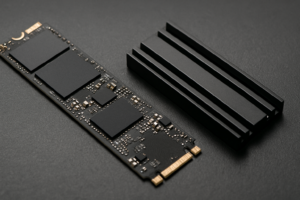
The trade-off is heat. The T700 runs hot and essentially requires a motherboard heatsink or the bundled heatsink model. Without active cooling, thermal throttling kicks in during exactly the kind of prolonged writes you’ll encounter in video editing. If your motherboard has a well-designed M.2 heatsink, this is a non-issue. If not, factor in a cooling solution. For installation tips, check out our guide to installing an NVMe SSD.

Crucial T700 2TB NVMe SSD
Best sustained write performance for heavy video editing workflows on PCIe 5.0 platforms
Sabrent Rocket 4 Plus: The Reliable Workhorse
The Sabrent Rocket 4 Plus sits on PCIe 4.0 and delivers sequential reads around 7,100 MB/s and writes around 6,600 MB/s. Those numbers are slower on paper compared to the T700, but the 2TB model’s sustained write behavior is remarkably consistent. After cache exhaustion, the Rocket 4 Plus typically sustains around 3,000 to 4,000 MB/s, which is more than enough for real-time 4K editing workflows.
Where the Rocket 4 Plus really shines is thermal management. It runs significantly cooler than the T700, which means more predictable performance during long export and transcode sessions without needing elaborate cooling. It’s also compatible with a much wider range of systems since PCIe 4.0 slots are everywhere. For a creator who wants a dependable scratch disk without worrying about thermals, this is a strong pick. Over time, SSDs can slow down for various reasons, but the Rocket 4 Plus handles sustained workloads gracefully even as it ages.

Sabrent Rocket 4 Plus 2TB
Excellent sustained write consistency and cool operation, ideal as a dedicated Premiere Pro scratch disk
ADATA Legend 960: Budget-Friendly but With Caveats
The ADATA Legend 960 is the most affordable option in this roundup, and it performs well in short burst tests with sequential reads around 7,400 MB/s and writes near 6,800 MB/s on PCIe 4.0. For quick file transfers and general editing responsiveness, it feels fast.
The catch shows up during extended writes. Once the SLC cache depletes on the 2TB model, sustained write speeds can dip below 2,000 MB/s, and in some tests even closer to 1,500 MB/s. For creators regularly exporting large timelines or copying multi-hundred-gigabyte project folders, this throttling becomes noticeable. The Legend 960 is still a capable drive for lighter editing workloads or as a secondary media storage drive, but it’s not my first recommendation as a primary scratch disk. If you’re weighing capacity needs alongside performance, our 1TB vs 2TB SSD comparison can help you decide on the right size.
My Pick for Creators
If you have a PCIe 5.0 motherboard and proper cooling, the Crucial T700 is the best-performing option for heavy video editing. Its sustained write speeds are in a different league. For most creators on PCIe 4.0 systems, though, the Sabrent Rocket 4 Plus offers the best balance of sustained performance, thermal behavior, and value. The ADATA Legend 960 is fine for lighter workflows or when budget is the primary concern, but don’t expect it to keep up during demanding sustained write scenarios.
And remember, whichever drive you choose, back up your projects. A fast scratch disk is great until it fails without a backup strategy. Consider pairing your NVMe workflow with a local NAS or cloud backup solution to protect your work.

NVMe SSDs for Video Editing
Browse top-rated NVMe SSDs popular with video editors and content creators
FAQ
Can I use my NVMe SSD as both my OS drive and a Premiere Pro scratch disk?
You can, but it’s not ideal. When your OS, applications, and scratch files all compete

James Kennedy is a writer and product researcher at Drives Hero with a background in IT administration and consulting. He has hands-on experience with storage, networking, and system performance, and regularly improves and optimizes his home networking setup.