V30 vs V60 vs V90 Memory Card Speed Ratings Explained
You’re shopping for an SD card, and you keep seeing V30, V60, and V90 stamped on the labels. They all look like fast cards, and the marketing copy on every product page promises smooth video recording. But these numbers aren’t just marketing fluff. They represent real, measurable differences in minimum sustained write speed, and picking the wrong one can mean dropped frames right in the middle of an important shoot.
Let’s break down exactly what each rating means and, more importantly, which one you actually need.
What the Video Speed Class Ratings Actually Mean
The Video Speed Class (V) system was created by the SD Association to guarantee a minimum sustained write speed for recording video. The number after the “V” tells you exactly what that minimum is, measured in megabytes per second (MB/s).
- V30: Minimum sustained write speed of 30 MB/s
- V60: Minimum sustained write speed of 60 MB/s
- V90: Minimum sustained write speed of 90 MB/s
The keyword here is minimum sustained. Your card’s burst speeds might be much higher (sometimes 250+ MB/s for reads), but burst speed doesn’t matter when you’re recording a continuous video stream. What matters is whether the card can maintain a consistent write speed without dipping below the threshold. When it dips, you get dropped frames, recording errors, or your camera stops recording entirely.
Think of it like a highway speed limit in reverse: the V rating is the slowest the card is allowed to go during sustained recording. A V90 card will never write slower than 90 MB/s, even under heavy load.
Which Rating Do You Actually Need?
This depends entirely on what resolution and bitrate you’re recording at. Here’s a practical breakdown:
V30: Good for Most Shooters
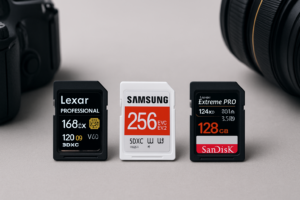
V30 cards handle 4K recording at standard bitrates (up to about 100 Mbps) without issues. If you’re shooting on a mirrorless camera like the Sony a7 IV, Canon R6, or Fujifilm X-T5 at normal 4K settings, V30 is all you need. The SanDisk Extreme Pro V30 and Samsung PRO Plus V30 are both excellent choices in this category.

SanDisk Extreme Pro V30 128GB SDXC
The go-to V30 card for most videographers shooting 4K at standard bitrates.
V60: The Sweet Spot for Serious Video Work
Once you start shooting 4K at higher bitrates (200+ Mbps), recording 4K at 120fps, or using codecs like All-Intra that dump massive amounts of data per second, V30 cards can choke. V60 cards give you the headroom to shoot these demanding formats without worrying about buffer overflows.
Cameras like the Panasonic GH6, Blackmagic Pocket Cinema Camera, and the Canon R5 (in certain high-bitrate modes) benefit from V60 cards. The ProGrade Digital V60 is a well-regarded option here.
V90: For 8K, RAW Video, and Maximum Bitrates
V90 cards exist for cameras that push extreme data rates. Recording 8K video, Cinema RAW Light, Blackmagic RAW to SD, or any format that exceeds 400+ Mbps demands V90. Cameras like the Canon R5 (8K RAW), Nikon Z8, and Sony a1 benefit from this headroom.
V90 cards also carry a premium, and they only come in UHS-II form factor. If your camera doesn’t have a UHS-II slot, a V90 card will still work but will fall back to UHS-I speeds, essentially wasting the extra capability.

ProGrade Digital V90 128GB UHS-II SD Card
Top-tier V90 card with consistent real-world speeds for 8K and high-bitrate RAW recording.
Once your footage is offloaded, you’ll want a reliable storage solution back at your desk. If you’re building out a video editing workflow, fast external drives optimized for video editing make a big difference during the post-production phase. And for long-term project archiving, it’s worth comparing cloud backup versus a local NAS setup to figure out what fits your budget and storage needs.
Quick Comparison Table
| Rating | Min. Write Speed | Best For |
|---|---|---|
| V30 | 30 MB/s | 4K video at standard bitrates (up to ~100 Mbps) |
| V60 | 60 MB/s | 4K high-bitrate, 4K 120fps, All-Intra codecs |
| V90 | 90 MB/s | 8K, Cinema RAW, Blackmagic RAW, extreme bitrates |
One common mistake is buying a V90 card and pairing it with a camera that only has a UHS-I slot. Always check your camera’s card slot spec before spending more on a faster card. Similarly, if you plan to travel with portable SSDs for field backups, make sure your card reader supports UHS-II to take full advantage of faster transfer speeds when offloading.
Frequently Asked Questions
Can I use a V90 card in a camera that only requires V30?
Yes, V90 cards are fully backward compatible. Your camera will work fine with a higher-rated card. However, if your camera only has a UHS-I slot, the card will be limited to UHS-I speeds (up to about 104 MB/s for bus speed, often much less for write), so you won’t benefit from the V90’s full capability. You’re better off saving the difference and buying a quality V30 card instead.
Is the V rating the same as the UHS Speed Class (U1/U3)?
They’re related but not identical. U3 guarantees a minimum 30 MB/s sustained write, which is the same as V30. But the V system extends beyond U3 to cover V60 and V90, which the UHS Speed Class system doesn’t address. If you see a card labeled U3 but no V rating, it’s safe to treat it as V30. For anything faster, look specifically for the V60 or V90 marking on the card itself.
This article contains affiliate links. We may earn a small commission at no extra cost to you

James Kennedy is a writer and product researcher at Drives Hero with a background in IT administration and consulting. He has hands-on experience with storage, networking, and system performance, and regularly improves and optimizes his home networking setup.