SanDisk Extreme Pro vs Samsung PRO Plus: 4K and 8K Video Card Showdown
Shooting 4K or 8K video puts your SD card under relentless pressure. Unlike snapping photos, where the card gets brief moments to catch its breath, continuous video recording demands sustained write speeds that never dip below a critical threshold. One stutter, one dropped frame, and your perfect shot is ruined. That’s why choosing the right card for video work isn’t just about peak speeds on the box. It’s about minimum sustained write performance under real-world conditions.
Two cards dominate the conversation for serious videographers: the SanDisk Extreme Pro SDXC UHS-I and the Samsung PRO Plus SDXC UHS-I. Both carry V30 ratings, both promise blistering sequential speeds, and both cost roughly the same. But when the red recording light is on and your camera is pumping out high-bitrate footage, which one actually holds up? Let’s break it down.
Specs on Paper: What Each Card Promises
The SanDisk Extreme Pro (SDSDXXD series) and Samsung PRO Plus (MB-SD) share nearly identical headline specs. Both are UHS-I, U3, V30, Class 10 cards. The V30 rating means both guarantee a minimum sustained write speed of 30 MB/s, which is the baseline requirement for recording 4K video at standard bitrates.
SanDisk advertises sequential read speeds up to 200 MB/s and write speeds up to 140 MB/s on their latest Extreme Pro models. Samsung’s PRO Plus counters with up to 180 MB/s read and 130 MB/s write. On paper, SanDisk has a slight edge in peak throughput. But peak numbers only matter when you’re transferring files to your computer. During video recording, it’s the sustained minimum that determines whether your footage survives.
Both cards are available in capacities from 64GB to 512GB, making them suitable for extended recording sessions. For context, 30 minutes of 4K footage at 100 Mbps eats roughly 22GB, so a 128GB card gives you about three hours of continuous recording at that bitrate.
Sustained Write Performance: Where It Actually Matters
When a card advertises “up to 140 MB/s write,” that number represents the best-case scenario with fresh, empty storage and a tailwind. During prolonged video recording, the card’s controller has to manage garbage collection, wear leveling, and thermal conditions simultaneously. Write speeds can and do fluctuate.
In sustained write testing, the SanDisk Extreme Pro consistently maintains write speeds between 80 and 95 MB/s over long sequential writes, rarely dipping below 70 MB/s even after filling most of the card. The Samsung PRO Plus performs similarly, sustaining 75 to 90 MB/s in comparable tests, though some users have reported slightly more variability in the 64GB capacity compared to the 128GB and 256GB models.
Both cards stay well above the 30 MB/s V30 minimum, which means either will handle standard 4K recording without issue. The real question is whether you’re pushing higher bitrates. Cameras like the Sony A7S III or Canon R5 can record 4K at 200+ Mbps internally (roughly 25 MB/s sustained requirement), and both cards handle this comfortably. Even 4K at 400 Mbps (50 MB/s sustained) sits within each card’s sustained write floor.
If you’re also transferring footage to an external drive for video editing, the SanDisk’s slightly faster read speeds will save you a few minutes on large file transfers, which adds up over a full day of shooting.

SanDisk Extreme Pro SDXC 128GB V30
Slightly faster sustained writes and reads make this the better pick for demanding 4K video workflows
8K Video: Do Either of These Cards Cut It?
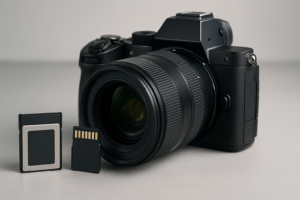
Here’s where we need to be honest. True 8K internal recording at high bitrates (think Canon R5’s 8K RAW at roughly 2600 Mbps) is beyond what any UHS-I SD card can handle. That kind of data rate demands CFexpress Type B cards, which operate in a completely different performance tier.
However, some cameras offer compressed 8K recording at lower bitrates. The Samsung Galaxy S24 Ultra shoots 8K video at roughly 80-100 Mbps (10-12.5 MB/s), which both the SanDisk Extreme Pro and Samsung PRO Plus handle without breaking a sweat. Similarly, if you’re using an external recorder that downsamples or compresses 8K to manageable bitrates, a V30 card can work as intermediate storage.
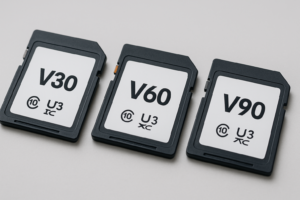
For true 8K cinema work, you’ll want V60 or V90 rated cards like the SanDisk Extreme Pro UHS-II V60 or better yet, move to CFexpress entirely. The V30 cards we’re comparing today are 4K workhorses, not 8K solutions for professional cinema cameras.
Camera Compatibility and Real-World Behavior
Camera compatibility goes beyond whether the card physically fits the slot. Some cameras are notoriously picky about which cards they’ll accept for high-bitrate recording modes, even if the card’s specs technically qualify.
The SanDisk Extreme Pro has been on the market longer and enjoys the widest compatibility of any SD card. It’s specifically listed as a recommended card by Canon, Sony, Nikon, Panasonic, and Fujifilm for their mirrorless and DSLR lineups. If you’re shooting with a Sony A7 IV, Canon R6 II, Nikon Z6 III, or Panasonic S5 II, the SanDisk Extreme Pro is a safe bet.
The Samsung PRO Plus has excellent compatibility as well, though it’s slightly less common on official “recommended” lists from camera manufacturers. In practice, users report smooth performance across the same camera bodies. Samsung’s cards have gained a strong reputation among content creators using Fujifilm X-T5 and Sony ZV-E1 bodies for 4K vlogging.
One practical difference: SanDisk includes a lifetime limited warranty (with 30-year proof of purchase retention) while Samsung offers a 10-year limited warranty. For working professionals who burn through cards and need replacement coverage, SanDisk’s warranty is notably better. This matters more than you’d think, since SD cards are consumable items that degrade with heavy use, similar to how SSDs wear down over time with sustained writes.

Samsung PRO Plus 256GB SDXC V30
Reliable 4K video performance with strong thermal management, ideal for longer recording sessions
Reliability, Durability, and Backup Considerations
Both cards are built to survive fieldwork. The SanDisk Extreme Pro is rated for temperature extremes, water resistance, shock, and X-ray protection. Samsung’s PRO Plus matches these durability claims with its own six-proof protection (water, temperature, X-ray, magnet, drop, and wearout).
Thermal performance deserves special mention. During extended 4K recording in warm conditions (outdoor shoots in direct sunlight, for example), cards can throttle their write speeds to prevent overheating. Samsung’s PRO Plus cards have earned a slight reputation for better thermal consistency during 30+ minute continuous recordings, though the difference is marginal in most shooting scenarios.
Regardless of which card you choose, you should be backing up footage regularly. SD cards can fail without warning, and losing a day’s shoot is devastating. Many videographers use a dual-card camera body and write to both slots simultaneously. For long-term storage, consider whether cloud backup or a local NAS makes more sense for your video archive. If you go the NAS route, our guide to setting up automated NAS backups can have you protected in half an hour.
The Verdict: Which Card Should You Buy?
For most videographers shooting 4K content, both the SanDisk Extreme Pro and Samsung PRO Plus will serve you well. They’re close enough in sustained write performance that you won’t notice a difference during recording.
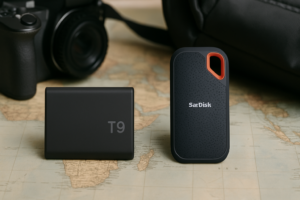
But if I have to pick a winner, and I do, the SanDisk Extreme Pro gets my recommendation. The slightly faster sustained writes, broader official camera compatibility, longer warranty, and better resale recognition (which matters if you’re renting gear) give it a consistent edge. For traveling videographers who need gear they can trust in unpredictable conditions, the Extreme Pro pairs nicely with a portable SSD for on-location backups.
The Samsung PRO Plus is an excellent alternative, especially if you find it at a better price point. Check current pricing on Amazon for both cards, as the price gap between them fluctuates frequently. If the Samsung is meaningfully cheaper when you’re shopping, grab it without hesitation. Your footage won’t know the difference.
Frequently Asked Questions
Can I use a V30 SD card for 8K video recording?
It depends on the bitrate. V30 cards guarantee a minimum 30 MB/s sustained write speed, which is sufficient for compressed 8K on smartphones (typically 80-100 Mbps). However, professional 8K cameras recording at high bitrates (like the Canon R5’s 8K RAW) require CFexpress cards. For dedicated 8K cinema work, you’ll need V60 or V90 UHS-II cards at minimum.
How many hours of 4K video can a 256GB card hold?
At a common 4K bitrate of 100 Mbps, a 256GB card holds approximately 5.5 to 6 hours of continuous footage. At higher bitrates like 200 Mbps (used in cameras like the Sony A7S III for higher quality 4K), that drops to about 2.5 to 3 hours. The exact amount varies by codec and camera. Always bring more storage than you think you’ll need.
Do SD cards lose performance over time like SSDs?
Yes, but the degradation pattern differs from traditional SSDs. SD cards use NAND flash with a finite number of write cycles. With heavy daily video use, you may notice slightly slower write speeds after a year or two. Formatting the card regularly in-camera (not on a computer) helps maintain consistent performance. Most professional videographers replace their primary cards every 2 to 3 years as a precaution, treating them as consumable equipment rather than permanent storage.
This article contains affiliate links. We may earn a small commission at no extra cost to you.

James Kennedy is a writer and product researcher at Drives Hero with a background in IT administration and consulting. He has hands-on experience with storage, networking, and system performance, and regularly improves and optimizes his home networking setup.