A1 vs A2 MicroSD Cards: Which Is Better for Apps and Gaming?
You’re shopping for a microSD card and you spot “A1” and “A2” ratings on the packaging. The A2 card costs more, so it must be faster for apps and games, right? Not necessarily. The real-world difference between A1 and A2 microSD cards is far more nuanced than the spec sheet suggests, and in many cases, you might be paying extra for performance your device can’t even use.
What Do A1 and A2 Ratings Actually Mean?
The “A” in A1 and A2 stands for “Application Performance Class,” a standard created by the SD Association. These ratings define minimum speeds for random read/write operations, which matter most when running apps directly from the card rather than just storing photos or video.
Here’s how the two ratings compare on paper:
- A1: Minimum 1,500 random read IOPS, 500 random write IOPS, and 10 MB/s sustained sequential speed.
- A2: Minimum 4,000 random read IOPS, 2,000 random write IOPS, and 10 MB/s sustained sequential speed.
Those A2 numbers look significantly better. But there’s a critical catch that most shoppers miss: A2 performance requires the host device to support specific Command Queuing features (part of the SD 6.0 spec). Without that hardware support, an A2 card behaves almost identically to an A1 card.
When A2 Actually Outperforms A1
A2 cards truly shine in devices that support the SD 6.0 command set with full Command Queuing and cache management. In practice, this means certain newer Android phones, tablets, and some single-board computers like the Raspberry Pi 4 and 5 (with updated firmware). On these devices, app install times, game loading screens, and general multitasking from the microSD card will feel noticeably snappier with an A2 card.
For mobile gaming specifically, if your Android phone supports Adoptable Storage and A2 command queuing, you’ll see shorter load times in asset-heavy games like Genshin Impact or Call of Duty Mobile when those games are running from the card. The higher random IOPS translate directly into faster loading of the many small files these games scatter across storage. If you’re curious about how storage speed affects gaming more broadly, our comparison of SATA vs NVMe SSDs for gaming explores similar principles on the desktop side.
The SanDisk Extreme series (A2-rated) is one of the most popular choices for Android gaming and Raspberry Pi setups, consistently hitting high random read speeds when paired with compatible hardware.

SanDisk Extreme 256GB A2 microSD
Best all-around A2 microSD for Android phones, Nintendo Switch, and Raspberry Pi with excellent real-world app performance.
When A1 Is All You Need
Most devices on the market today, including the Nintendo Switch, older Android phones, dashcams, drones, and action cameras, don’t support A2 command queuing. On these devices, an A2 card defaults to standard protocol behavior, and you’ll see virtually no speed advantage over a good A1 card. You’re essentially paying for a feature your device ignores.
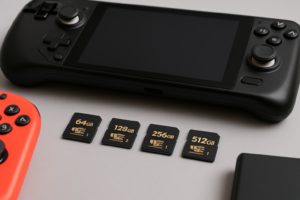
For Nintendo Switch owners in particular, the console doesn’t use A2 command queuing, so a quality A1 card like the Samsung EVO Select will load games at the same speed as a premium A2 card. The Switch cares about sequential read speeds (which both A1 and A2 cards handle well), not the random IOPS where A2 pulls ahead.
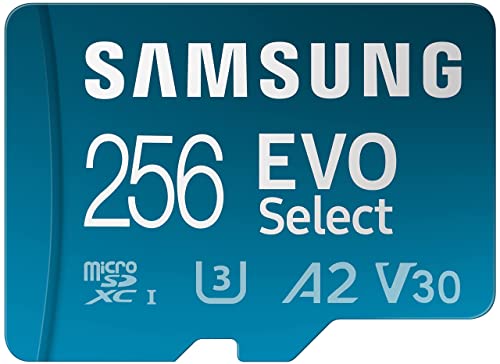
Samsung EVO Select 256GB A1 microSD
Excellent value A1 card that matches A2 performance on devices without Command Queuing support, perfect for the Nintendo Switch.
If your device primarily stores media files, whether that’s photos, video, or music, sequential speed and the UHS speed class (U1/U3) and Video Speed Class (V30/V60) matter far more than the Application Performance Class rating. A great A1 card with V30 rating will record 4K video just as reliably as an A2 card. And just like SSDs that can slow down over time, microSD cards can also experience performance degradation when nearly full, so leave some free space regardless of which class you buy.
Frequently Asked Questions
Can I use an A2 microSD card in a device that only supports A1?
Absolutely. A2 cards are fully backward compatible. They’ll work in any device that accepts microSD cards. You just won’t get the extra random IOPS performance that the A2 rating promises, because the device doesn’t send the right commands to use it. The card will still perform at least as well as an A1 card, often with strong sequential speeds thanks to its higher-end NAND and controller.
Is A2 worth the extra cost for a Raspberry Pi?
For Raspberry Pi 4 and 5 users running a full desktop OS from the microSD card, yes. These boards support A2 command queuing (make sure your firmware is updated), and you’ll notice faster boot times, quicker app launches, and smoother multitasking. For Raspberry Pi projects that primarily run headless or do simple tasks, an A1 card will serve you just fine. The money saved might be better spent on a budget SSD connected via USB for truly demanding workloads.
This article contains affiliate links. We may earn a small commission at no extra cost to you.

James Kennedy is a writer and product researcher at Drives Hero with a background in IT administration and consulting. He has hands-on experience with storage, networking, and system performance, and regularly improves and optimizes his home networking setup.