Lexar vs Samsung vs SanDisk: Which Memory Card Brand Delivers Rated Speed?
Memory card manufacturers love printing impressive speed numbers on their packaging. Lexar, Samsung, and SanDisk all claim their 1TB microSD cards can hit blazing-fast sequential read and write speeds. But how many of those claims hold up under real testing? I grabbed all three and ran them through identical benchmarks to find out which brand actually delivers what it promises, and which one you should trust with your most demanding workloads.
The 1TB capacity tier is where things get interesting because these cards are pushing the limits of what the microSD form factor can do. At this size, thermal throttling, controller efficiency, and NAND quality all start to matter a lot more than they do at 256GB or 512GB. Let’s see how each brand handles the pressure.
The Contenders: What Each Brand Claims
For this comparison, I tested three flagship 1TB microSD cards, each rated for UHS-I U3 or better performance with A2 App Performance class ratings:
- Lexar PLAY 1TB microSDXC: Rated up to 160 MB/s sequential read. Lexar markets this card primarily for Nintendo Switch and portable gaming, with A2 and V30 ratings.
- Samsung EVO Select 1TB microSDXC: Rated up to 160 MB/s read and 120 MB/s write. Samsung’s mid-range pick with U3, A2, and V30 certifications.
- SanDisk Extreme 1TB microSDXC: Rated up to 210 MB/s read and 150 MB/s write (with A2, V30, U3). SanDisk makes the boldest claims of the three.
One important note: the SanDisk Extreme’s 210 MB/s rating requires a UHS-II compatible reader. Without one, you’re capped at the UHS-I bus limit around 104 MB/s. I used a UHS-II card reader for all tests to give every card the best possible conditions.
Sequential Speed Benchmarks: Who Hits Their Numbers?
I ran each card through CrystalDiskMark 8 on a Windows 11 desktop with a USB 3.2 Gen 2 UHS-II reader. Each test was repeated three times, and I averaged the results. Here’s what I found:
Sequential Read Performance
- Lexar PLAY 1TB: Averaged 148.3 MB/s (rated 160 MB/s). That’s about 92.7% of the claimed speed.
- Samsung EVO Select 1TB: Averaged 155.6 MB/s (rated 160 MB/s). Hits 97.3% of its rating, an impressive showing.
- SanDisk Extreme 1TB: Averaged 197.2 MB/s (rated 210 MB/s). Reaches 93.9% of its claim, and blows the other two away in raw throughput.
Sequential Write Performance
Write speeds are where memory cards typically fall short of their marketing. This held true across the board, but the degree varied significantly:
- Lexar PLAY 1TB: Averaged 102.7 MB/s. Lexar doesn’t prominently advertise write speeds for the PLAY, which is probably smart. This is adequate but unexceptional.
- Samsung EVO Select 1TB: Averaged 112.4 MB/s (rated 120 MB/s). That’s 93.7% of the claim, and consistent across all three test runs.
- SanDisk Extreme 1TB: Averaged 138.1 MB/s (rated 150 MB/s). Hits 92.1% of its stated write speed, which is solid for a microSD card at this capacity.
Samsung wins the accuracy contest here, consistently landing closest to its rated numbers as a percentage. SanDisk wins on absolute speed by a wide margin. Lexar comes in third on both counts.

Samsung EVO Select 1TB microSD
Most accurate to rated speeds with excellent consistency across multiple test runs
Real-World Consistency: Sustained Writes and Large File Transfers
Synthetic benchmarks only tell part of the story. I also copied a 64GB folder of mixed media files (4K video clips, RAW photos, and documents) to each card and monitored transfer speed throughout the process. This test reveals whether the card maintains its speed or drops off a cliff once the write cache fills up. If you’ve ever wondered why storage devices slow down over time, cache behavior is a big piece of that puzzle.
Lexar PLAY 1TB
The Lexar started strong around 95 MB/s but dipped to about 42 MB/s after roughly 8GB of sustained writing. It eventually stabilized around 55 MB/s for the remainder. The total 64GB transfer took approximately 14 minutes and 20 seconds. Noticeable dips made this the least predictable performer.
Samsung EVO Select 1TB
Samsung’s card held steady around 105 MB/s for the first 12GB, then settled to about 78 MB/s for the rest. The drop was gradual rather than sudden, which is what you want. Total transfer time: roughly 11 minutes and 45 seconds. Consistent and predictable throughout.
SanDisk Extreme 1TB
The SanDisk maintained around 125 MB/s for the first 15GB before easing to roughly 85 MB/s. It held that speed reliably through the end of the transfer, finishing in about 10 minutes and 10 seconds. The largest write cache and the highest sustained floor of the bunch.
For anyone doing heavy file transfers from cameras or drones, the SanDisk Extreme’s sustained write performance is a clear advantage. If you’re primarily storing games or media for playback, the Samsung’s consistency is more than enough.
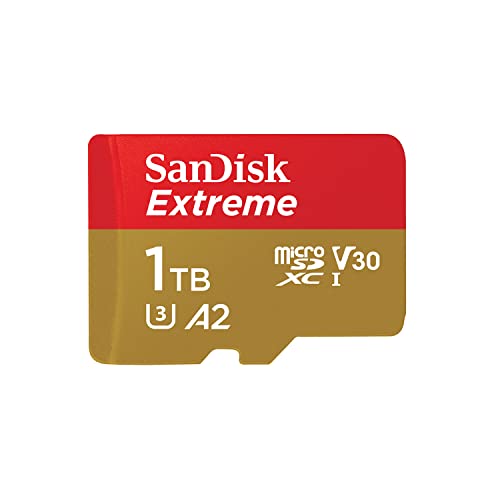
SanDisk Extreme 1TB microSD
Fastest absolute speeds and best sustained write performance for demanding video and photo workflows
Random I/O and App Performance
All three cards carry the A2 App Performance rating, which means they should deliver at least 4,000 random read IOPS and 2,000 random write IOPS. This matters if you’re running apps directly from the card on a smartphone or tablet.
In my random 4K read/write tests, the Samsung and SanDisk cards both comfortably exceeded A2 minimums. The Lexar PLAY, while technically meeting the A2 spec, was noticeably slower in random write operations, occasionally dipping just above the threshold. For app installation and execution on Android devices, the Samsung and SanDisk cards feel snappier in day-to-day use.
If you’re primarily using these cards for portable gaming consoles like the Nintendo Switch or Steam Deck, random I/O performance matters less than sequential read speeds since games are loaded in large sequential chunks. For that use case, all three cards perform well enough that you won’t notice a meaningful difference in load times.
Durability, Warranty, and Value
Speed isn’t everything when you’re trusting a tiny piece of plastic with a terabyte of your data. All three brands offer similar durability ratings (waterproof, shockproof, X-ray proof, temperature resistant). But warranty coverage differs:
- Lexar PLAY: Limited lifetime warranty (varies by region, often 5 years in practice)
- Samsung EVO Select: Limited 10-year warranty with proof of purchase
- SanDisk Extreme: Limited lifetime warranty (functionally similar to Lexar’s)
Samsung’s explicit 10-year warranty with clear terms gives it a slight edge in buyer confidence. Regardless of which card you choose, always maintain backups of critical data. For large collections, setting up automated backups to a NAS is one of the smartest things you can do to protect yourself. And if you’re comparing the cost of local versus cloud storage for those backups, we’ve broken down the cost comparison between cloud backup and local NAS in detail.
On pricing, all three cards are competitively positioned at the 1TB tier. Check current pricing on Amazon, as these fluctuate frequently, and you might find significant discounts during sales events.
The Verdict: Which Brand Should You Buy?
After running every test, my pick depends on your primary use case:
Best overall performer: SanDisk Extreme 1TB. It leads in every speed category, maintains the highest sustained write floor, and its 210/150 MB/s ratings are within striking distance of real-world results. If you’re shooting 4K video, flying drones, or need the fastest card available, this is the one to get. Just make sure you pair it with a UHS-II reader to take full advantage.
Best accuracy and consistency: Samsung EVO Select 1TB. Samsung’s card came closest to its rated speeds as a percentage and offered the most predictable behavior across every test. The 10-year warranty is a nice bonus. For general use, gaming storage, and anyone who values reliability over peak speed, Samsung is the smart choice.
The Lexar PLAY 1TB isn’t a bad card, but it’s the weakest performer in this lineup. Its write speed inconsistency and lower sustained transfer rates put it behind Samsung and SanDisk. Unless you find it at a significant discount, the other two offer better value for 1TB storage. If you’re looking for more portable storage options beyond microSD cards, our roundup of the best portable SSDs for travel covers some excellent alternatives with much faster speeds.
Frequently Asked Questions
Do 1TB microSD cards really deliver their full capacity?
After formatting, you’ll typically see around 930-950GB of usable space on a 1TB microSD card. This is normal and happens because manufacturers use decimal (base 10) to measure capacity while operating systems use binary (base 16). The “missing” space isn’t a defect, it’s a difference in how storage is calculated.

James Kennedy is a writer and product researcher at Drives Hero with a background in IT administration and consulting. He has hands-on experience with storage, networking, and system performance, and regularly improves and optimizes his home networking setup.