PS5 SSD vs Xbox Storage Expansion Card: Which Gives More Space for Less?
Modern games regularly demand 50GB to 100GB or more per title, which means the internal storage on both the PS5 and Xbox Series X fills up alarmingly fast. Both consoles offer ways to expand your storage, but they take very different approaches. Sony lets you install a standard M.2 NVMe SSD, while Microsoft uses a proprietary expansion card that slots into a dedicated port. The question for most gamers is simple: which approach actually gives you more storage space for less money, and does one perform noticeably better than the other?
I’ve spent considerable time testing and researching both expansion options, and the differences are more significant than most people realize. Let’s break down speed, flexibility, pricing, and overall value so you can make a smart decision for your console.
How PS5 Storage Expansion Works
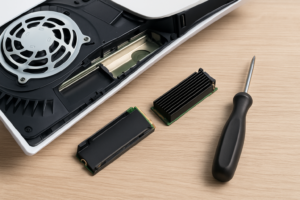
The PS5 includes an internal M.2 expansion slot hidden behind a side panel. You pop it open, screw in a standard M.2 2230 or 2280 NVMe SSD, and the console formats it for use. Sony requires a Gen 4 NVMe drive with sequential read speeds of 5,500 MB/s or faster for optimal performance, though slightly slower drives will still work.
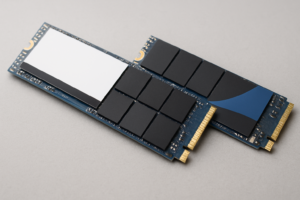
This open-standard approach means you can shop across dozens of brands and models. Popular choices include the Samsung 990 Pro, the WD_BLACK SN850X, and the Seagate FireCuda 530. You’ll find these in 500GB, 1TB, 2TB, and even 4TB capacities. If you’re curious about how different NVMe drives stack up in real-world use, our Samsung 990 Pro vs WD_BLACK SN850X comparison covers two of the most popular options head to head.
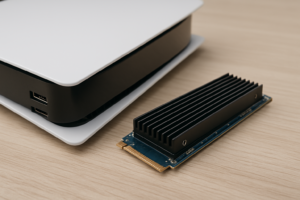
Installation takes about 10 minutes and requires only a small Phillips-head screwdriver. Some drives come with a heatsink pre-installed, while others need a separate one. The PS5’s expansion bay has room for a heatsink, and aftermarket options are inexpensive. For anyone who’s installed an NVMe drive in a PC, the process will feel familiar. Our NVMe SSD installation guide walks through the general process if you’ve never handled one before.

WD_BLACK SN850X 2TB NVMe SSD
One of the best PS5 expansion drives available, with 7,300 MB/s read speeds and an optional heatsink model designed for consoles
How Xbox Storage Expansion Works
Microsoft went a completely different direction. The Xbox Series X and Series S use a proprietary Seagate Storage Expansion Card that plugs into a dedicated slot on the back of the console. It’s essentially a custom CFexpress-based module, and for a long time, Seagate was the only manufacturer making them. More recently, Western Digital has entered the market with its own licensed expansion card.
The main advantage here is pure simplicity. You push the card into the slot and you’re done. No screws, no panels to remove, no heatsinks to worry about. The card matches the internal SSD’s performance exactly, since it uses the same Xbox Velocity Architecture interface. Games load at the same speed whether they’re on the internal drive or the expansion card.
However, your choices are limited. The Seagate Storage Expansion Card for Xbox comes in 512GB, 1TB, and 2TB options. The WD_BLACK C50 Expansion Card offers 512GB and 1TB versions. With only two manufacturers and a proprietary form factor, competitive pricing pressure is minimal.

Seagate Storage Expansion Card 2TB for Xbox Series X|S
The go-to Xbox expansion option with plug-and-play convenience and speeds matching the internal drive
Speed and Performance Comparison
On paper, the PS5’s expansion slot supports PCIe Gen 4 NVMe drives, and many popular options deliver sequential read speeds between 6,500 and 7,300 MB/s. The PS5’s internal SSD runs at about 5,500 MB/s (raw), so a fast expansion drive can actually match or slightly exceed the internal drive’s throughput. In practice, game loading times on a quality expansion SSD are virtually identical to those on the internal storage.
The Xbox expansion cards deliver 2,400 MB/s, matching the console’s internal Custom NVMe SSD. Microsoft’s Xbox Velocity Architecture handles decompression at the hardware level, so raw sequential speed numbers don’t tell the full story. Both the internal drive and the expansion card use DirectStorage and hardware decompression to feed data to games efficiently. Loading times on the expansion card are the same as on internal storage.
For day-to-day gaming, you won’t notice a meaningful speed difference between the two consoles when using their respective expansion options. Both load games from expanded storage at the same rate as from internal storage, which is exactly what you want. If you’re interested in how NVMe technology compares to older drive types in gaming scenarios, check out our SATA vs NVMe gaming performance tests.
Pricing, Flexibility, and Value
This is where the PS5 pulls ahead significantly. Because Sony uses an open M.2 standard, you benefit from the fiercely competitive consumer SSD market. Dozens of manufacturers compete on price for Gen 4 NVMe drives, and prices have dropped steadily. You can find name-brand 2TB Gen 4 NVMe drives at very competitive price points, and sales are frequent. If you’re patient and shop during events like Black Friday, the savings can be substantial. Our Black Friday SSD deals guide covers which drives are worth grabbing on sale.
Xbox expansion cards, on the other hand, carry a premium because of their proprietary design. With only Seagate and WD producing them, there’s limited competition driving prices down. At the same capacity, Xbox expansion cards typically cost noticeably more than equivalent M.2 NVMe drives suitable for the PS5. You can check current Amazon pricing on the Xbox expansion cards and PS5-compatible NVMe SSDs to see the difference for yourself.
The PS5 also wins on capacity options. You can install a 4TB M.2 NVMe drive if you want maximum storage, while Xbox expansion cards currently top out at 2TB. And because M.2 drives are a standard PC component, you can repurpose a PS5 expansion drive in a laptop or desktop if you ever move on from the console. An Xbox expansion card has no use outside of an Xbox.
Keep in mind that over time, SSDs can experience performance changes. If you want to keep your expansion drive running at its best for years, our guide on why SSDs slow down over time and how to fix it has useful maintenance tips.
Which Should You Choose?
If you own a PS5, you’re in a better position. The M.2 NVMe slot gives you access to a wider range of drives at more competitive price points, with capacities up to 4TB and the option to repurpose the drive later. I’d recommend the WD_BLACK SN850X 2TB with heatsink as an excellent all-around choice for most PS5 owners. The Samsung 990 Pro is another top-tier pick, especially if you find it on sale.
If you own an Xbox Series X or S, your only real decision is between Seagate and WD expansion cards, and what capacity to get. The Seagate 2TB card is the best value per gigabyte in the Xbox ecosystem. It’s a premium compared to what PS5 owners pay for equivalent storage, but it’s the only way to play Series X|S optimized games from expanded storage on an Xbox.
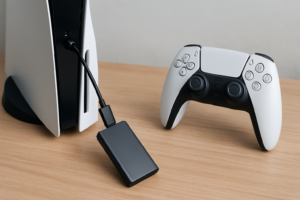
One workaround for Xbox owners: you can plug in a standard USB 3.0 external hard drive to store (but not play) current-gen games. This lets you archive titles and transfer them back to internal or expansion storage when you’re ready to play, which saves you from re-downloading large files. For last-gen Xbox One games, you can actually play them directly from the external drive.
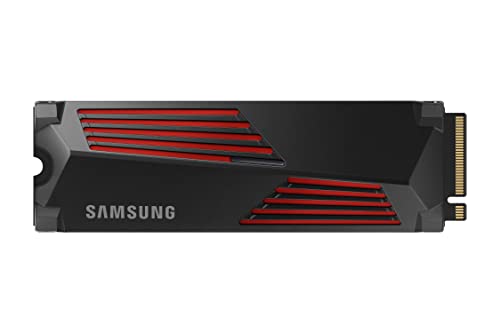
Samsung 990 Pro 2TB NVMe SSD with Heatsink
A top-performing PS5 expansion drive with integrated heatsink and excellent endurance ratings
Frequently Asked Questions
Can I use a regular external SSD to play PS5 or Xbox Series X games?
On PS5, native PS5 games must run from either the internal SSD or an installed M.2 NVMe expansion drive. You can store PS5 games on an external USB drive, but you’ll need to transfer them back to internal or NVMe storage to play. PS4 games can run directly from an external USB drive. On Xbox, the situation is similar: Series X|S optimized games require the internal drive or the proprietary expansion card, while older Xbox One titles can run from any external USB drive. If you’re curious about M.2 form factors and how they differ from traditional drives, our M.2 vs 2.5-inch SSD comparison explains the differences clearly.
Do I need a heatsink for my PS5 M.2 SSD?
Yes, a heatsink is strongly recommended. The PS5’s expansion bay generates heat during extended gaming sessions, and NVMe drives can throttle performance when they get too hot. Many drives, like the WD_BLACK SN850X and Samsung 990 Pro, are available in versions with a heatsink pre-attached. If your chosen drive doesn’t include one, aftermarket PS5 SSD heatsinks are widely available and inexpensive on Amazon. The PS5’s expansion bay cover also acts as a basic heatsink, but a dedicated one provides better thermal management.
Is it worth waiting for prices to drop further before expanding my console storage?
SSD prices have been trending downward for several years, and there are regularly good deals

James Kennedy is a writer and product researcher at Drives Hero with a background in IT administration and consulting. He has hands-on experience with storage, networking, and system performance, and regularly improves and optimizes his home networking setup.