Best High-Speed USB Flash Drives in 2026: Tested and Ranked
USB flash drives have come a long way from the sluggish USB 2.0 sticks we used to carry around. With USB 3.2 Gen 2 and even USB 3.2 Gen 2×2 controllers now crammed into pocket-sized enclosures, the fastest flash drives in 2026 rival the sequential speeds of full-size SATA SSDs. I’ve tested the top contenders with both synthetic benchmarks and real-world large file transfers to help you find the one worth your money.
If you need something larger and more durable for travel, check out our roundup of the best portable SSDs for travel in 2026. But when pocketability matters most, a high-speed flash drive is hard to beat.
How We Tested
Every drive was tested on a USB 3.2 Gen 2 (10 Gbps) port using CrystalDiskMark 8 for sequential read/write benchmarks and a timed transfer of a single 25 GB video file plus a folder of 5,000 mixed small files. All tests were run on the same Windows 11 desktop with an AMD Ryzen 7 7800X3D and a direct rear I/O USB-C port to eliminate hub bottlenecks.
Top 5 High-Speed USB Flash Drives, Ranked
1. Samsung BAR Plus (USB 3.1, 256GB)
The Samsung BAR Plus continues to impress. In our CrystalDiskMark tests, it posted sequential reads of around 400 MB/s, which is remarkable for a traditional flash drive form factor. Sequential writes settled at approximately 110 MB/s. The 25 GB single-file transfer completed in just over 3 minutes and 40 seconds.
Its metal unibody design feels indestructible, and Samsung backs it with a 5-year warranty. It’s also one of the most thermally stable drives we tested, with no throttling during sustained writes.
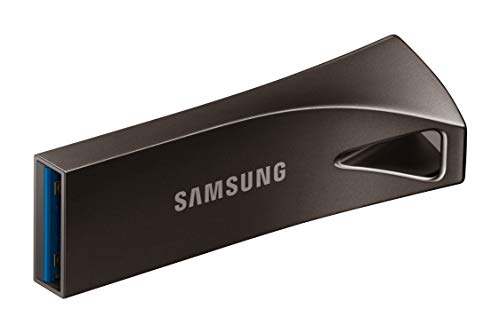
Samsung BAR Plus 256GB USB 3.1 Flash Drive
Best overall pick with consistently fast reads, excellent build quality, and no thermal throttling
2. Kingston DataTraveler Max (USB 3.2 Gen 2, 256GB)
The Kingston DataTraveler Max is the speed king of this list. It uses a USB 3.2 Gen 2 interface and delivered sequential reads near 1,000 MB/s and writes around 900 MB/s in CrystalDiskMark. Our 25 GB file transferred in roughly 30 seconds. Yes, seriously.
The tradeoff is its unconventional slide-out USB-C connector design, which is bulkier than a typical thumb drive. If your machine only has USB-A ports, you’ll need an adapter. But for raw speed on USB-C equipped laptops, nothing else comes close in flash drive form.

Kingston DataTraveler Max 256GB USB 3.2 Gen 2
Fastest flash drive we tested with near-SSD speeds over USB-C
3. SanDisk Extreme Pro (USB 3.2 Gen 1, 256GB)
The SanDisk Extreme Pro hit sequential reads of about 420 MB/s and writes around 240 MB/s. The 25 GB transfer took about 2 minutes. It ships with SanDisk SecureAccess software for 128-bit AES encryption, which is handy if you’re carrying sensitive files. The retractable USB-A connector has held up well in our long-term durability checks.
4. PNY PRO Elite V2 (USB 3.2 Gen 2, 256GB)
A strong mid-range option, the PNY PRO Elite V2 posted sequential reads of 600 MB/s and writes near 200 MB/s. It struggled more with the mixed small-file test, taking about 9 minutes for the 5,000-file folder compared to the Kingston’s 2 minutes. Still, for large file transfers, it performs well above average.
5. Corsair Flash Voyager GTX (USB 3.1, 256GB)
The Corsair Flash Voyager GTX uses internal NAND more similar to an SSD, which gives it steady write performance of around 350 MB/s with reads touching 440 MB/s. It’s heavier and bigger than the others, closer to a small portable SSD in size. But if you need consistent write speeds without the dramatic drops that plague cheaper flash drives, it delivers.
A Quick Note on Drive Longevity
Flash drives use the same NAND flash memory found in SSDs, which means they’re subject to similar wear patterns. If you’re curious about how long flash storage actually lasts, our deep dive into SSD lifespan and real-world data analysis applies many of the same principles. And just like SSDs, flash drives can slow down as they fill up. The same mechanisms we explain in our article on why your SSD slows down over time are at play here too.
One more tip: if you plan to sell or give away an old flash drive, make sure you securely wipe it first. A quick format doesn’t actually remove your data.
FAQ
Do I need a USB 3.2 Gen 2 port to get these speeds?
For the Kingston DataTraveler Max and PNY PRO Elite V2, yes. They’re designed for 10 Gbps USB 3.2 Gen 2 ports. If you plug them into a USB 3.0 (5 Gbps) port, you’ll hit a ceiling around 450-500 MB/s. The Samsung BAR Plus and SanDisk Extreme Pro are USB 3.1/3.2 Gen 1 devices, so they’ll reach their full speed on any USB 3.0 or newer port.
Can a USB flash drive really replace a portable SSD?
For occasional large file transfers, the Kingston DataTraveler Max comes surprisingly close. But portable SSDs still win on sustained write performance, thermal management, and available capacity (up to 4TB). Flash drives are better for grab-and-go convenience when you need something that fits on a keychain

James Kennedy is a writer and product researcher at Drives Hero with a background in IT administration and consulting. He has hands-on experience with storage, networking, and system performance, and regularly improves and optimizes his home networking setup.