Crucial T700 Gen 5 vs Samsung 990 Pro: Which NVMe Is Actually Faster?
The Crucial T700 and Samsung 990 Pro represent two very different philosophies in the NVMe space. One is a Gen 5 monster built to push theoretical bandwidth limits. The other is a mature Gen 4 flagship that’s been refined over multiple firmware updates and has earned a loyal following. But faster specs on paper don’t always translate to a better drive for your money, and this comparison gets more nuanced than most reviewers admit.
I’ve spent considerable time testing both drives across sequential transfers, random I/O, and sustained workloads. Here’s how they actually stack up, and which one deserves a spot in your build.
The Spec Sheet Showdown
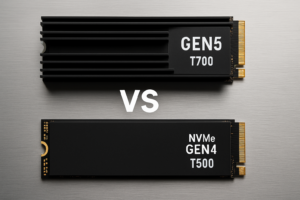
On paper, the Crucial T700 looks like it belongs in a different league. It’s built on the PCIe 5.0 x4 interface with a Phison E26 controller and 232-layer Micron NAND. Crucial rates it at up to 12,400 MB/s sequential read and 11,800 MB/s sequential write. Those numbers are roughly 70% higher than anything Gen 4 can deliver.
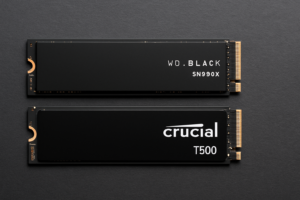
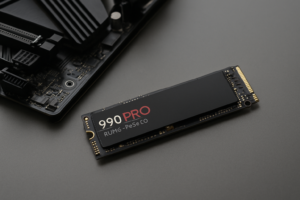
The Samsung 990 Pro runs on PCIe 4.0 x4 with Samsung’s in-house Pascari controller and V-NAND. Its rated speeds top out at 7,450 MB/s read and 6,900 MB/s write. Samsung also includes hardware AES 256-bit encryption, and the drive is available with or without a heatsink.
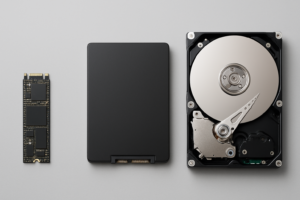
Both drives come in 1TB, 2TB, and 4TB capacities. The T700 also ships in a heatsink variant, which you’ll almost certainly want (more on thermals later). If you’re curious about the physical differences between M.2 drives and traditional form factors, our M.2 vs 2.5-inch SSD comparison guide breaks that down.
Sequential Performance: Gen 5 Flexes Hard
In pure sequential benchmarks using CrystalDiskMark and ATTO, the T700 absolutely dominates. At the 2TB capacity, you’ll see real-world sequential reads around 12,200 MB/s and writes around 11,600 MB/s. These numbers closely match Crucial’s marketing claims, which is refreshing.
The 990 Pro delivers approximately 7,400 MB/s reads and 6,850 MB/s writes in the same tests. Consistent, predictable, and right in line with Samsung’s specs.
For large file transfers (think moving a 50GB video project from one location to another on the same drive), the T700 finishes noticeably faster. We’re talking roughly 4-5 seconds versus 7-8 seconds for that kind of workload. In content creation workflows where you’re shuffling massive files multiple times per day, those seconds add up.

Crucial T700 2TB Gen5 NVMe SSD
Best choice for creators and professionals who need maximum sequential throughput on a Gen 5 platform
Random I/O: Where the Gap Shrinks
Random 4K read and write performance matters far more for everyday computing, gaming, and OS responsiveness than sequential speeds. And this is where the 990 Pro claws back significant ground.
In random 4K Q1T1 reads (the metric most relevant to how snappy your system feels), the 990 Pro delivers around 22,000-23,000 IOPS. The T700 lands in a similar range, sometimes slightly higher at 24,000-25,000 IOPS. The difference is nearly imperceptible in real use.
At higher queue depths (Q32T16), the T700 pulls ahead more convincingly, reaching up to 1,700K random read IOPS versus the 990 Pro’s 1,400K. But these deep-queue scenarios primarily benefit server workloads and heavily threaded applications. For gaming, general productivity, and even most creative work, you won’t feel this gap.
Our real-world gaming test between SATA and NVMe drives demonstrated that even the jump from SATA to NVMe barely registers in game load times. The jump from a fast Gen 4 drive to Gen 5 is even less noticeable in gaming scenarios.
Sustained Workloads and Thermal Behavior
This section is critical, because it reveals a real weakness of the T700. Gen 5 drives run hot. Very hot.
Under sustained sequential write workloads, the T700 without its included heatsink can hit controller temperatures above 100°C, triggering aggressive thermal throttling. Even with the heatsink variant, expect temperatures in the 70-80°C range during prolonged writes. In a poorly ventilated case or a laptop with limited airflow, throttling becomes a genuine concern.
The 990 Pro runs dramatically cooler. Sustained loads typically keep the controller in the 55-65°C range, and the drive rarely throttles under normal conditions. Samsung’s power efficiency here is excellent, and it’s one reason the 990 Pro works well in a wider variety of systems, including laptops and compact ITX builds.
Both drives use SLC caching for burst writes, and both slow down once the cache is exhausted. The T700’s post-cache write speed drops to around 2,500-3,000 MB/s depending on capacity, while the 990 Pro settles around 1,800-2,200 MB/s. The T700 maintains a lead even in the worst case, but neither drive sustains its peak rated speeds during extended writes beyond the cache.
Over time, all SSDs can experience some performance degradation as they fill up and the NAND accumulates write cycles. If you’re interested in understanding why that happens and what you can do about it, check out our article on why your SSD slows down over time.
Platform Requirements and Compatibility
Before you get excited about Gen 5 speeds, make sure your system actually supports PCIe 5.0 for the M.2 slot. You’ll need a recent platform: Intel 13th/14th Gen (Z790 or newer) or AMD Ryzen 7000 series (X670E/B650E) with a Gen 5 M.2 slot. Many B650 (non-E) boards don’t include a Gen 5 M.2 slot at all.
The T700 is backward compatible with Gen 4 slots, but it’ll be limited to Gen 4 speeds, making it a poor value proposition compared to the 990 Pro. If your motherboard doesn’t have Gen 5 M.2 support, the 990 Pro is the obvious pick.
The 990 Pro works in any M.2 NVMe slot from Gen 3 onward, though you’ll get full performance only on Gen 4 or higher. It’s a much more versatile drive across different builds. For a step-by-step walkthrough on physical installation, our NVMe installation guide covers everything you need to know.

Samsung 990 Pro 2TB NVMe SSD
Best overall value for gaming and general use, with excellent thermals and broad compatibility
Price-to-Performance Verdict: Who Wins?
The T700 commands a significant premium over the 990 Pro at every capacity. Check current pricing on Amazon, but expect the T700 to cost noticeably more, sometimes substantially so at the 2TB and 4TB tiers.
For the majority of users, including gamers, general productivity workers, and even many content creators, the Samsung 990 Pro delivers better value. Its random I/O performance is nearly identical to the T700 in common workloads, it runs cooler, it’s compatible with more systems, and it costs less. Samsung’s firmware maturity and consistent track record also count for something. We covered the 990 Pro extensively in our full Samsung 990 Pro review if you want deeper analysis.
The Crucial T700 makes sense in a narrow but real set of scenarios: professional video editors working with 8K RAW footage, data scientists moving massive datasets, or anyone whose daily workflow genuinely bottlenecks on sequential storage throughput. If you’ve already invested in a Gen 5 platform and your workload demands maximum bandwidth, the T700 delivers on its promise.
My recommendation: For 90% of builders, the Samsung 990 Pro is the smarter buy. It’s fast enough for everything most people throw at it, it doesn’t require a beefy heatsink or Gen 5 motherboard, and the money you save can go toward a larger capacity or other components. The T700 is genuinely impressive technology, but it’s ahead of what most consumer workloads actually need in 2026.
Frequently Asked Questions
Will the Crucial T700 work in a Gen 4 M.2 slot?
Yes, the T700 is backward compatible with PCIe 4.0 M.2 slots. However, it will be limited to Gen 4 speeds (roughly 7,000 MB/s), which means you’re paying a premium for performance you can’t access. If your motherboard only supports Gen 4, the Samsung 990 Pro is a much better match.
Do I need a heatsink for the Crucial T700?
Strongly recommended, yes. The T700 can reach controller temperatures above 100°C under sustained load without a heatsink, causing thermal throttling and reduced performance. Crucial sells a heatsink variant of the drive, and many Z790/X670E motherboards include built-in M.2 heatsinks that work well. The 990 Pro is far less dependent on cooling, making it easier to install in compact builds.
Is Gen 5 NVMe worth it for gaming?
Not yet, for most games. Current game engines and DirectStorage implementations don’t saturate Gen 4 bandwidth, let alone Gen 5. Real-world game load times between the T700 and 990 Pro differ by fractions of a second at most. Until games are designed to take advantage of Gen 5 throughput, a high-quality Gen 4 drive like the 990 Pro offers a better balance of performance and cost for gaming builds.
This article contains affiliate links. We may earn a small commission at no extra cost to you.

James Kennedy is a writer and product researcher at Drives Hero with a background in IT administration and consulting. He has hands-on experience with storage, networking, and system performance, and regularly improves and optimizes his home networking setup.