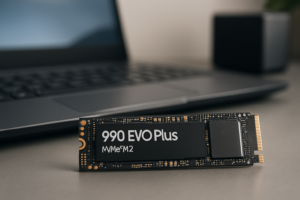
Samsung T9 Portable SSD Review: Worth The Upgrade
Samsung’s T-series portable SSDs have earned a reputation as some of the most reliable external drives you can buy. The T5 was a favorite among photographers and video editors for years, and the T7 series pushed things further with faster speeds and optional fingerprint security. When Samsung announced the T9, expectations were high. After spending several weeks testing it across different workflows, I’m ready to share whether this drive lives up to the hype and, more importantly, whether it’s worth upgrading from what you already own.
The Samsung T9 represents a meaningful shift in the portable SSD lineup. It’s the first T-series drive to use a USB 3.2 Gen 2×2 interface, which theoretically doubles the maximum transfer speeds compared to the T7 Shield. But specs on paper don’t always translate to real-world performance, and there are a few things you should know before pulling the trigger. I’ve tested this drive with large video files, photo libraries, and everyday backups to give you an honest picture of what to expect.
Build Quality and Design
The T9 is noticeably larger than its predecessors. If you loved the T7’s slim, credit-card-sized form factor, you’ll need to adjust your expectations. The T9 measures roughly 3.8 x 2.3 x 0.7 inches and weighs about 122 grams. It’s still very pocketable, but it feels more substantial in your hand compared to the T7 or T7 Shield.
Samsung wrapped the T9 in a rubberized exterior with a textured pattern that provides excellent grip. It’s rated for drops up to 3 meters (about 9.8 feet) on non-carpeted floors, which matches the T7 Shield’s drop resistance. The build feels premium and durable. I’ve tossed it in bags, dropped it from desk height, and carried it loose in a jacket pocket without any issues.
One thing I appreciate is the integrated loop on the corner for attaching a lanyard or carabiner. This is a small detail that photographers and outdoor content creators will value when they’re working on location. The drive comes in black, and the overall aesthetic is understated and professional.
Samsung T9 Portable SSD 2TB
Best capacity option for video editors and photographers who need fast USB 3.2 Gen 2×2 speeds with rugged durability
Transfer Speeds: What You’ll Actually Get
Samsung rates the T9 at up to 2,000 MB/s for both sequential reads and writes. Those are impressive numbers, but they come with an important caveat: you need a USB 3.2 Gen 2×2 port on your computer to reach those speeds. This is a detail that trips up a lot of buyers.
USB 3.2 Gen 2×2 Compatibility
USB 3.2 Gen 2×2 is still relatively uncommon. Most laptops, including recent MacBook Pro models, don’t include this specific port type. You’ll find it more often on desktop motherboards from the last couple of years, particularly higher-end models from ASUS, MSI, and Gigabyte. If your computer only has USB 3.2 Gen 2 (which tops out at 10 Gbps), the T9 will be limited to roughly 1,000 MB/s, essentially matching the T7 Shield’s performance.
Before you buy the T9, check your computer’s USB specifications. If you don’t have a Gen 2×2 port and don’t plan on upgrading soon, the T7 Shield might be the smarter purchase.
Real-World Benchmarks
Testing on a desktop PC with a dedicated USB 3.2 Gen 2×2 port (Type-C), I recorded the following speeds using CrystalDiskMark:
- Sequential Read: 1,950 MB/s
- Sequential Write: 1,880 MB/s
- Random Read (4K): 68 MB/s
- Random Write (4K): 145 MB/s
Those sequential numbers are remarkably close to Samsung’s advertised specs. In practical terms, I transferred a 100 GB folder of mixed RAW photos and video clips in about 55 seconds. The same transfer on a T7 Shield took just over 1 minute and 50 seconds. For large file transfers, the speed difference is very real and very noticeable.
Sustained Write Performance
Where the T9 really separates itself is during sustained writes. I copied a single 200 GB video file to the drive and monitored speeds throughout. The T9 maintained speeds above 1,700 MB/s for the entire duration without any significant thermal throttling. The drive did get warm to the touch, but never uncomfortably hot, and speeds stayed consistent. This is critical for videographers working with large ProRes or BRAW files who can’t afford speed drops during transfers.
Samsung Magician Software
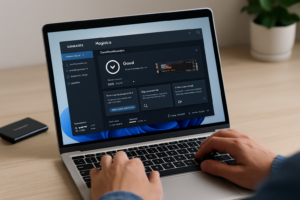
The T9 ships with Samsung’s Magician software, which is available for both Windows and macOS. The software allows you to set up optional password protection with AES 256-bit hardware encryption. You can also update the drive’s firmware, monitor drive health, and run speed benchmarks directly within the app.
The encryption feature works well, but keep in mind that enabling it requires formatting the drive. Set up encryption before you start loading files onto it. The software interface is clean and easy to navigate, though I wish Samsung would add a native Linux version instead of requiring workarounds.
One useful feature is the ability to check the drive’s temperature and total data written (TBW) over its lifetime. This helps you monitor the health of your investment over time, which matters if you’re relying on this drive for professional work.
Samsung T9 vs. T7 Shield: Is the Upgrade Worth It?
This is the question most people are asking, so I’ll be direct. The answer depends almost entirely on whether you have a USB 3.2 Gen 2×2 port.
When the T9 Makes Sense
- You have a desktop PC or workstation with USB 3.2 Gen 2×2
- You regularly transfer files over 50 GB (video editing, large photo sets)
- You need strong sustained write performance without throttling
- You want the fastest portable SSD in Samsung’s consumer lineup
When the T7 Shield Is the Better Buy
- You primarily use a laptop (especially a MacBook) that lacks Gen 2×2
- Your typical file transfers are under 20 GB
- You want a smaller, lighter drive
- You prefer to save money and put it toward more storage capacity
The Samsung T7 Shield remains an excellent drive. It still offers up to 1,050 MB/s speeds, the same IP65 dust and water resistance rating, and a more compact form factor. For many users, it’s genuinely the better choice because of broader port compatibility.

Samsung T7 Shield Portable SSD 1TB
Still the best all-around portable SSD for most laptop users thanks to wide compatibility and excellent durability
Ideal Use Cases
For Photographers
The T9 is a strong companion for photographers who shoot high-volume events or produce large RAW files. Wedding photographers, for instance, can offload hundreds of gigabytes from memory cards significantly faster than with previous-generation drives. If you’re working with a desktop editing station that has Gen 2×2, the T9 can genuinely speed up your ingest workflow.
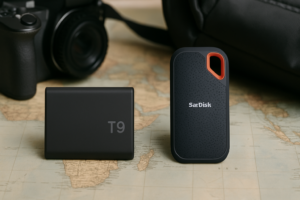
For photographers who mostly work from a laptop in the field, the T7 Shield is probably the more practical option. You won’t see the T9’s speed advantage without the right port, and the T7 Shield’s smaller size is easier to carry in a camera bag.
For Videographers
This is where the T9 truly shines. Video files are enormous, especially if you’re shooting in 4K ProRes, 6K BRAW, or 8K RAW formats. A single day of shooting can easily produce 500 GB or more of footage. The T9’s sustained write speeds mean you can transfer that footage to the drive quickly and without worrying about speed drops partway through.
Some videographers have also tested using the T9 as a direct recording target with cameras like the Blackmagic Pocket Cinema Camera 6K Pro. While Samsung doesn’t officially certify the T9 for direct camera recording, its consistent write speeds make it a viable option for this workflow. Just be sure to test thoroughly before relying on it for a paid shoot.
For General Users
If you’re using a portable SSD for everyday backups, storing your media library, or carrying documents between home and office, the T9 is more drive than you need. The speed advantage only materializes with a specific USB port type that most general-use laptops don’t include. You’d be better served by the T7 Shield or even the standard T7 for basic storage needs.
Storage Capacity Options
The Samsung T9 is available in three capacities:
- 1TB – Good for photographers and light video work
- 2TB – The sweet spot for most professional users
- 4TB – Best for videographers and heavy data workflows
I’d recommend the 2TB model for most buyers. It offers enough space for serious project work without the premium jump to the 4TB model. If you’re strictly a photographer working with RAW files, the 1TB Samsung T9 should be plenty for most assignments, and you can always pick up a second drive later.
Samsung T9 Portable SSD 4TB
The top-tier option for videographers handling massive 4K/6K/8K video files who need maximum portable storage
What I Don’t Love About the T9
No product is perfect, and the T9 has a few drawbacks worth mentioning.
First, the USB 3.2 Gen 2×2 requirement is a real limitation. Samsung is essentially asking you to buy a drive that many computers can’t fully utilize yet. The standard is gaining adoption, but slowly. This makes the T9 feel like a forward-looking purchase rather than an immediately practical one for many users.
Second, the larger form factor is a step backward in portability. The T7 line proved that high-speed portable SSDs could be genuinely tiny. The T9 trades some of that convenience for speed and durability, which is a fair compromise but still worth noting.
Third, the T9 lacks the IP65 water and dust resistance that the T7 Shield offers. It handles drops well, but if you’re regularly working in dusty or wet environments (outdoor shoots, beach weddings, construction sites), the T7 Shield actually provides better environmental protection.
Frequently Asked Questions
Does the Samsung T9 work with Mac computers?
Yes, the T9 is compatible with macOS. It ships formatted in exFAT, which works with both Mac and Windows out of the box. However, most current Macs (including MacBook Pro models with M-series chips) only support USB 3.2 Gen 2, which means you’ll top out around 1,000 MB/s rather than the full 2,000 MB/s. You’ll still get a great drive, but you won’t reach its maximum speed potential on a Mac.
Can I use the Samsung T9 for gaming on PS5 or Xbox?
You can use the T9 to store and play PS4 games on a PS5, and it works for Xbox Series X/S game storage as well. However, neither console supports USB 3.2 Gen 2×2, so you won’t get the T9’s full speed. For console gaming purposes, the T7 series offers a better value since you’re limited by the console’s USB capabilities regardless of which drive you choose.
How long will the Samsung T9 last?
Samsung backs the T9 with a 5-year limited warranty. The drive uses TLC NAND flash memory, and while Samsung doesn’t publish an official TBW (terabytes written) endurance rating for the T9, their internal SSDs with similar NAND typically last well beyond normal consumer usage patterns. For most professionals, the drive should remain reliable for its entire warranty period and likely much longer.
Is the Samsung T9 worth it over a fast USB flash drive?
Absolutely. Even the fastest USB flash drives top out around 400 to 600 MB/s in real-world testing, and most deliver far less than that. The T9 is roughly 3 to 5 times faster, significantly more durable, and includes hardware encryption. USB flash drives are fine for carrying documents, but they can’t compete with a portable SSD for any serious file transfer workflow.
Final Verdict
The Samsung T9 is an excellent portable SSD that delivers genuinely fast transfer speeds, strong build quality, and reliable sustained performance. It’s the best option for videographers and creative professionals who work with massive files and have the right USB port to take advantage of its speed. The 2TB model hits the best balance of capacity and value for most professional workflows.
But I want to be honest with you: if you don’t have a USB 3.2 Gen 2×2 port, the T9 doesn’t offer a meaningful advantage over the T7 Shield. In that case, save your money and grab the T7 Shield, which remains one of the best portable SSDs on the market for the vast majority of users. Check current Samsung T9 pricing on Amazon to compare models and find the right capacity for your needs.
This article contains affiliate links. We may earn a small commission at no extra cost to you.

James Kennedy is a writer and product researcher at Drives Hero with a background in IT administration and consulting. He has hands-on experience with storage, networking, and system performance, and regularly improves and optimizes his home networking setup.