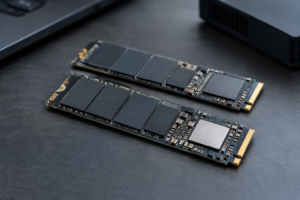
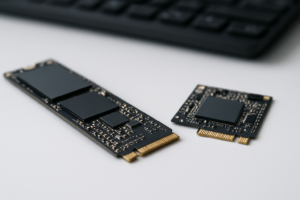
PCIe 4.0 SSDs With DRAM Cache
Not every PCIe 4.0 SSD is built the same way, and the DRAM cache is one of the biggest hidden differences between models that look identical on a spec sheet. Some drives use dedicated DRAM chips to manage the flash translation layer, while others rely purely on Host Memory Buffer (HMB) and borrow a sliver of your system RAM instead. If you want consistent performance under heavy, sustained workloads like large file transfers, video editing, or database work, the drives with real onboard DRAM are usually the safer pick.
This page is meant to work as a lookup reference. Instead of a general explainer, you’ll find actual controller names, NAND types, DRAM behavior, and capacity-specific differences for the most relevant PCIe 4.0 drives currently on the market. Manufacturers quietly swap components between revisions more often than people realize, so we’ve flagged those changes where they matter.
Why DRAM Cache Still Matters on PCIe 4.0 Drives
DRAM on an SSD stores the mapping table that tells the controller where every piece of data physically lives on the NAND. Without it, the controller either uses HMB (a small allocation of your system’s RAM) or falls back to slower on-flash mapping. Both work fine for everyday tasks, but they tend to lose steam once the drive is under sustained heavy writes or nearly full.
If you’re comparing a DRAM-equipped drive against a DRAM-less one, our breakdown of the WD Black SN770 vs SN850X specs is a good real-world example, since one uses HMB and the other has dedicated DRAM. For a broader look at whether the interface itself makes the bigger difference, check out Is NVMe Really Faster Than SSDs?
PCIe 4.0 SSDs With Dedicated DRAM Cache
Samsung 990 PRO
- Controller: Samsung Pascal, in-house design
- NAND: Samsung 236-layer V-NAND (V7 TLC)
- DRAM: LPDDR4 DRAM on all capacities, no HMB reliance
- Interface: PCIe 4.0 x4, NVMe 2.0
- TBW: Roughly 600TBW at 1TB, 1200TBW at 2TB, 2400TBW at 4TB
- Warranty: 5 years
Samsung’s own controller and NAND stack give this drive very consistent sustained write performance, and it runs noticeably cooler than the 980 PRO under load. This is the drive to buy if you want Samsung’s ecosystem and Magician software without second-guessing hardware revisions.
Samsung 990 PRO NVMe SSD
Samsung’s own controller, NAND, and DRAM stack make this one of the most reliable PCIe 4.0 performers you can buy.
Samsung 980 PRO
- Controller: Samsung Elpis, in-house
- NAND: Early units used 92-layer V6 TLC, later production shifted to 128-layer V7 TLC
- DRAM: LPDDR4 present across all capacities
- Interface: PCIe 4.0 x4, NVMe 1.3c
- TBW: 150TBW at 250GB, 300TBW at 500GB, 600TBW at 1TB, 1200TBW at 2TB
- Warranty: 5 years
Worth flagging here: Samsung’s NAND swap between production runs caused early firmware to run hotter on some batches, which Samsung patched. If you buy a used or older-stock 980 PRO, update the firmware immediately before doing any heavy testing.
WD Black SN850X
- Controller: Western Digital in-house (updated from the original SN850)
- NAND: 112-layer BiCS5 TLC (Kioxia/WD)
- DRAM: Dedicated DRAM cache on all capacities
- Interface: PCIe 4.0 x4, NVMe 1.4
- TBW: 300TBW at 500GB, 600TBW at 1TB, 1200TBW at 2TB, 2400TBW at 4TB
- Warranty: 5 years
The SN850X replaced the original SN850 and picked up a firmware and controller refresh aimed at gaming workloads, including the Game Mode 2.0 feature. If you’re weighing it against Samsung’s lineup, our WD Black vs Samsung SSD comparison covers the tradeoffs in more depth.
Seagate FireCuda 530
- Controller: Phison E18
- NAND: Micron 176-layer TLC
- DRAM: LPDDR4 dedicated cache, present on every capacity
- Interface: PCIe 4.0 x4, NVMe 1.4
- TBW: Roughly 640TBW at 500GB, 1275TBW at 1TB, 2550TBW at 2TB, 5100TBW at 4TB
- Warranty: 5 years
This one stands out for endurance. Seagate rates the FireCuda 530 well above most competitors at the same capacity, which makes it a strong pick if you’re doing heavy write workloads like video editing scratch disks or frequent large dataset transfers.
Seagate FireCuda 530 SSD
The Phison E18 controller plus high TBW ratings make this the endurance champion in this lineup.
Kingston KC3000
- Controller: Phison E18
- NAND: Micron 176-layer TLC
- DRAM: Dedicated DRAM on all capacities
- Interface: PCIe 4.0 x4, NVMe 1.4
- TBW: 400TBW at 512GB, 800TBW at 1TB, 1600TBW at 2TB, 3200TBW at 4096GB
- Warranty: 5 years
Kingston uses the same Phison E18 platform as Seagate here, but tunes firmware differently and skips the heatsink in favor of a slim graphene label. That makes it a good option for thin laptops and consoles where clearance is tight, something worth remembering if you’re also looking into upgrading a handheld like the ROG Ally.
Crucial P5 Plus
- Controller: Micron in-house
- NAND: Micron 176-layer TLC
- DRAM: Dedicated DRAM cache across all capacities
- Interface: PCIe 4.0 x4, NVMe 1.4
- TBW: 300TBW at 500GB, 600TBW at 1TB, 1200TBW at 2TB
- Warranty: 5 years
Crucial’s P5 Plus doesn’t chase the absolute top of the benchmarks, but it’s a solid mid-range option if you want DRAM cache without paying for Phison E18-class performance you may not actually use in day-to-day tasks.
Crucial P5 Plus NVMe SSD
A dependable mid-range PCIe 4.0 option with dedicated DRAM at every capacity.
Capacity Matters: Where Manufacturers Cut Corners
Don’t assume every capacity of a given model shares the same internals. Smaller capacities almost always carry less DRAM (proportional to less NAND to map) and lower TBW ratings, which is normal and expected. What’s less obvious is that some manufacturers change NAND die count or layer generation between capacities and even between production runs of the same SKU, as Samsung did with the 980 PRO.
Before buying, check the exact model number and, if possible, recent user teardown reports for that specific capacity. A 1TB and 4TB version of the same drive family can behave differently under sustained writes simply because the smaller drive has fewer NAND dies to parallelize writes across.
DRAM Cache vs HMB: Which Should You Buy
For gaming and general desktop use, HMB drives like the WD Black SN770 or Samsung 980 (non-Pro) perform well enough that most people won’t notice a difference in day-to-day use. Our SATA vs NVMe SSD gaming comparison shows how small the real-world gap often is for load times specifically.
Where DRAM cache earns its keep is in sustained, heavy write workloads: large video exports, big game installs happening back to back, or working with datasets that exceed the drive’s SLC cache. If any of that describes your workload, spend the extra money on a DRAM-equipped drive from the list above rather than a DRAM-less budget option.
Frequently Asked Questions
Do I need DRAM cache for gaming?
Not really. Game load times are dominated by the interface and random read speeds, and HMB-based drives handle that well. DRAM cache matters more for large sustained writes than for gaming specifically.
Does more DRAM always mean faster performance?
Not directly. DRAM size scales with capacity to manage the mapping table efficiently, but the controller and NAND generation usually matter more for real-world speed than raw DRAM size.
Can I tell if a drive has DRAM just by looking at the box?
Rarely. You’ll need to check the manufacturer’s official spec sheet or a verified teardown, since packaging almost never states whether DRAM or HMB is used. When in doubt, search the exact model number alongside “DRAM” before buying.
This article contains affiliate links. We may earn a small commission at no extra cost to you.

James Kennedy is a writer and product researcher at Drives Hero with a background in IT administration and consulting. He has hands-on experience with storage, networking, and system performance, and regularly improves and optimizes his home networking setup.