How to Choose the Right SD Card for Your Camera
Buying an SD card sounds simple until you’re staring at a wall of options covered in cryptic logos, speed ratings, and Roman numerals. Pick the wrong one and you’ll deal with dropped frames during video recording, painfully slow burst shooting, or a card your camera flat-out refuses to recognize. This guide cuts through the confusion so you can match the right SD card to your specific camera and shooting style.
Understanding SD Card Speed Classes (and Which Ones Actually Matter)
SD cards have multiple speed ratings stamped on them, and they don’t all mean the same thing. Here’s what you need to pay attention to:
- Speed Class (C2, C4, C6, C10): The original rating system. A Class 10 card guarantees a minimum write speed of 10 MB/s. This is the bare minimum for any modern camera, so don’t even consider anything below C10.
- UHS Speed Class (U1, U3): U1 guarantees 10 MB/s minimum write speed, while U3 guarantees 30 MB/s. For 4K video or fast burst shooting, U3 is what you want.
- Video Speed Class (V30, V60, V90): This is the most relevant rating for video shooters. The number tells you the guaranteed minimum write speed in MB/s. V30 handles 4K, V60 is for higher bitrate 4K and some 8K formats, and V90 is built for 8K and high-bitrate cinema codecs.
The headline speed on the packaging (like “170 MB/s”) is the maximum read speed, which affects how fast you can transfer files to your computer. It tells you very little about recording performance. Always look at the write speed and the Video Speed Class instead.
Recommendations by Camera Type
Entry-Level DSLRs and Mirrorless Cameras (Photos + Casual 1080p/4K Video)
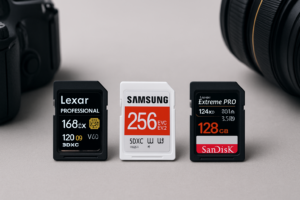
If you’re shooting with something like a Canon EOS Rebel, Nikon D3500, or Sony a6100, you don’t need to spend a fortune on cards. A solid U3/V30 card with 64GB or 128GB of capacity will handle photos, burst mode, and standard 4K video recording without breaking a sweat. The SanDisk Extreme 128GB is a reliable pick at this level, with V30 speeds and strong compatibility across brands.

SanDisk Extreme 128GB SDXC UHS-I V30
Excellent all-around SD card for entry and mid-range cameras shooting photos and standard 4K video
Mid-Range and Advanced Mirrorless (High-Bitrate 4K, 4K 120fps, 10-bit Video)
Cameras like the Sony a7 IV, Fujifilm X-T5, or Canon EOS R6 II push more data through higher bitrate codecs. A V30 card can sometimes choke here, especially during long recording sessions or when using ALL-I compression. Step up to a V60 card like the ProGrade Digital V60 128GB or the Sony TOUGH SF-M series. These give you breathing room for demanding recording modes without costing as much as top-tier V90 cards.
Professional Cinema and Flagship Bodies (8K, ProRes, RAW Video)
Shooting 8K on a Canon R5 or recording ProRes internally on a Nikon Z8? You need V90. There’s no negotiating here. Cards like the Sony SF-G TOUGH V90 or the ProGrade Digital Gold V90 deliver sustained write speeds above 250 MB/s. These cards also tend to be built tougher, which matters when you’re on paid shoots where losing footage isn’t an option.

Sony SF-G TOUGH V90 128GB SDXC
Top-tier V90 card built for 8K, RAW video, and professional reliability
Capacity: How Much Do You Actually Need?
For still photography, 64GB holds roughly 1,500 RAW files on a 24MP camera, which is plenty for most single-session shoots. If you’re shooting video, the math changes fast. 4K at 100 Mbps burns through about 45GB per hour, and 8K or ProRes can eat over 200GB in the same timeframe.
My recommendation: carry two 128GB cards rather than one 256GB card. If a card fails or corrupts, you only lose half your work. Once you’re home, make sure you have a solid backup strategy. If you’re weighing the pros and cons of cloud storage versus a local setup, our cloud backup vs. local NAS cost comparison breaks down the real numbers. For something more hands-on, you can also set up automated backups to a NAS in about 30 minutes.
Quick Compatibility Tips
Before you buy, check your camera’s manual for the exact card types it supports. Some cameras only take SD cards, while others use CFexpress Type B or CFexpress Type A. A few older models still require CompactFlash. An incompatible card won’t just underperform. It simply won’t work.
Also keep your card reader up to date. If you’re transferring large photo and video files regularly, a USB 3.0 or USB-C reader paired with a fast card makes a huge difference. For photographers who travel frequently and need fast portable storage for backups, our list of the best portable SSDs for travel covers some great companion options. And if your card or external drive ever stops being recognized by your computer, our guide on fixing drives that won’t show up can help you troubleshoot.
Frequently Asked Questions
Can I use a microSD card with an adapter in my camera?
Technically, yes. Most cameras will read a microSD card through a full-size SD adapter. But it’s not ideal. The adapter adds a potential point of failure, and some microSD cards have slightly lower sustained write speeds compared to full-size SD equivalents. For anything beyond casual snapshots, stick with a native full-size SD card.
How do I know if my SD card is slowing down my camera?
The biggest sign is your buffer filling up quickly during burst shooting, forcing you to wait before taking more photos. For video, you might see recording stop unexpectedly or get a “slow card” warning on screen. If you’re experiencing this, check that your card

James Kennedy is a writer and product researcher at Drives Hero with a background in IT administration and consulting. He has hands-on experience with storage, networking, and system performance, and regularly improves and optimizes his home networking setup.