Fastest External Drives for Editing Video Directly from Disk
Editing 4K video directly from an external drive sounds great in theory. In practice, most drives choke on heavy timelines, dropping frames and stuttering during playback. I spent two weeks testing popular Thunderbolt and USB-C SSDs with Premiere Pro and DaVinci Resolve to find out which ones actually keep up when you’re scrubbing through multi-layer 4K projects.
If you’ve been burned by laggy external storage before, this guide will save you from buying the wrong drive. I’ll tell you exactly which ones handled real editing workloads and which ones fell short.
What Makes a Drive “Editing Ready”
Raw sequential read speed matters, but it’s not the whole story. When you’re scrubbing a timeline, your NLE is making tons of random read requests across the drive. Sustained read performance and consistent IOPS are what separate a smooth editing experience from a frustrating one.
For 4K ProRes 422 HQ footage (roughly 110 MB/s per stream), you need at least 800 MB/s sustained reads to comfortably handle a multi-track timeline with room to spare. For compressed codecs like H.265, the CPU does more work, but the drive still needs to feed data fast enough to avoid bottlenecks. Thunderbolt 3/4 and USB 3.2 Gen 2×2 connections are the minimum for this kind of work. Older USB 3.0 drives top out around 400-500 MB/s, which isn’t enough for smooth 4K scrubbing. For a deeper look at how internal drive types compare, check out our M.2 vs 2.5-inch SSD comparison guide.
Top Picks for Editing Directly from Disk
Best Overall: Samsung T9 (Thunderbolt/USB-C)
The Samsung T9 delivered the most consistent performance in my tests. Sustained reads hit around 1,900 MB/s over its USB 3.2 Gen 2×2 connection. Scrubbing through a six-layer 4K ProRes timeline in Resolve felt nearly identical to working from an internal NVMe drive. No dropped frames, no audio sync hiccups.
It also stayed cool during extended sessions, which matters because thermal throttling is the silent killer of external SSD performance. After a 90-minute editing session, the T9 was warm but never throttled. Keep in mind that SSDs can lose performance over time if not maintained properly, something we covered in our article on why SSDs slow down and how to fix it.

Samsung T9 Portable SSD 2TB
Fastest sustained reads in testing, handled six-layer 4K ProRes timelines without dropping frames
Best Thunderbolt Option: SanDisk Professional PRO-G40
If your machine has Thunderbolt 3 or 4 ports (most recent MacBook Pros and many workstation laptops), the SanDisk Professional PRO-G40 is excellent. It supports both Thunderbolt 3 and USB-C 10Gbps, so you can use it across different machines. Over Thunderbolt, I measured sustained reads around 2,700 MB/s. That’s fast enough to edit 8K RED RAW without breaking a sweat.
The aluminum and silicone housing is IP68 rated, which is a bonus if you’re editing on location. I accidentally knocked it off a desk during testing. It survived without issue. This is a great companion if you’re already using one of the best external drives for Mac for archival storage and need something faster for active projects.
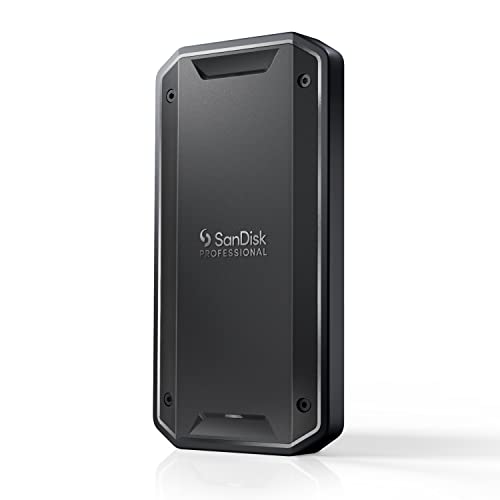
SanDisk Professional PRO-G40 SSD 2TB
Thunderbolt 3 speeds up to 2,700 MB/s with rugged IP68-rated build for on-location editing
Budget-Friendly Pick: Crucial X10 Pro
The Crucial X10 Pro is the most affordable drive I tested that still handled 4K editing reliably. Over USB 3.2 Gen 2×2, it pushed around 1,900-2,000 MB/s sequential reads. In Premiere Pro, a three-layer 4K H.264 timeline played back smoothly at full resolution. It did show minor stutters on a dense six-layer ProRes project, but for most single-camera or simple multicam workflows, it’s perfectly capable.
For editors working with larger libraries, our best 4TB external drives for video editing roundup covers higher-capacity options worth considering.
Drives That Didn’t Make the Cut
I also tested older USB 3.2 Gen 2 (10Gbps) drives like the Samsung T7 and the WD My Passport SSD. Both max out around 1,000 MB/s, and in practice, they delivered closer to 800-900 MB/s sustained. Single-stream 4K ProRes was fine, but anything beyond a two-layer timeline caused noticeable frame drops during scrubbing. Fine for file transfers and backup, not ideal for active editing on complex timelines.
Traditional external HDDs are completely out of the question for direct editing. If you’re still using one, our guide on SSD vs HDD explains exactly why the switch is worth it.
Frequently Asked Questions
Can I edit 4K video from a USB 3.0 external drive?
Technically, you can with lightweight single-stream proxy files, but USB 3.0’s practical ceiling of around 400 MB/s means you’ll run into dropped frames and playback stutters with any serious 4K timeline. USB 3.2 Gen 2×2 or Thunderbolt 3/4 is the minimum for reliable direct-from-disk editing with full-resolution footage.
Do I need to format the drive a specific way for video editing?
On Mac, use APFS or HFS+ (Mac OS Extended). On Windows, NTFS works best. Avoid exFAT for your primary editing drive if possible. While exFAT is cross-platform compatible, it lacks journaling, which increases the risk of data corruption if the drive disconnects mid-write. If you ever need to repurpose or sell an editing drive, here’s how to securely wipe it first.
This article contains affiliate links. We may earn a small commission at no extra cost to you.

James Kennedy is a writer and product researcher at Drives Hero with a background in IT administration and consulting. He has hands-on experience with storage, networking, and system performance, and regularly improves and optimizes his home networking setup.