Best SSDs for PS5 and Xbox Series X in 2026
Running out of storage on your PS5 or Xbox Series X hits different when you’re staring at a 100GB game install and trying to decide which title to delete. Both consoles support storage expansion, but they take very different approaches. This guide covers the best options for each system in 2026, with specific recommendations so you can stop agonizing and start downloading.
PS5 Storage Expansion: What You Need to Know
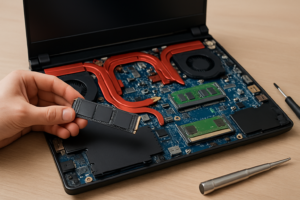
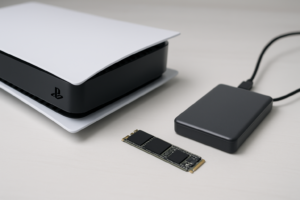
The PS5 uses a standard M.2 NVMe SSD slot, which gives you a wide range of choices from various manufacturers. Sony requires a PCIe Gen 4 NVMe drive with sequential read speeds of 5,500 MB/s or faster. The M.2 2230 form factor won’t fit without an adapter, so stick with the more common M.2 2280 size. If you’re unfamiliar with these form factors, our M.2 vs 2.5-inch SSD comparison guide breaks down the differences.
You’ll also need a heatsink. Some drives come with one pre-installed, and Sony’s expansion bay can accommodate drives with heatsinks up to 25mm tall. If your chosen SSD doesn’t include a heatsink, grab a slim aftermarket one. They’re inexpensive and essential for preventing thermal throttling during long gaming sessions.
Best PS5 SSD Picks
Samsung 990 PRO (1TB / 2TB): This remains the gold standard for PS5 storage. It delivers sequential reads up to 7,450 MB/s, well above Sony’s minimum requirement, and the version with the built-in heatsink means zero extra parts to buy. We’ve covered this drive extensively in our Samsung 990 PRO review, and it continues to impress. The 2TB model is the sweet spot for most gamers.
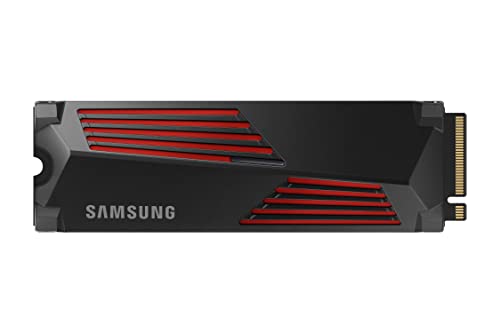
Samsung 990 PRO 2TB with Heatsink
Top-tier PS5 SSD with built-in heatsink and 7,450 MB/s read speeds
WD_BLACK SN850X (1TB / 2TB / 4TB): Western Digital’s flagship gaming SSD goes toe-to-toe with the Samsung 990 PRO, and the availability of a 4TB option makes it the best choice for anyone with a massive library. Read speeds hit 7,300 MB/s. We compared these two head-to-head in our Samsung 990 PRO vs WD_BLACK SN850X showdown if you want the granular details.
Budget pick: Kingston Fury Renegade (1TB): If you want PS5-compatible performance without the premium price tag, the Kingston Fury Renegade delivers 7,300 MB/s reads and is often available at a lower price point than Samsung or WD. You’ll need to add your own heatsink, but that’s a minor trade-off. For more budget-friendly SSD options, check out our best budget SSDs roundup.
Xbox Series X Storage Expansion: A Different Approach
Microsoft took a more locked-down path. The Xbox Series X uses a proprietary Expansion Card slot on the back of the console. For years, Seagate was the only manufacturer making these cards, but the ecosystem has expanded. These plug-in cards match the console’s internal SSD speed, meaning Xbox Series X|S optimized games run identically whether stored internally or on the expansion card.
You can use a standard USB external drive with Xbox, but only for storing (not playing) current-gen optimized titles, or for playing older Xbox One and backward-compatible games. For anything built specifically for Series X|S, you need the official expansion card format.
Best Xbox Series X Storage Picks
Seagate Storage Expansion Card (1TB / 2TB): The original and still the most widely available option. It slots into the back of the console with zero setup required. The 2TB version effectively triples your usable storage when combined with the internal drive. Check current pricing on Amazon, as these cards frequently go on sale.

Seagate Xbox Storage Expansion Card 2TB
Plug-and-play 2TB expansion that matches the Xbox Series X internal SSD speed
WD_BLACK C50 Expansion Card (512GB / 1TB): Western Digital’s officially licensed alternative gives you another option in this space. Performance matches Seagate’s card since both adhere to Microsoft’s specifications. The 1TB model is a solid middle ground if 2TB feels like more than you need.
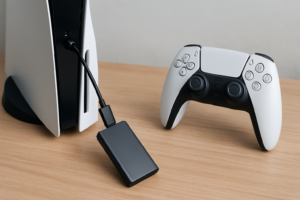
For storing older games or as a transfer staging drive, a standard USB 3.0 external HDD or portable SSD works perfectly fine. You can move games between the external drive and internal storage whenever you want to play them.
How to Choose the Right Capacity
Modern games regularly exceed 50GB, and several AAA titles push past 100GB. A 1TB expansion gets you roughly 8 to 15 additional games depending on their size, while 2TB doubles that. Our 1TB vs 2TB SSD capacity guide goes deeper on picking the right size for your habits.
One thing to keep in mind: SSDs can slow down as they fill up and age. If you notice performance dipping after a year or two, there are steps you can take to address it. Our guide on why SSDs slow down over time and how to fix it covers the details.
FAQ
Can I use the same SSD in both a PS5 and Xbox Series X?
No. The PS5 accepts standard M.2 NVMe SSDs (PCIe Gen 4, 2280 form factor), while the Xbox Series X requires a proprietary expansion card format. They’re completely different connectors and form factors. An M.2 drive physically won’t fit into the Xbox expansion slot, and vice versa.
Do I need to format the SSD before installing it in my PS5?
The PS5 will prompt you to format the drive automatically when you first insert it. You don’t need to do anything beforehand. Just install the M.2 SSD into the expansion bay, boot up the console, and follow the on-screen instructions. The whole process takes about five minutes.
This article contains affiliate links. We may earn a small commission at no extra cost to you.

James Kennedy is a writer and product researcher at Drives Hero with a background in IT administration and consulting. He has hands-on experience with storage, networking, and system performance, and regularly improves and optimizes his home networking setup.